Businesses are moving beyond social media groups because they want greater control over their brand experience, member relationships, community engagement, and first-party insights. While social media groups remain useful for audience discovery and informal conversations, a branded community offers a dedicated environment designed around the organization and its members.
This shift does not mean abandoning social media. Businesses can continue using social channels to attract audiences while building a branded community for deeper, ongoing engagement. Platforms such as Thrico bring together member connections, discussions, content, events, and community management to support this approach.
What Is the Difference Between Social Media Groups and Branded Communities?
Social media groups and branded communities both help people connect and share information. However, they differ in how much control organizations have over the experience, how interactions are managed, and how community activities support long-term business goals.
What Is a Social Media Group?
A social media group is a space within an existing social networking platform where people gather around a shared interest, organization, brand, or topic.
Businesses commonly use Facebook Groups, LinkedIn Groups, and other social or messaging communities to share updates, start discussions, answer questions, and interact with their audiences.
Social media groups offer several advantages:
Easy to get started: Businesses can often create a group without building a separate digital environment.
Access to existing audiences: Social platforms provide opportunities to reach people who already use those networks.
Familiar interaction features: Members can participate using tools they already understand.
Audience discovery: Public posts, recommendations, and social sharing may help new people discover a group.
Informal conversations: Groups can make it easy to discuss topics and exchange information.
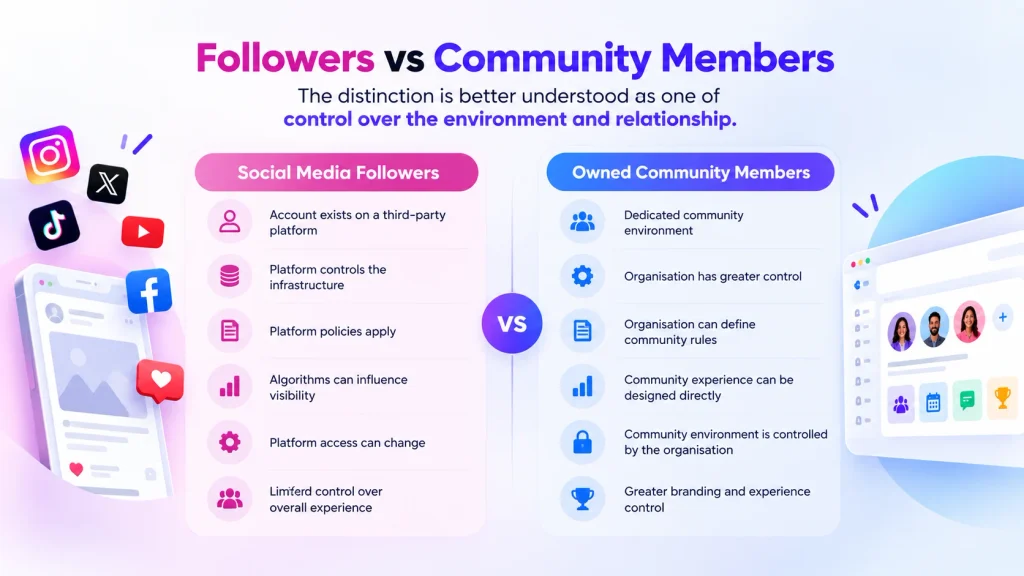
However, social media groups also have limitations. Businesses depend on the host platform’s policies, available features, interface, and distribution mechanisms. Changes to algorithms or product features can affect how content reaches members.
Branding and customization may also be restricted, and access to analytics and member information depends on the platform’s available tools and policies.
Social media groups remain useful for many purposes, but they may not provide every capability a business needs as its community grows.
What Is a Branded Community?
A branded community is a dedicated digital environment where an organization brings members together under its own identity and community structure.
Instead of relying entirely on a third-party social platform, a business can use a community platform designed to support member profiles, discussions, networking, content sharing, events, and ongoing engagement.
Depending on the platform, a branded community may offer:
Custom branding and a consistent member experience.
Member profiles and connections.
Dedicated discussion spaces and groups.
Content publishing and knowledge sharing.
Events and community activities.
Engagement and recognition features.
Member management and moderation.
Community analytics and engagement insights.
A branded community gives businesses more flexibility to organize interactions around their objectives. The actual level of customization, data access, and control depends on the selected platform and its capabilities.
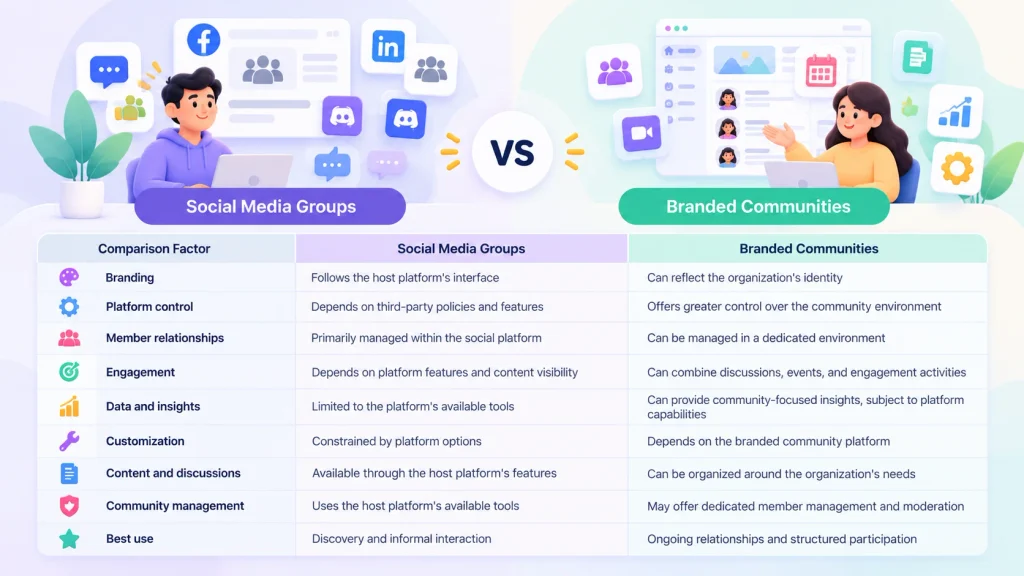
Social Media Groups vs Branded Communities: Key Differences
The following table highlights the main differences between the two approaches.
Comparison Factor
Social Media Groups
Branded Communities
Branding
Follows the host platform’s interface
Can reflect the organization’s identity
Platform control
Depends on third-party policies and features
Offers greater control over the community environment
Member relationships
Primarily managed within the social platform
Can be managed in a dedicated environment
Engagement
Depends on platform features and content visibility
Can combine discussions, events, and engagement activities
Data and insights
Limited to the platform’s available tools
Can provide community-focused insights, subject to platform capabilities
Customization
Constrained by platform options
Depends on the branded community platform
Content and discussions
Available through the host platform’s features
Can be organized around the organization’s needs
Community management
Uses the host platform’s available tools
May offer dedicated member management and moderation
Best use
Discovery and informal interaction
Ongoing relationships and structured participation
Neither option is automatically better in every situation. Social media groups can provide useful engagement and analytics, while branded communities vary in the level of control and functionality they offer.
The right choice depends on the organization’s objectives, audience, resources, and long-term community strategy.
Why Are Businesses Moving From Social Media Groups to Branded Communities?
As businesses invest more in customer relationships and audience engagement, many begin looking for ways to build communities that extend beyond individual social media interactions.
Here are six reasons a branded community may become a valuable addition to a business’s digital strategy.
1. Greater Control Over the Brand Experience
A business’s brand extends beyond its logo and website. It also includes how customers interact with the organization, discover information, participate in conversations, and connect with other members.
Social media groups operate within the host platform’s design and functionality. Businesses generally have limited control over how the group looks and how the overall experience is organized.
A branded community can provide greater flexibility to create an experience that reflects the organization’s identity and audience.
Businesses may be able to customize branding, organize community spaces, structure discussions, and create a more consistent journey for members, depending on the platform.
For example, a software company could organize its community around product education, customer support, feature discussions, and events. Members would have a dedicated environment for finding information and interacting with other users.
This structure can make the community feel like a more integrated part of the organization’s customer experience.
2. Less Dependence on Social Media Algorithms
Social media platforms determine how content is distributed and displayed through their own systems, policies, and product features.
Changes to those systems can influence content visibility, notifications, and the ways businesses interact with their audiences.
A business that relies entirely on a social media group has limited control over these external factors.
A branded community provides another channel for maintaining member relationships and organizing conversations. Depending on its capabilities, the organization may have additional options for member notifications, direct communication, content organization, and event participation.
This does not guarantee that every community post will reach every member. Participation still depends on member interest, content relevance, communication preferences, and the community’s engagement strategy.
The advantage is having another environment for building relationships rather than relying exclusively on a third-party social platform.
3. Better Access to First-Party Community Insights
Understanding members is essential for building a useful community.
Businesses need to know which topics matter to their audience, what questions members ask, which resources they use, and what encourages them to participate.
Social media groups provide some useful insights, but the available information depends on the platform.
A dedicated community platform may offer additional ways to understand member activity through discussions, profiles, event participation, surveys, feedback, and engagement analytics.
These insights can help businesses:
Identify frequently discussed topics.
Understand common customer questions.
Discover gaps in existing content.
Evaluate participation in community events.
Improve onboarding and member experiences.
Identify opportunities for more relevant engagement.
Access to community information should always be handled responsibly. Businesses must follow applicable privacy laws, respect member consent, and apply appropriate data security practices.
They should also understand why owning your community data matters when evaluating how a community platform supports data access, portability, and long-term community management.
Greater control over community data does not mean unlimited ownership of every piece of information. Actual rights and responsibilities depend on platform terms, data protection requirements, and the circumstances in which information is collected.
4. More Meaningful Member Engagement
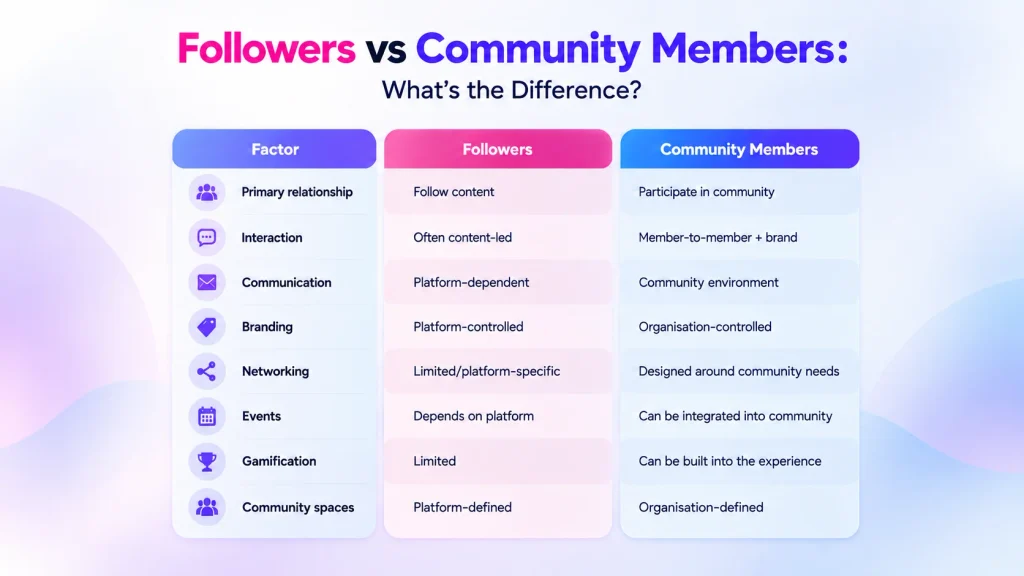
A social media group can generate likes, comments, shares, and discussions. However, businesses interested in long-term relationships often need to look beyond activity on individual posts.
A branded community can organize recurring conversations, networking opportunities, events, shared resources, and member contributions within one environment.
This creates opportunities for members to return for reasons beyond seeing a new update.
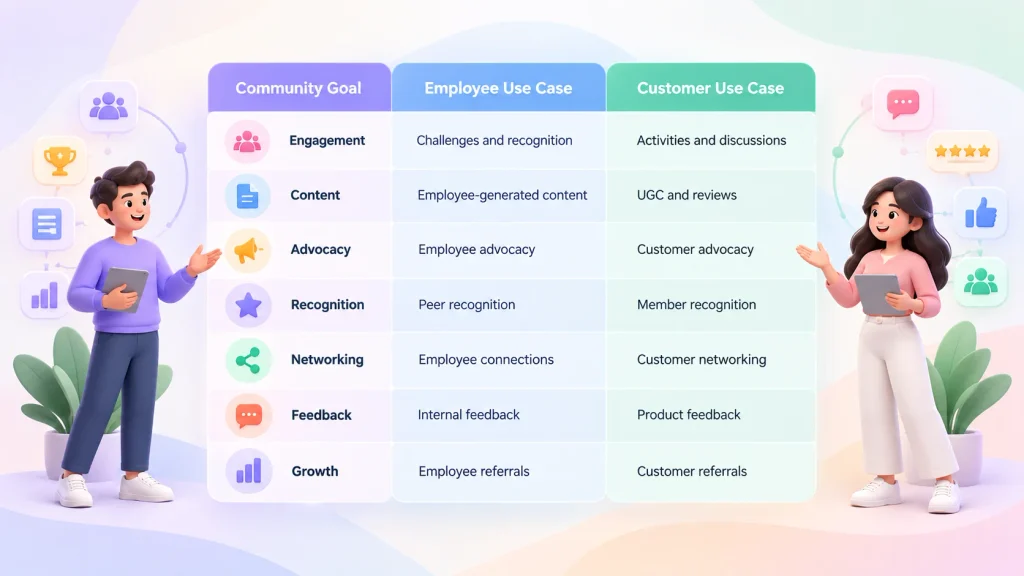
For example, members of a professional community may participate in industry discussions, attend events, exchange advice, and connect with people who share their interests.
A customer community may help users ask questions, share product experiences, and learn from other customers.
Businesses should measure meaningful engagement through indicators such as:
Active members over a defined period.
Repeat participation.
Quality of member contributions.
Discussion responses and useful answers.
Event attendance.
Member feedback and retention.
A large follower count does not necessarily indicate a healthy community. The more important question is whether members receive value and have reasons to participate consistently.
5. Multiple Community Activities in One Environment
As a community grows, businesses may find themselves using several tools to manage discussions, publish content, organize events, collect feedback, and recognize contributions.
When these activities are spread across disconnected systems, members may find it harder to discover information and participate consistently.
A community platform may bring several activities together, depending on its features.
These can include:
Content feeds and discussions: Give members a place to share updates, ask questions, and exchange ideas.
Member connections and networking: Help members discover people with relevant interests or expertise.
Events and activities: Support webinars, workshops, meetings, and community gatherings.
Polls, surveys, and feedback: Help organizations collect member opinions and understand their needs.
Gamification and recognition: Offer ways to acknowledge contributions and encourage specific participation activities.
Moderation and member management: Help administrators organize the community and maintain appropriate participation standards.
Bringing these capabilities together can make community management more organized and provide a more consistent member experience.
However, businesses should compare the actual functionality of each platform rather than assuming every provider offers the same features.
Customer relationships do not end when a purchase is complete.
Customers may need help understanding a product, discovering new features, solving problems, or learning from other users. A community can provide an ongoing environment for these interactions.
A branded customer community may support:
Customer education and product adoption.
Peer-to-peer knowledge sharing.
Product feedback and feature discussions.
Customer events and learning opportunities.
Connections between customers with similar needs.
Continued interaction after a purchase.
For example, customers using a business software product could exchange practical advice, share workflows, and discuss common challenges. The company could also use relevant feedback to identify areas where documentation or product education needs improvement.
These activities may contribute to stronger customer relationships, but results depend on the quality of the community experience, the relevance of its resources, and how consistently the organization supports its members.
A branded community is not a guaranteed way to increase retention or revenue. It is an environment businesses can use to support those objectives through useful interactions and ongoing engagement.
What Challenges Do Businesses Face When Relying Only on Social Media Groups?
Social media groups can work well for small communities and informal discussions. As organizational needs become more complex, however, some limitations may become more noticeable.
Fragmented Conversations Across Multiple Platforms
Businesses often communicate with their audiences through several channels, including social media, email, messaging applications, websites, and event tools.
When community discussions are spread across these channels, it can become harder for members to find previous conversations, discover useful resources, and continue discussions.
Administrators may also need to manage different moderation processes, communication workflows, and activity reports.
A dedicated community environment can help organize these interactions, provided the selected platform supports the required activities.
Limited Branding and Customization
Social media groups typically follow the design and functionality of their host platform.
Businesses may have limited options for organizing the experience, presenting their identity, or adapting the environment to their specific community goals.
A branded community may offer greater flexibility, depending on the provider’s customization options.
This can be particularly relevant for organizations that want the community to form part of a broader customer, employee, or member experience.
Difficulty Measuring Community Health
A large group may appear successful because it has many members or frequent posts. However, these numbers do not necessarily show whether members find the community useful.
Businesses need to understand participation quality, repeat activity, contribution levels, and member retention.
Useful indicators include:
Monthly or weekly active members.
New-member activation.
Repeat participation.
Questions answered and resources shared.
Event registration and attendance.
Member feedback.
Retention over a defined period.
The right metrics depend on the community’s purpose. A customer support community, for example, may prioritize useful answers and resolution activity, while a professional community may focus on networking and event participation.
Limited Control Over the Member Journey
A community member may discover a business through social media, sign up for an event through another tool, join a mailing list, and participate in a discussion elsewhere.
When these interactions are disconnected, creating a consistent member journey can be challenging.
A branded community may provide a more structured environment for onboarding, content discovery, discussions, events, and ongoing participation.
Businesses should consider how the platform fits with their existing tools and whether its integrations support the experience they want to create.
How Can Businesses Transition From Social Media Groups to Branded Communities?
Moving from a social media group to a branded community requires more than creating a new account and inviting members.
The transition should give people a clear reason to join and make the new environment useful from the beginning.
Step 1: Define the Purpose of the Community
Start by identifying what the community should accomplish.
Possible objectives include customer engagement, customer education, employee communication, professional networking, advocacy, learning, and peer support.
Choose a primary purpose and identify the activities that will help achieve it.
For example, a customer community may focus on product education and peer support, while an association community may prioritize member networking, events, and ongoing participation.
A clear purpose helps guide platform selection, content planning, and success measurement.
Step 2: Identify What Members Need
Review the existing group’s discussions, common questions, feedback, and participation patterns.
Look for topics members regularly discuss and problems they want help solving.
Ask questions such as:
What information do members frequently request?
Which discussions attract meaningful participation?
What prevents members from participating?
Would members benefit from events or networking?
What resources would make the community more useful?
These findings can help shape the new environment around real member needs rather than assumptions.
Step 3: Choose a Suitable Branded Community Platform
Compare potential platforms based on your requirements.
Consider:
Branding and customization.
Member profiles and connections.
Discussions and content publishing.
Events and community activities.
Member management and moderation.
Privacy and access controls.
Analytics and reporting.
Mobile accessibility.
Integration with existing systems.
Pricing and ongoing operating costs.
Not every organization needs every feature. Prioritize capabilities that support your community’s purpose and avoid paying for unnecessary complexity.
Step 4: Plan Member Onboarding
Explain the transition clearly before inviting members to join the new community.
Tell them why the organization is creating a dedicated environment, what benefits it offers, and how they can participate.
A practical onboarding plan should include:
Clear joining instructions.
A simple registration process.
A welcome message explaining the community’s purpose.
Guidance on finding discussions and resources.
Community guidelines.
Relevant conversations and activities for new members.
Do not assume that every social media group member will automatically migrate. Some members may prefer the existing platform, while others may need time to understand the benefits of joining a new environment.
Make participation easy and give members a meaningful reason to take the next step.
Step 5: Give Members Reasons to Participate
A community becomes useful when members find relevant information and opportunities to interact.
Prepare activities before inviting people to join.
These may include:
Discussions around common questions.
Useful guides and educational resources.
Member introductions.
Expert sessions and events.
Polls and feedback activities.
Networking opportunities.
Challenges and recognition, where appropriate.
Encourage participation by responding to questions, highlighting useful contributions, and creating opportunities for members to help one another.
Avoid focusing entirely on posting frequency. The goal is to create valuable interactions that members want to return to.
Step 6: Measure and Improve
Track the community’s performance against the objectives established at the beginning.
Useful metrics may include:
Number of members who join.
Percentage of new members who become active.
Repeat participation.
Discussion and content contributions.
Event attendance.
Member feedback.
Retention over time.
Review these indicators regularly and use the findings to improve onboarding, content, activities, and community management.
How Does Thrico Support Branded Community Building?
Thrico is a community platform that brings together capabilities designed to support member connections, discussions, content, engagement, and community management.
For organizations evaluating a move beyond social media groups, a dedicated platform can provide an environment structured around the needs of the business and its members.
The appropriate setup depends on the organization’s goals and the features available in the selected plan.
Branded Community Experiences
A branded community gives an organization an opportunity to create a member environment aligned with its identity and audience.
Branding and customization options can help establish a consistent experience and make the community feel connected to the wider organization.
Businesses should review the available customization options to determine whether they meet their requirements.
Member Connections and Discussions
Member profiles, conversations, content, and community spaces can help people connect and exchange information.
For example, customer communities can support product-related discussions, while professional communities can help members discover people with relevant experience or interests.
These interactions can create opportunities for knowledge sharing and ongoing participation.
Engagement Through Events and Gamification
Events and other community activities give members different ways to participate.
Depending on the platform’s available features, businesses may also use challenges, points, rewards, and recognition to encourage specific contributions.
For instance, an organization might recognize helpful answers, encourage participation in a learning event, or create activities around a shared community objective.
The most effective approach is to choose activities that provide value to members rather than adding engagement mechanics without a clear purpose.
Community Management and Insights
Community management involves organizing member spaces, supporting discussions, maintaining guidelines, and monitoring participation.
Relevant analytics can help administrators understand activity and identify opportunities to improve the experience.
Businesses should evaluate the platform’s moderation tools, reporting capabilities, data access, and integrations before making a decision.
Thrico can be considered as part of a broader community strategy in which the organization defines its objectives, chooses relevant features, and measures performance over time.
Should Every Business Move Away From Social Media Groups?
No. Social media groups remain useful for many businesses, and moving to a branded community is not always necessary.
The right approach depends on the organization’s objectives, community size, available resources, and member expectations.
When Social Media Groups May Be Enough
A social media group may be sufficient when:
The community is small and informal.
The main goal is audience discovery or public discussion.
Existing platform features meet members’ needs.
Branding and customization requirements are limited.
The organization does not need a separate community environment.
Available analytics are sufficient for measuring progress.
For example, a small business testing interest in a new product may find that an existing social media group provides everything it needs.
In this situation, introducing another platform could add unnecessary work and cost.
When a Branded Community Makes More Sense
A dedicated community platform may be worth considering when:
The business needs a branded member experience.
Members require ongoing interaction beyond social media posts.
Community activities need better organization.
The organization wants relevant first-party insights and more control over community operations.
Discussions, events, networking, and content need to work together.
The community has become an important part of the customer or member experience.
For example, a professional association with recurring events, member directories, educational resources, and networking activities may benefit from a dedicated environment that brings these experiences together.
A Simple Decision Checklist
Before choosing between social media groups and a branded community, ask:
Do we need more control over the community experience?
Are our current tools making member management difficult?
Do members need activities beyond posts and comments?
Do we need more detailed insights into community participation?
Would a dedicated environment improve how members find information and connect?
Do we have the resources to manage and maintain another platform?
If the answer to several questions is yes, it may be time to evaluate a branded community platform.
Businesses do not necessarily need to abandon social media. They can continue using social channels for discovery while using a branded community to support deeper, ongoing relationships.
Conclusion
Social media groups remain useful for audience discovery, informal conversations, and community participation. However, as businesses develop more structured community strategies, they may need greater control over branding, member experiences, activities, and access to relevant community insights.
Branded communities provide an alternative environment for organizing discussions, networking, events, content, and ongoing interactions around an organization’s objectives.
Moving beyond social media does not mean abandoning it. Businesses can continue using social channels to reach new audiences while developing a dedicated community for deeper engagement and long-term relationships.
The right decision depends on the needs of the business and its members. By defining clear objectives, selecting suitable tools, planning onboarding, and measuring meaningful participation, organizations can build communities that provide value over time.
For businesses exploring this approach, Thrico offers a community platform to consider when evaluating how to bring member connections, discussions, content, and engagement activities together in a dedicated environment.
Frequently Asked Questions
Why Are Businesses Moving From Social Media Groups to Branded Communities?
Businesses are moving toward branded communities because they want greater control over the brand experience, member relationships, engagement, and community insights. A dedicated community can organize discussions, events, content, and networking in one environment. Social media remains useful for discovery, while branded communities can support deeper, ongoing participation.
What Is the Difference Between a Social Media Group and a Branded Community?
A social media group operates within an existing third-party platform and follows its available features and policies. A branded community provides a dedicated environment organized around an organization’s identity and goals. Depending on the platform, it may offer greater customization, member management, community analytics, and ways to organize ongoing interactions.
Are Branded Communities Better Than Social Media Groups?
Neither option is universally better. Social media groups can be effective for discovery, informal conversations, and smaller communities. Branded communities may be more suitable when organizations need a dedicated member environment, more structured activities, or additional control over branding and community operations. The right choice depends on business objectives and member needs.
Can Businesses Use Social Media and Branded Communities Together?
Yes. Businesses can use social media to attract audiences, share public updates, and introduce people to their community. A branded community can then provide a dedicated space for discussions, events, knowledge sharing, and ongoing member relationships. Using both channels allows organizations to support discovery and deeper participation without relying entirely on one platform.
How Do Branded Communities Improve Customer Engagement?
Branded communities can support customer engagement through recurring discussions, peer-to-peer interaction, events, educational resources, networking, and recognition. These activities give customers additional ways to participate and find value after a purchase. Results depend on the relevance of the content, the quality of community management, and how well activities address customer needs.
Do Branded Communities Give Businesses Ownership of Customer Data?
Branded communities may provide businesses with greater control over community data and access to relevant engagement insights. However, actual data rights depend on the platform’s terms, technical capabilities, member consent, and applicable privacy regulations. Businesses should review data access, portability, security, and compliance requirements before choosing a platform.
When Should a Business Move From a Social Media Group to a Dedicated Community Platform?
A business should consider moving when its community requires more customization, structured activities, member management, or integrated experiences than its current tools provide. Fragmented discussions, limited reporting, and growing administrative complexity may also indicate that a dedicated community platform is worth evaluating.
How Can Businesses Encourage Members to Join a Branded Community?
Businesses can encourage participation by explaining the benefits clearly, making registration straightforward, and providing useful content and activities from the beginning. Member introductions, relevant discussions, events, educational resources, and opportunities to connect can help people understand the community’s value. A gradual transition and clear communication can also reduce confusion.
What Features Should a Branded Community Platform Include?
Important features may include branding and customization, member profiles, discussions, content publishing, groups, events, networking, moderation, member management, analytics, and appropriate privacy controls. Depending on the community’s goals, businesses may also need gamification, integrations, mobile access, and reporting tools. The best feature set depends on the organization’s requirements.
How Does Thrico Help Businesses Build Branded Communities?
Thrico provides a community platform designed to bring together community-related capabilities such as member connections, discussions, content, engagement, and community management. Businesses can evaluate its available features against their requirements for branding, participation, and ongoing member relationships. The results depend on the chosen configuration, implementation, and community strategy.
Gamification software helps businesses encourage specific behaviours through points, badges, challenges, and rewards. A community platform provides a broader environment for member profiles, discussions, content sharing, networking, and ongoing interactions. The right choice depends on your goals. Businesses looking to combine community building with structured participation incentives may benefit from using both.
Gamification software uses game-inspired mechanics in non-game activities to encourage participation, motivate users, track progress, and reinforce desired behaviours.
Instead of relying only on traditional engagement methods, businesses can introduce points, achievements, challenges, and rewards to make specific activities more interactive.
For example, a company may reward employees for completing training modules, encourage customers to participate in a loyalty programme, or recognize community members who regularly contribute helpful answers.
Gamification software is useful when an organization wants to motivate people to take specific actions and measure their progress toward defined goals.
Common Features of Gamification Software
Although features vary by provider, most gamification solutions focus on motivating participation and recognizing achievements.
1. Points and Scores
Points allow businesses to assign value to specific actions. Users might earn points for completing tasks, participating in activities, or achieving defined milestones.
2. Badges and Achievements
Badges recognize accomplishments and provide visible markers of progress. They can reward activities such as completing a course, contributing useful information, or reaching a participation milestone.
3. Leaderboards and Rankings
Leaderboards display performance or participation rankings. They can encourage friendly competition when users understand the criteria and consider the competition fair.
4. Challenges and Missions
Challenges give users specific objectives to complete. Businesses can use them to encourage learning, product adoption, customer participation, or employee development.
5. Progress Tracking
Progress indicators help users understand how far they have progressed toward a goal. They can make larger tasks easier to manage by breaking them into smaller milestones.
6. Rewards and Incentives
Rewards recognize participation or achievement. Depending on the programme, they may include digital recognition, privileges, discounts, or other incentives.
7. Streaks and Milestones
Streaks recognize consistent participation, while milestones celebrate progress over time. These mechanics can encourage users to return regularly, provided the expectations remain reasonable.
8. Performance Dashboards
Where available, dashboards help administrators review participation, task completion, achievement rates, and other relevant metrics.
The value of these features depends on how well they support the intended behaviour. Adding points or badges without a clear objective does not automatically produce meaningful engagement.
What Is Gamification Software Used For?
Gamification software can support several business activities.
Employee training: Organizations can use challenges, progress tracking, and achievements to encourage employees to complete learning programmes.
Customer loyalty: Businesses can recognize repeat purchases, referrals, and other activities that align with their loyalty programme.
Learning programmes: Educational organizations can use points, milestones, and achievements to make learning progress more visible.
Sales enablement: Sales teams can use challenges and performance tracking to encourage completion of training activities or progress toward defined objectives.
Product adoption: Businesses can encourage users to explore important product features and complete onboarding activities.
Community participation: Organizations can use rewards and recognition to encourage members to contribute content, answer questions, attend events, and participate in discussions.
A community platform is a digital environment where people connect, communicate, share information, participate in discussions, attend events, and build ongoing relationships around a shared interest, organization, brand, or professional goal.
Unlike a standalone gamification tool, which primarily focuses on encouraging specific behaviours, a community platform provides the infrastructure for continuous interaction between members.
For example, a business may create a customer community where users exchange product knowledge, ask questions, share experiences, and participate in events. An organization may also use a community platform to connect employees, alumni, association members, or professional networks.
The primary purpose is to create a space where members can interact and continue finding value over time.
Common Features of a Community Platform
Community platforms bring together different tools that support member interaction and community management.
1. Member Profiles and Directories
Profiles help members introduce themselves, share relevant information, and discover other people with similar interests or professional backgrounds.
2. Communities and Groups
Groups allow members to organize conversations around specific topics, teams, interests, or objectives.
3. Content Feeds and Publishing
Content features allow members and administrators to share updates, articles, announcements, questions, and other useful information.
4. Discussions, Forums, and Chat
Discussion tools enable members to ask questions, exchange ideas, share experiences, and communicate with one another.
5. Networking and Member Connections
Networking features help members discover relevant contacts and develop relationships within the community.
6. Events and Activities
Event capabilities support the organization of webinars, workshops, meetings, networking sessions, and other community activities.
7. Moderation and Member Management
Administrative tools help organizations manage membership, oversee discussions, establish community guidelines, and maintain a suitable environment.
8. Analytics and Engagement Insights
Available analytics can help administrators understand member activity, participation patterns, content performance, and community growth.
9. Branding and Customization
Customization capabilities allow organizations to create a community experience that reflects their brand, audience, and objectives.
10. Gamification and Rewards
Some community platforms include built-in gamification features such as points, badges, leaderboards, challenges, and recognition.
The availability and depth of these capabilities vary by provider, so businesses should evaluate features against their actual requirements.
What Is a Community Platform Used For?
Community platforms support different types of organizations and audiences.
Customer communities: Help customers exchange knowledge, find answers, and share product experiences.
Employee communities: Support internal communication, knowledge sharing, and collaboration.
Professional networks: Connect people within an industry, profession, or area of expertise.
Educational communities: Bring together students, educators, researchers, and alumni.
Association communities: Help associations maintain member relationships and encourage participation.
Brand communities: Give customers and supporters a place to interact around a shared brand or interest.
Understanding what a community platform brings together can help businesses assess how member profiles, connections, discussions, content, events, and engagement features work together to support long-term relationships.
Gamification Software vs Community Platform: What Is the Difference?
The primary difference between gamification software and a community platform is their purpose.
Gamification software focuses on motivating specific behaviours through game-inspired mechanics. A community platform focuses on creating an environment where members can interact, share information, and build relationships.
The following comparison highlights their main differences.
Comparison Factor
Gamification Software
Community Platform
Primary purpose
Encourage specific behaviours
Build and manage member relationships
Main focus
Motivation, progress, and achievements
Interaction, connection, content, and participation
Typical features
Points, badges, challenges, and leaderboards
Profiles, groups, discussions, events, and networking
Member interaction
Depends on the software
Usually a central part of the platform
Rewards
Often a core capability
May be included as an engagement feature
Content and discussions
May be limited or provided through integrations
Commonly central features
Community management
May require another system
Usually includes member and community management
Success metrics
Task completion, participation, and achievement rates
Active members, meaningful interactions, retention, and contribution quality
Actual features vary by provider. Some gamification products include community functionality, while modern community platforms may offer built-in gamification tools.
This distinction matters because businesses should choose based on the problem they need to solve, not simply the number of features a product advertises.
A company that already has an active application and wants to encourage users to complete specific tasks may need gamification software. An organization that wants to build a branded environment for discussions, networking, and ongoing member relationships may need a community platform.
Businesses that want both capabilities should evaluate whether one solution can meet their requirements before purchasing separate tools.
What Are the Key Benefits of Gamification Software?
Gamification software can help organizations structure participation and make progress more visible. Its effectiveness depends on the relevance of the activities, the design of the incentives, and the needs of the people using it.
Encourages Specific Actions
Gamification allows businesses to identify desired behaviours and create incentives around them.
For example, a training programme may reward employees for completing modules, while a customer programme may recognize users who complete onboarding activities.
Clear objectives help participants understand what is expected and why an activity matters.
Makes Progress Visible
Progress bars, milestones, scores, and levels show users how far they have progressed.
This can make larger objectives easier to approach by breaking them into manageable steps. Participants can see what they have completed and what remains.
Supports Training and Learning
Training programmes can use challenges, achievements, and progress indicators to encourage learners to complete activities.
For instance, an organization might divide a training course into stages and recognize learners as they complete each stage.
These features support participation, but they should complement useful learning content rather than replace it.
Recognizes Performance and Contributions
Badges, scores, and rewards provide ways to recognize specific accomplishments.
In a community setting, recognition might be given to members who answer questions, share useful resources, or contribute to discussions.
Recognition works best when the criteria are clear and the activities being rewarded are genuinely valuable.
Helps Track Participation
Gamification tools may provide reports on task completion, activity levels, achievement rates, and participation patterns.
These insights help administrators identify which activities attract participation and where users may need additional support.
However, increased activity does not automatically translate into better business outcomes. Organizations should connect participation data with the goals they want to achieve.
What Are the Key Benefits of a Community Platform?
A community platform provides a shared environment for people to connect, communicate, and contribute over time.
Builds Long-Term Member Relationships
Community platforms give members opportunities to interact beyond individual transactions or isolated activities.
Through ongoing conversations, networking, and shared experiences, members can develop relationships with other people and with the organization supporting the community.
For businesses, these relationships may support customer education, knowledge sharing, and continued participation.
Brings Communication Into One Environment
Without a dedicated community space, conversations may be scattered across email, messaging applications, social networks, and separate event tools.
A community platform can bring discussions, content, events, and member interactions into a more organized environment.
This makes it easier for members to find relevant information and continue conversations over time.
Encourages Peer-to-Peer Knowledge Sharing
Members often have experiences and knowledge that can help others.
A community platform provides a place for members to ask questions, share advice, exchange solutions, and discuss common challenges.
Over time, useful discussions can become a knowledge resource for the wider community.
Supports Events and Networking
Events, group activities, and member discovery tools create opportunities for people to connect.
Organizations can use these capabilities to host discussions, organize educational sessions, and bring members together around shared interests.
The value comes from creating opportunities for meaningful interaction, not simply increasing the number of events.
Provides Community-Level Insights
Community analytics can help administrators understand participation, identify active members, evaluate content performance, and monitor growth.
These insights support decisions about content, onboarding, event planning, and engagement strategies.
Organizations should focus on metrics that reflect their objectives rather than treating every activity measure as a sign of success.
Gamification Software vs Community Platform: Which Do You Need?
The right choice depends on whether your primary goal is to motivate specific actions, build ongoing relationships, or achieve both.
Choose Gamification Software If…
A standalone gamification solution may be appropriate when:
You already have a website, application, learning system, or platform where users interact.
You want to introduce points, badges, challenges, or achievements.
Your main objective is to encourage specific actions.
You need progress tracking for learning or training.
Your existing system already handles communication and community interactions adequately.
You want to recognize task completion or participation without creating a separate community environment.
Example: A company has an employee training portal and wants to encourage employees to complete learning modules. It introduces progress indicators, achievement badges, and structured challenges within the existing system.
In this case, gamification software may address the primary need without requiring a separate community platform.
Choose a Community Platform If…
A community platform may be the better fit when:
You need a dedicated place for members to connect.
Discussions, networking, content, and events are important.
You need tools to manage members, groups, and community spaces.
Your audience needs ongoing peer-to-peer interaction.
You want to build a branded community around a business, organization, or shared interest.
You want members to exchange knowledge and develop relationships over time.
Example: A business wants to create a customer community where users can discuss products, ask questions, share experiences, attend events, and connect with other customers.
In this case, a community platform provides the environment needed for continuous interaction and relationship building.
Businesses may benefit from combining a community platform with gamification when they need an environment for ongoing interaction and structured incentives that encourage participation.
For example, a customer community may provide member profiles, discussions, events, and shared resources. Gamification can complement these features by recognizing members who answer questions, attend events, or contribute useful content.
Similarly, an employee community may use challenges and recognition to encourage knowledge sharing and participation in internal activities.
The two approaches serve different purposes:
The community platform provides the environment for members to interact.
Gamification provides mechanics that encourage specific actions within that environment.
However, a separate gamification product may not be necessary if the selected community platform already includes the required points, badges, rewards, or challenges.
The decision should be based on feature requirements, integration needs, user experience, and total cost.
Can a Community Platform Replace Gamification Software?
A community platform can replace standalone gamification software in some situations, but not all.
If a community platform includes the gamification features a business needs, it may be sufficient to manage member interactions and encourage participation in one environment.
For example, an organization that needs member discussions, profiles, events, badges, and basic participation challenges may not need a separate gamification tool.
However, specialized gamification software may be more suitable when the organization requires advanced game mechanics, complex scoring rules, highly customized reward systems, or integrations with existing applications.
Before deciding, evaluate the following factors.
Required gamification mechanics: Determine whether built-in features support the points, challenges, scoring rules, achievements, and rewards you need.
Integration requirements: Check whether the solution works with your existing website, application, CRM, learning management system, or other business tools.
Reporting and analytics: Assess whether the available reporting capabilities provide the information required to evaluate participation and performance.
Customization: Determine whether you can configure the experience to match your business rules and programme objectives.
Member experience: Consider whether the solution makes it easy for users to participate without introducing unnecessary complexity.
Total implementation and operating costs: Include subscriptions, setup, integrations, administration, maintenance, and staff time.
The goal is to select a solution that meets your actual requirements without paying for unnecessary functionality or creating avoidable operational complexity.
How Does Thrico Combine Community Building and Gamification?
Thrico brings community-building capabilities and engagement mechanisms together within a community platform.
This approach can be relevant to organizations that want to create a dedicated environment for member interaction while also encouraging participation through recognition and incentives.
The suitability of the platform depends on the specific features required and how they align with the organization’s goals.
Community Spaces and Member Connections
Community spaces, member profiles, connections, and conversations provide the foundation for interaction.
These capabilities can help organizations create places where members discover relevant people, exchange information, participate in discussions, and build ongoing relationships.
For example, a customer community can give users a place to share experiences and discuss common questions. A professional community can help members connect with others in their industry.
Gamification and Recognition
Gamification mechanisms can complement community interactions by recognizing specific activities and achievements.
Depending on the available capabilities, these mechanisms may include points, badges, leaderboards, rewards, and challenges.
Organizations can use such features to recognize helpful contributions, encourage participation in events, or structure activities around community objectives.
The important consideration is whether the incentives encourage behaviours that genuinely benefit members and the community.
A Connected Member Experience
Combining community interactions with participation incentives can help organizations manage relationships and encourage contributions within the same environment.
Rather than treating member interaction and gamification as completely separate activities, businesses can evaluate how the two work together to support their goals.
For example, a community may offer discussions and knowledge-sharing resources while recognizing members who contribute useful answers.
Explore the Thrico community platform to learn more about its community infrastructure and engagement capabilities.
As with any platform, businesses should evaluate the actual features, analytics, integrations, and operating requirements before making a decision. Results depend on how the solution is implemented and used.
How to Choose the Right Solution for Your Business
Choosing between gamification software and a community platform becomes easier when you evaluate your requirements systematically.
1. Define Your Primary Objective
Start by identifying the problem you want to solve.
Do you want users to complete specific activities, participate in training, or achieve defined milestones? Gamification may be the primary requirement.
Do you want members to connect, share knowledge, participate in discussions, and build ongoing relationships? A community platform may be more appropriate.
If both goals are important, consider a solution that combines the required capabilities.
2. Evaluate Existing Tools
Review your current technology stack before purchasing anything new.
You may already have a platform that supports communication, user accounts, and content sharing. In that case, adding gamification functionality could be sufficient.
Alternatively, if interactions are scattered across different tools and there is no dedicated member environment, a community platform may address a more fundamental need.
3. Compare Required Features
Create a list of essential and optional features.
For gamification, essential requirements might include points, badges, challenges, scoring rules, and progress tracking.
For a community platform, they might include member profiles, discussions, groups, events, moderation, analytics, and branding.
If you need both, identify whether one platform can meet the requirements or whether integrations are necessary.
4. Check Integrations and Scalability
Consider how the solution will work with your existing systems and future plans.
Evaluate integration requirements, data access, administrative workflows, customization, and the ability to support your expected community size.
A solution that meets your immediate needs should also fit your likely operational requirements as the programme develops.
5. Calculate Total Cost
Compare the full cost of ownership rather than looking only at subscription prices.
Include implementation, integrations, maintenance, administration, training, content, and staff time.
A standalone gamification tool may be economical when added to an existing platform. However, purchasing multiple tools can introduce additional costs and complexity.
A community platform with suitable built-in gamification may reduce the need for separate systems, depending on the features required.
6. Define Success Metrics
Choose metrics that reflect the solution’s purpose.
For gamification, relevant measures may include task completion, participation, achievement rates, and progress through learning activities.
For a community platform, relevant measures may include active members, meaningful interactions, retention, knowledge contributions, and event participation.
If you use both, evaluate whether the combined approach supports the outcomes you intended to achieve.
Defining success metrics before implementation makes it easier to assess performance and identify areas for improvement.
Conclusion
Gamification software and community platforms address different but complementary business needs.
Gamification software helps organizations encourage specific behaviours through points, badges, challenges, rewards, and progress tracking. Community platforms provide the environment for members to connect, share knowledge, participate in discussions, attend events, and build lasting relationships.
If your primary objective is to motivate users within an existing application, gamification software may be sufficient. If you need a dedicated environment for member interaction and relationship building, a community platform is likely to be the better fit.
Businesses that want to combine ongoing community interaction with structured participation incentives should evaluate whether a platform with built-in gamification can meet both requirements.
Thrico brings community-building capabilities and engagement mechanisms together, giving organizations an option to consider when evaluating their community needs.
Ultimately, the right solution is the one that supports your business objectives, fits your existing systems, delivers the required member experience, and provides a practical way to measure success.
Frequently Asked Questions
What Is the Difference Between Gamification Software and a Community Platform?
Gamification software uses game-inspired mechanics such as points, badges, challenges, and rewards to encourage specific behaviours. A community platform provides an environment for members to connect, share content, participate in discussions, attend events, and build relationships. Businesses should choose based on their objectives and may use both when they need community interaction and structured participation incentives.
Can a Community Platform Include Gamification?
Yes. Some community platforms include gamification features such as points, badges, leaderboards, challenges, and rewards alongside member interaction and community management tools. However, the available features vary by provider, so businesses should verify that a platform meets their requirements.
Is Gamification Software Enough to Build an Online Community?
Not necessarily. Gamification software can encourage participation, but it may not provide the member profiles, discussions, groups, content publishing, events, and community management tools needed to build an ongoing community. If these capabilities are important, a dedicated community platform may be more suitable.
When Should a Business Use Both Solutions?
A business should consider both when it needs a dedicated environment for member interaction and specialized gamification capabilities to encourage specific behaviours. For example, a customer community may need discussions and networking alongside challenges and recognition for helpful contributions. However, a separate gamification tool may be unnecessary if the community platform already provides the required features.
Does Gamification Improve Community Engagement?
Gamification can encourage participation by recognizing achievements, setting clear goals, and making progress visible. Its effectiveness depends on the relevance of the incentives, the needs of the members, and the quality of the overall community experience. Businesses should measure whether gamification contributes to meaningful participation rather than assuming that more points or badges automatically improve engagement.
Is a Community Platform Better Than Gamification Software?
Neither solution is universally better. A community platform is generally more suitable for ongoing member interaction and relationship building, while gamification software focuses on encouraging specific actions. The right choice depends on your objectives, existing tools, required features, and budget.
Does Thrico Offer Gamification Features?
Thrico’s community platform positioning combines community interactions with engagement mechanisms. Businesses interested in gamification should review the current platform capabilities and confirm that the available features meet their specific requirements for points, badges, rewards, challenges, and recognition before making a purchasing decision.
A community platform can deliver significant business value, but how do you know whether your investment is paying off? Measuring community platform ROI helps businesses understand the financial impact of their communities through customer retention, support cost savings, qualified leads, referrals, member engagement, and revenue. The right metrics depend on your community’s primary business objectives.
If you are planning to build a community, you can launch your own branded community and start tracking its performance against clearly defined business goals.
What Is Community Platform ROI?
Community platform ROI measures the business value generated by a community compared with the total cost of building, operating, and managing it. It helps businesses understand whether their community investment contributes to measurable outcomes, such as improved customer retention, reduced support costs, increased lead generation, and stronger customer relationships.
However, measuring community ROI involves more than counting members, posts, or comments. Businesses need to connect community activities with meaningful outcomes that support their objectives.
Community Activity vs. Business Outcomes
Community activity refers to the actions members take within a platform. These activities include joining discussions, publishing posts, attending events, sharing resources, and answering questions.
Business outcomes show how these activities contribute to organizational goals. Examples include:
Reducing repetitive customer support requests.
Improving customer retention and renewals.
Generating qualified leads and sales opportunities.
Increasing referrals and customer advocacy.
Encouraging repeat purchases.
Helping members find information more quickly.
For example, a community may have thousands of members who regularly participate in discussions. However, if those discussions do not support customer needs or business objectives, a high activity level alone does not demonstrate a positive return on investment.
Businesses should measure both community engagement and the outcomes associated with it.
Why Member Count Alone Does Not Prove ROI
Member growth is a useful indicator of reach, but it does not necessarily reflect the value a community creates.
A community with fewer active members may generate more business value than a larger community with limited participation. For instance, a small customer community that resolves support questions, improves product adoption, and encourages renewals may deliver measurable benefits.
To understand the actual value of a community, businesses should evaluate participation quality, member retention, knowledge sharing, and the financial outcomes associated with these activities.
How Community Goals Influence ROI Measurement
The metrics used to measure community ROI depend on the community’s purpose.
A customer support community may focus on reducing support costs and improving response times. A B2B community may prioritize qualified leads, customer relationships, and sales opportunities. An employee community may focus on knowledge sharing, collaboration, and time saved.
Businesses should also understand why owning your community data matters. Access to relevant community data helps organizations analyze member activity, identify trends, and connect engagement with business outcomes.
How Do You Calculate Community Platform ROI?
Businesses can calculate community platform ROI by comparing the measurable benefits generated by a community with the total costs required to build and operate it.
The standard formula is:
Community Platform ROI (%) = [(Measurable Benefits − Total Costs) ÷ Total Costs] × 100
The formula produces a percentage that represents the return relative to the investment.
Understanding Measurable Benefits
Measurable benefits are the financial gains or savings that can reasonably be attributed to community activities.
These may include:
Customer support savings: Reduced costs associated with repetitive support requests or lower agent handling time.
Incremental revenue: Additional revenue attributable to community-influenced leads, conversions, or purchases.
Referral value: Revenue generated by referrals from community members.
Customer retention value: Measurable financial benefits associated with improved retention or renewals.
Operational efficiency: Quantifiable savings from improved knowledge sharing or reduced duplication of work.
Businesses should use reliable data wherever possible and distinguish observed results from estimates.
Understanding Total Community Costs
To calculate ROI accurately, businesses must account for the full cost of operating their community.
Common costs include:
Platform subscription fees.
Initial implementation and setup.
Staff time spent managing the community.
Content creation and distribution.
Community moderation.
Events and engagement activities.
Software integrations and analytics.
Ongoing maintenance and management.
Ignoring these costs can make the return appear higher than it actually is.
Community Platform ROI Calculation Example
Consider a business that invests in a community platform to improve customer support, strengthen retention, and generate referrals.
For illustration, assume the business measures ₹12,00,000 in benefits attributable to its community and incurs total community costs of ₹8,00,000.
Item
Illustrative Value
Total community costs
₹12,00,000
Total community costs
₹8,00,000
Net benefit
₹4,00,000
ROI
50%
The calculation is:
ROI = [(₹12,00,000 − ₹8,00,000) ÷ ₹8,00,000] × 100
ROI = (₹4,00,000 ÷ ₹8,00,000) × 100
ROI = 50%
In this illustrative example, the community generates ₹4,00,000 more in measurable benefits than its total costs, representing a 50% return on investment.
These figures are examples for explaining the calculation. They are not industry benchmarks or claims about Thrico’s results.
Businesses should also avoid double-counting benefits. For instance, if a single customer renewal is included in both retention value and community-influenced revenue, counting the full amount twice would inflate the ROI calculation.
To plan your own estimates, use the community ROI calculator. Treat the result as a planning estimate based on your inputs and assumptions, not as a guarantee of actual returns.
Which Community Platform ROI Metrics Should Businesses Track?
The most useful community ROI metrics are those that connect directly to business objectives. Tracking every available number can create unnecessary complexity, so businesses should prioritize the indicators that demonstrate meaningful progress.
1. Member Engagement Rate
Member engagement measures how actively people participate in a community.
Relevant indicators include:
Number of active members.
Posts and comments published.
Discussion participation.
Event attendance.
Responses to questions.
Contributions to shared resources.
Businesses should define what qualifies as an active member and measure engagement over a consistent period.
For example, a community focused on customer education may place greater value on members asking questions and using helpful resources than on the total number of posts published.
Engagement is an important early indicator, but it should be evaluated alongside the outcomes the community is expected to deliver.
2. Member Retention Rate
Member retention measures the percentage of members who remain active over a defined period.
A basic calculation is:
Member Retention Rate (%) = (Members Retained During the Period ÷ Members at the Beginning of the Period) × 100
Businesses should clearly define what retained or active means for their community and use the same definition when comparing results.
For customer communities, retention may also be evaluated alongside customer renewals, repeat purchases, or continued product usage.
Where possible, businesses should compare relevant community participants with an appropriate comparison group. This can help identify whether participation is associated with better retention, although the comparison alone does not prove that the community caused the difference.
3. Customer Support Cost Savings
Customer support savings can be one of the most tangible ways to measure community ROI.
When members answer common questions and share solutions, businesses may reduce repetitive support requests and help customers find information without contacting an agent.
Useful metrics include:
Number of support requests avoided.
Reduction in repetitive questions.
Average support handling time.
Cost per support request.
Number of questions resolved through community discussions.
Time spent by staff maintaining community support.
A basic calculation is:
Support Savings = Avoided Support Costs − Additional Community Support Costs
For example, if a community reduces repetitive support work, businesses should estimate the associated savings using their actual support costs. They should then subtract the additional costs of moderating discussions, maintaining resources, and managing the community.
Businesses should also account for changes in support demand and other channels to avoid attributing every reduction to the community.
4. Lead Generation and Conversion Rate
For B2B companies and businesses with sales-focused communities, lead generation can be an important ROI indicator.
A community may help potential customers discover a product, exchange information, ask questions, and build relationships with a business.
Metrics to track include:
Number of community-originated leads.
Qualified leads generated.
Sales opportunities influenced by community interactions.
Lead-to-customer conversion rate.
Revenue attributable to converted leads.
Cost per qualified lead.
Businesses can use CRM records, campaign tracking, and referral data to understand how community interactions relate to sales outcomes.
It is important to distinguish leads generated directly through the community from leads that interacted with the community during a broader buying journey.
5. Repeat Purchases and Customer Lifetime Value
Customer communities can support stronger relationships by helping members learn about products, solve problems, and discover relevant resources.
Businesses can examine whether active community participation is associated with:
More frequent repeat purchases.
Higher renewal rates.
Longer customer relationships.
Increased product adoption.
Changes in customer lifetime value.
Customer lifetime value represents the value a business expects to generate from a customer relationship over time. Its calculation depends on the business model and the assumptions used.
Community participation should not automatically be credited for every repeat purchase or renewal. Businesses should use appropriate comparisons and attribution methods to estimate the community’s contribution.
6. Referral and Advocacy Value
Engaged members may recommend products, invite others to join, or share positive experiences with their networks.
These activities can contribute to business growth, particularly when recommendations lead to measurable sign-ups, qualified leads, or purchases.
Useful indicators include:
Number of member referrals.
Referral conversion rate.
New customers acquired through referrals.
Revenue from attributable referral purchases.
Participation in advocacy activities.
Businesses should track referrals using suitable links, CRM records, referral codes, or other reliable methods.
The financial value should reflect attributable outcomes rather than assuming that every recommendation produces a sale.
7. Content and Knowledge Contribution
Communities often become valuable knowledge resources where members exchange answers, share experiences, and help others solve problems.
Businesses can evaluate this contribution through:
Number of useful answers published.
Accepted or verified solutions.
Usage of shared resources.
Reduction in repeated questions.
Time required to find relevant information.
Reuse of community knowledge by other members.
For customer support communities, well-organized discussions and reliable answers may help reduce repeated work.
For employee communities, knowledge sharing may improve collaboration and reduce the time employees spend searching for information.
These benefits should be measured using practical indicators and translated into financial value only when the supporting assumptions are reasonable.
8. Community Operating Costs
ROI calculations are only as reliable as the cost data used.
Businesses should regularly review the expenses associated with running their community, including platform fees, staffing, moderation, content, events, integrations, and maintenance.
Staff time should not be ignored simply because it is not billed as a separate service. Time spent planning activities, answering questions, managing events, and reviewing analytics represents a real operating cost.
A complete view of community expenses helps businesses understand whether the value generated justifies the resources invested.
Businesses looking for additional indicators can also explore how to measure the success of your online community. The focus of ROI analysis should remain on connecting those metrics to financial outcomes, cost calculations, and measurable business impact.
How to Measure Community ROI Step by Step
Measuring community ROI becomes easier when businesses follow a consistent process. The goal is to establish a clear connection between the community’s purpose, its activities, and the outcomes it produces.
Step 1: Define the Community’s Business Objective
Start by identifying the main reason for building or investing in the community.
Possible objectives include:
Improving customer success.
Increasing customer retention.
Reducing support costs.
Generating qualified leads.
Encouraging employee knowledge sharing.
Improving member participation.
Strengthening customer relationships.
Choose a primary objective and identify any secondary goals. This will help determine which metrics deserve the most attention.
Step 2: Record a Baseline
A baseline provides a reference point for evaluating progress.
Before launching a new community initiative or making a major change, collect relevant data about the current situation.
Depending on the objective, this may include existing support volume, customer retention, referral activity, lead conversion rates, employee engagement, or the time required to resolve common questions.
Once the community is active, compare subsequent results with the baseline while accounting for changes in demand, business conditions, and other relevant factors.
Without a baseline, it can be difficult to determine whether observed changes represent meaningful improvement.
Step 3: Choose the Right KPIs
Select a small group of key performance indicators that directly support the community’s objective.
For example:
A customer support community may track avoided support costs and answer resolution rates.
A customer retention community may track renewals and repeat purchases.
A B2B community may track qualified leads and conversion rates.
An employee community may track knowledge contributions and time saved.
Avoid choosing metrics simply because they are easy to measure. Each KPI should help answer a specific business question.
Step 4: Set Up Measurement and Attribution
Businesses need a practical way to connect community activity with business outcomes.
Depending on their systems and goals, they can use:
Community analytics.
CRM records.
Customer support data.
UTM-tagged campaign links.
Referral tracking.
Surveys and member feedback.
Sales and renewal records.
Event participation data.
For example, a business could track whether a lead participated in a community discussion before becoming a qualified sales opportunity.
This does not automatically mean the community caused the conversion. It provides evidence that can support a more informed attribution analysis.
Once the necessary data is available, estimate the financial benefits and compare them with the total community costs.
Include measurable support savings, attributable revenue, referral value, and other relevant outcomes.
Keep observed results separate from estimates and assumptions. For instance, verified savings from reduced handling time should be reported differently from projected savings based on expected future participation.
Use consistent measurement periods and avoid counting the same benefit more than once.
Step 6: Review Results Regularly
Community performance should be reviewed at intervals that match the business objective.
Monthly reviews may help teams monitor engagement, content contributions, and support activity. Longer review periods may be more appropriate for customer retention, renewals, and revenue outcomes that take time to emerge.
Regular reviews allow businesses to identify trends, understand unexpected changes, and determine whether the community is moving toward its intended goals.
Step 7: Improve Based on Findings
ROI measurement should lead to action.
If engagement is low, businesses may need to improve onboarding, create more relevant content, or make discussions easier to discover.
If support savings are limited, they may need to improve the quality of shared answers or encourage more peer-to-peer assistance.
If lead generation is the primary goal, they may need to create more useful discussions, improve follow-up processes, or make relevant resources easier to find.
The objective is not simply to report a number. It is to use evidence to improve the community and increase the value it delivers over time.
How Does Community Platform ROI Differ by Business Type?
Not every community exists to generate direct sales. The appropriate ROI metrics depend on the people the community serves and the outcomes it is designed to support.
Community Type
Useful ROI Indicators
Customer community
Customer retention, repeat purchases, support savings
Customer communities often focus on helping customers use products successfully, resolve common questions, and build stronger relationships with a brand.
Relevant indicators include customer retention, support efficiency, product adoption, and repeat purchases.
B2B Communities
B2B communities may support professional networking, industry discussions, customer education, and business relationships.
Their ROI may be evaluated through qualified leads, sales opportunities, customer retention, and the value of customer relationships influenced by participation.
Employee Communities
Employee communities help people exchange knowledge, share resources, and collaborate across teams.
Their value may be reflected in time saved, reduced duplication of work, improved access to information, and stronger participation.
Association Communities
Associations often use communities to maintain member relationships, encourage participation, and provide ongoing value between events.
Relevant measures include renewals, member retention, event participation, and engagement with association resources.
Creator Communities
Creator communities may support paid memberships, exclusive content, referrals, and recurring revenue.
Businesses can track paid conversions, member retention, referral activity, and recurring income while accounting for the cost of producing content and managing the community.
Academic Communities
Academic communities may connect students, faculty, researchers, and alumni.
Their value may be reflected in participation, alumni engagement, event attendance, knowledge sharing, and continued involvement with the institution.
The key takeaway is that community ROI does not always need to come from direct sales. Cost savings, knowledge sharing, retention, and participation can also deliver meaningful value when they align with the community’s purpose.
What Makes Community Platform ROI Difficult to Measure?
Although the ROI formula is straightforward, identifying and measuring the community’s actual contribution can be challenging.
Vanity Metrics vs. Business Outcomes
Metrics such as total membership, page views, likes, and post counts can help explain community activity. However, they do not necessarily demonstrate financial value.
A growing membership count may indicate increasing awareness, but it does not prove that the community is improving retention, reducing costs, or generating revenue.
Businesses should use activity metrics alongside indicators that reflect meaningful outcomes.
Attribution Challenges
Customers and members often interact with multiple business channels before making a decision.
Someone may discover a product through advertising, learn more through email, ask questions in a community, and eventually purchase after speaking with a sales representative.
Assigning the entire purchase value to the community would overlook the contribution of other channels.
Businesses should establish clear attribution rules, use available tracking data, and distinguish between revenue generated directly through community activity and revenue influenced by it.
Benefits That Take Time to Appear
Not every community benefit becomes visible immediately.
Engagement and participation may increase during the first few weeks, while improvements in retention, advocacy, customer relationships, or operational efficiency may take months to measure.
Businesses should identify early indicators and longer-term outcomes, then evaluate each using an appropriate timeframe.
Incomplete Data
Disconnected analytics, CRM systems, and support records can make it difficult to understand how community interactions relate to business results.
For example, a community may contain useful answers that reduce repetitive questions, but the business may not have a reliable method for tracking those outcomes.
Better data access, consistent definitions, and suitable integrations can improve measurement. Understanding why owning your community data matters can help businesses make more informed decisions about community analytics and performance.
How Can Businesses Improve Community Platform ROI?
Improving community ROI requires more than increasing the number of members. Businesses need to create an environment where people find value, participate meaningfully, and contribute to the community’s intended outcomes.
Here are several practical ways to improve performance.
Make Onboarding Useful and Easy
Help new members understand how the community works, where to find information, and how to participate.
Clear onboarding can reduce confusion and help members discover useful discussions, resources, and events more quickly.
Create Content Around Member Needs
Publish content that answers real questions and addresses the challenges members face.
Useful discussions, practical guides, expert insights, and relevant resources can encourage participation and make the community more valuable.
Encourage Member-to-Member Support
Peer-to-peer support allows members to share experiences and help each other solve problems.
Businesses can encourage this behavior by making useful answers easy to discover and recognizing members who contribute helpful information.
Use Events and Discussions to Increase Meaningful Participation
Events, expert sessions, group discussions, and question-and-answer activities can give members more reasons to participate.
Choose activities that align with the community’s purpose rather than organizing events simply to increase activity numbers.
Recognize Helpful Contributions
Acknowledging members who share useful knowledge, answer questions, or support others can encourage continued participation.
Recognition can include highlighting helpful answers, featuring valuable contributions, or thanking members who make the community more useful.
Collect Feedback and Act on It
Member feedback can reveal gaps in content, onboarding, accessibility, and community experience.
Ask members what they find useful, what they struggle with, and what would encourage them to participate more often. Use those insights to guide improvements.
Review Engagement and Outcome Metrics Regularly
Track engagement indicators alongside business outcomes.
If participation increases but the expected outcomes remain unchanged, investigate whether the activities are reaching the right members or supporting the intended objectives.
Focus Investment on Activities That Support Business Goals
Use measurement findings to prioritize the activities that create the most value.
For example, a customer support community may benefit more from maintaining accurate answers to common questions than from publishing a high volume of unrelated content.
Businesses that are building a new community can launch their own branded community and establish a measurement plan from the beginning. This makes it easier to track progress, identify improvement opportunities, and evaluate the value of the investment over time.
How Can Thrico Help Businesses Evaluate Community Value?
Thrico provides community infrastructure that brings together participation, connections, content, events, discussions, and engagement mechanisms.
Businesses can evaluate how these capabilities support their specific objectives, whether those objectives involve customer engagement, retention, support efficiency, knowledge sharing, or referrals.
However, using a community platform does not automatically guarantee a positive ROI. The actual return depends on implementation, member adoption, operating costs, the quality of engagement, and the business outcomes achieved.
Organizations should evaluate a platform based on their requirements for analytics, data access, integrations, member management, and performance measurement.
Use a Community ROI Calculator for Planning
A community ROI calculator can help businesses estimate the potential value of their investment by entering assumptions about costs, expected benefits, and business outcomes.
The resulting estimate can support planning, budgeting, and discussions about the resources required to build and manage a community.
Businesses should treat calculator outputs as indicative estimates rather than guaranteed or realized results. Actual ROI depends on real costs, member participation, attribution, and measurable outcomes.
Connect Platform Capabilities to Business Objectives
When evaluating a community platform, businesses should begin with the outcomes they want to measure and identify the capabilities needed to support those outcomes.
For example:
Engagement: Look for tools that support discussions, content sharing, events, and member participation.
Retention: Evaluate whether the platform helps members build relationships and continue finding value in the community.
Support efficiency: Consider how members can exchange knowledge, share solutions, and find useful answers.
Lead generation: Evaluate whether relevant interactions and referral activity can be tracked using appropriate analytics and integrations.
Operational efficiency: Consider the tools available for member management, moderation, reporting, and ongoing administration.
Explore the Thrico community platform to understand its community infrastructure and engagement capabilities.
The most useful platform is one that fits the community’s purpose and provides the information businesses need to evaluate performance and make informed decisions.
Conclusion
Measuring community platform ROI helps businesses move beyond activity metrics and understand the value their communities create.
By defining clear objectives, recording a baseline, selecting relevant KPIs, tracking costs, and connecting community interactions with measurable outcomes, businesses can make better decisions about their community investments.
The most effective approach combines engagement data with financial and operational indicators. Member participation matters, but its value becomes clearer when businesses understand how it relates to customer retention, support efficiency, referrals, revenue, and other important outcomes.
Thrico gives businesses a foundation for building and managing communities. By aligning the platform with clear objectives and reviewing performance regularly, organizations can identify opportunities to improve participation, strengthen member relationships, and measure the value their communities deliver over time.
Frequently Asked Questions
What Is Community Platform ROI?
Community platform ROI measures the financial return generated by a community relative to the total costs of building, operating, and managing it. It helps businesses evaluate whether the benefits of their community justify the investment.
How Do You Calculate Community Platform ROI?
Subtract total community costs from measurable benefits, divide the result by total community costs, and multiply by 100. ROI (%) = [(Measurable Benefits − Total Costs) ÷ Total Costs] × 100
What Are the Most Important Community ROI Metrics?
The most important metrics depend on the community’s objectives. Common indicators include member engagement, customer retention, support cost savings, qualified leads, conversions, referrals, repeat purchases, and operating costs.
Can Community Engagement Generate Revenue?
Yes. Community engagement can contribute to revenue through referrals, lead generation, customer retention, and repeat purchases. However, businesses should measure the community’s contribution using reliable data rather than assuming every purchase is a direct result of community participation.
How Long Does It Take to See Community ROI?
The timeline depends on the community’s purpose, member adoption, business model, and buying or retention cycle. Engagement changes may become visible relatively early, while financial outcomes such as improved retention or increased revenue may take longer to evaluate.
How Can Businesses Measure Community Support Savings?
Businesses can compare support volume, average handling time, and support costs before and after community initiatives. They should account for changes in demand, other support channels, and the additional costs of maintaining the community.
Is Member Growth Enough to Measure Community Success?
No. Member growth measures reach, but it does not establish business value. Businesses should also track active participation, retention, contribution quality, and the outcomes associated with their community objectives.
Is a Community ROI Calculator Accurate?
A community ROI calculator provides estimates based on the information and assumptions entered. Actual ROI depends on implementation costs, member adoption, operating expenses, attribution methods, and realized business outcomes. Calculator results should be used for planning rather than treated as guaranteed returns.
Modern organisations rarely interact with just one type of audience. Employees, customers, partners, advocates, members and brand audiences all play different roles in the growth of an organisation.
The challenge is that these relationships are often managed through separate platforms. Employee communication may happen through an internal system, customer conversations through another platform, social engagement somewhere else, and advocacy through individual campaigns.
This can create fragmented experiences and make it difficult to understand how different audiences interact with the organisation.
A connected approach asks a different question:
What if employee engagement, customer engagement and brand advocacy could operate as connected community experiences within one ecosystem?
A modern community platform can provide the infrastructure needed to bring these experiences closer together while still allowing organisations to create different journeys, permissions, content and engagement programmes for different audiences.
Thrico follows this approach by providing community infrastructure that can support employees, customers, advocates, partners, members and other stakeholder groups within a broader community ecosystem.
Why Employee, Customer and Brand Communities Are Becoming Connected
Employees and customers may have different objectives, but their relationship with an organisation is not always completely separate.
Employees can become advocates. Customers can become contributors. Community members can create content, provide feedback, participate in events and recommend a brand to others.
When these relationships are viewed as connected parts of a broader ecosystem, organisations can create more opportunities for participation and advocacy.
Employees Build the Internal Community
Employee communities can support more than internal communication.
They can provide spaces for:
Employee communication
Collaboration
Knowledge sharing
Recognition
Employee-generated content
Internal discussions
Challenges and activities
Employee advocacy
The goal is to move from one-way communication towards active participation.
Instead of simply receiving company updates, employees can contribute knowledge, recognise colleagues, participate in discussions and become active participants in the organisation’s community.
Customers Build the External Community
Customer communities can extend the relationship beyond a purchase or support interaction.
Customers can participate through:
Product discussions
Questions and answers
Product feedback
Peer-to-peer interaction
User-generated content
Events
Reviews and recommendations
Referrals
Advocacy programmes
This creates opportunities for customers to contribute value to other customers while also sharing experiences with the brand.
Brand Communities Connect the Relationship
A brand community can provide the broader environment where different stakeholder relationships become connected.
The objective is not necessarily to place every person into the same space.
Instead, organisations can create relevant community experiences for different audiences while connecting them through a common infrastructure, brand identity and engagement strategy.
This can help turn separate interactions into a more connected relationship between the organisation and its wider ecosystem.
The Problem With Managing Communities in Silos
Managing employee, customer and brand communities separately can create fragmented communication, disconnected engagement data and inconsistent community experiences.
When every audience operates in a different system, organisations may face several challenges:
Separate communication channels
Disconnected engagement data
Duplicated community management
Limited cross-community advocacy
Fragmented member journeys
Difficulty identifying highly engaged members
Dependence on multiple platforms
The problem becomes more visible as the organisation grows.
Fragmented Data
An organisation may know that an employee attended an event, that a customer contributed to a discussion, or that an advocate shared content.
But when these interactions exist across disconnected platforms, understanding broader engagement patterns becomes more difficult.
A connected ecosystem can provide a more structured way to understand participation across different community experiences.
Fragmented Engagement
People can have multiple relationships with the same organisation.
An employee may also be a brand advocate. A customer may create valuable content. A community member may participate in events, discussions and referral programmes.
Treating every relationship as completely separate can make these journeys harder to manage.
A connected community model allows organisations to design different experiences while maintaining a broader view of participation.
How Thrico Creates a Unified Community Ecosystem
A unified community ecosystem does not mean every audience needs the same experience.
Instead, it means the organisation can use a common community infrastructure while creating relevant experiences for different groups.
Thrico’s community solutions are designed to support different audiences, including employees, customers, members, students, alumni, fans and other communities.
This approach can bring together:
Community
Content
Conversations
Engagement
Gamification
Events
Networking
Advocacy
Insights
One Community Infrastructure, Multiple Audiences
An organisation may need different community experiences for:
Employees
Customers
Brand advocates
Partners
Members
Alumni
Students
Fans
Other stakeholder groups
The underlying infrastructure can remain connected while the experience is adapted to each audience.
For example, an employee community may focus on recognition and internal collaboration, while a customer community may focus on product discussions, peer support and feedback.
Thrico’s community solutions are designed around these different community objectives rather than forcing every organisation or audience into the same model.
Connecting Employee Engagement With Brand Advocacy
Employee engagement can develop into employee advocacy when employees are given meaningful opportunities to participate, contribute and represent the organisation.
The journey does not happen automatically. Organisations need to create opportunities that encourage participation.
These can include:
Recognition
Challenges
Rewards
Content sharing
Employee-generated content
Peer recognition
Advocacy campaigns
Community activities
From Employee Participation to Advocacy
An employee who regularly participates in internal discussions may eventually contribute expertise, share company content or participate in an advocacy programme.
The important factor is creating a progression from simple participation to meaningful contribution.
Community engagement can therefore become a foundation for advocacy rather than treating advocacy as an isolated campaign.
Recognition as an Engagement Mechanism
Recognition can make participation visible.
Points, badges, levels, challenges and rewards can give employees clear ways to understand their contribution and progress.
Thrico’s approach to gamification includes mechanisms such as points, badges, levels and engagement loops. These can help turn individual actions into visible participation journeys.
Connecting Customer Engagement With Brand Advocacy
The customer journey can follow a similar progression:
Customer → Community Member → Contributor → Advocate → Brand Champion
A customer may initially join a community to ask a question or find information.
Over time, that customer may start answering questions, sharing experiences, participating in events, creating content or referring other people.
Turning Customer Participation Into Advocacy
Customer advocacy becomes more meaningful when it grows from genuine participation.
For example, customers can contribute through:
Product discussions
Feedback
User-generated content
Events
Peer support
Reviews
Referrals
Community challenges
Knowledge sharing
This creates a path where customers can move from passive consumers to active contributors.
Creating Feedback Loops
A customer community can also create an ongoing feedback cycle:
Customer Feedback → Community Insight → Brand Action → Community Update → Further Participation
The organisation receives feedback, identifies useful insights, takes action where appropriate and communicates updates back to the community.
This can encourage members to continue participating because they can see that community contributions are part of an ongoing conversation.
This model also connects naturally with community-led growth, where customers, users and advocates contribute through discussions, feedback, referrals, user-generated content, events and peer-to-peer interactions.
How Gamification Connects Different Community Experiences
Gamification can provide a common engagement layer across different community experiences.
However, this does not mean employees, customers and advocates need to follow identical rules.
The mechanics can be adapted around the behaviour an organisation wants to encourage.
Employee Gamification
Employee communities can use gamification for:
Recognition
Challenges
Contribution points
Leaderboards
Rewards
Participation milestones
Knowledge-sharing activities
For example, an organisation could recognise employees who contribute useful knowledge, participate in community activities or complete specific challenges.
Customer Gamification
Customer communities can use gamification to encourage:
Helpful contributions
Product knowledge
Community participation
Event attendance
Feedback
Referrals
Content creation
Recognition
The goal should be to reward behaviours that create value for the community rather than simply encouraging a high volume of low-value activity.
Brand Advocacy Gamification
Advocacy programmes can use gamification around:
Content sharing
Referrals
User-generated content
Campaign participation
Community contributions
Ambassador programmes
Different audiences can therefore have different reward structures while operating within the same broader community infrastructure.
One Ecosystem, Different Experiences
One of the most important principles of a unified community ecosystem is that connected does not mean identical.
Can Employees and Customers Have Different Community Experiences?
Yes.
A unified community ecosystem can provide different content, permissions, groups, campaigns and engagement journeys for different audiences.
For example:
Employees may receive:
Internal content
Employee groups
Recognition programmes
Internal challenges
Advocacy campaigns
Customers may receive:
Product discussions
Customer groups
Educational content
Feedback opportunities
Customer events
Referral programmes
Brand advocates may receive:
Advocacy campaigns
Exclusive content
Referral opportunities
Recognition
Ambassador activities
The infrastructure can remain connected without requiring everyone to experience the community in exactly the same way.
From Separate Communities to One Community Flywheel
A connected ecosystem can be represented as a community flywheel:
The objective is not to create one giant community where every person sees everything.
The objective is to connect community experiences while maintaining relevant journeys for each audience.
This distinction is important because different groups have different expectations, motivations and reasons for participating.
The Role of Content, Conversations and Community Data
A connected community ecosystem needs more than member profiles.
Three layers are particularly important:
Content
Content keeps the community active and gives members reasons to return.
This can include:
User-generated content
Brand updates
Educational resources
Employee stories
Customer stories
Community announcements
Event content
Content can also become a starting point for discussions and participation.
Conversations
Conversations turn content consumption into interaction.
These can include:
Discussions
Q&A
Feedback
Networking
Peer interaction
Forums
Polls
Surveys
The more opportunities members have to contribute, the more the community can move beyond one-way communication.
Insights
Community data can help organisations understand participation patterns.
Depending on the community model, organisations may want to monitor:
Participation
Content interactions
Engagement
Member activity
Retention
Community growth
Event participation
Advocacy activity
Organisations looking at the broader capabilities of a community platform can explore these community platform features when evaluating what their community infrastructure needs.
Why an Owned Community Ecosystem Matters
Organisations increasingly want to build direct relationships with their audiences rather than depending entirely on third-party social platforms.
An owned or branded community can provide greater control over:
Community experience
Branding
Member relationships
Content
Engagement programmes
Community data
Audience journeys
A branded environment also gives members a dedicated place to interact with the organisation and with one another.
This is different from simply creating another social media account.
A branded community can provide an organisation-specific environment where community identity, engagement and member relationships are brought together.
What a Unified Employee and Customer Community Ecosystem Can Enable
Community Goal
Employee Use Case
Customer Use Case
Engagement
Challenges and recognition
Activities and discussions
Content
Employee-generated content
UGC and reviews
Advocacy
Employee advocacy
Customer advocacy
Recognition
Peer recognition
Member recognition
Networking
Employee connections
Customer networking
Feedback
Internal feedback
Product feedback
Growth
Employee referrals
Customer referrals
The infrastructure can support these different objectives without requiring identical experiences for employees and customers.
How Thrico Supports the Unified Community Model
A unified community model can be understood through six connected components:
1. Community
Groups, feeds, profiles, connections and conversations provide the foundation for member interaction.
2. Content
Organisations and members can create and share content that keeps the community active and encourages participation.
3. Gamification
Points, coins, badges, levels, challenges, leaderboards and rewards can provide additional mechanisms for recognising participation.
4. Insights
Community insights can help organisations understand engagement, participation, retention and growth patterns.
5. Advocacy
Employee and customer participation can support advocacy activities, referrals, content sharing and community-led growth.
6. Branded Experience
A branded community can create an organisation-specific experience across web and mobile environments while maintaining a consistent community identity.
Together, these components provide a foundation for building community experiences around different audiences and objectives.
Conclusion: One Ecosystem, Multiple Community Journeys
Employee, customer and brand communities do not have to operate as completely disconnected experiences.
A unified community ecosystem can provide the infrastructure needed to manage different audiences while connecting engagement, content, conversations, recognition, advocacy and insights.
The key is not to make every audience experience the same community.
Instead, organisations can create multiple community journeys on connected infrastructure.
Employees can have experiences designed around collaboration, recognition and advocacy. Customers can have experiences focused on product discussions, feedback, education and participation. Advocates can have dedicated campaigns, recognition and referral opportunities.
Thrico brings these capabilities together through a unified community infrastructure designed to help organisations build, engage and grow communities across employees, customers and other stakeholder groups.
Frequently Asked Questions
Can Thrico support both employee and customer communities?
Yes. Thrico can support employee and customer community experiences within a broader community ecosystem. Organisations can create relevant content, access levels, engagement journeys and programmes for different audiences while using connected community infrastructure.
What is a unified community platform?
A unified community platform brings community engagement, content, conversations, networking, gamification, insights and community management into a connected environment. Instead of relying entirely on disconnected tools, organisations can manage different community experiences through a broader infrastructure.
Can employees and customers have different experiences on Thrico?
Yes. A unified ecosystem does not require every member to see the same content or have identical permissions. Organisations can create different groups, content, access levels, campaigns, rewards and engagement journeys for employees, customers, partners, advocates and other audiences.
How does gamification support employee and customer communities?
Gamification can encourage participation through mechanisms such as points, badges, levels, challenges, leaderboards, recognition and rewards. The behaviours being rewarded can differ by audience. Employee programmes may focus on recognition and participation, while customer programmes may focus on contributions, feedback, referrals or advocacy.
How does Thrico support employee advocacy?
Thrico can support employee advocacy by providing community engagement, recognition, rewards, content participation and advocacy activities. Employees can move from participating in internal community experiences to contributing content, sharing knowledge and taking part in programmes designed around brand advocacy.
How does Thrico support customer advocacy?
Customer communities can use discussions, content, feedback, events, recognition, gamification and referrals to encourage customers to become active contributors. Over time, participation can create opportunities for customers to share experiences, create content, recommend the brand and support other community members.
Imagine spending years building followers, publishing content, and creating engagement—then one day your social media account disappears.
Losing a social media account is not simply about losing access to a profile. It can affect your audience reach, published content, communication, community interactions, brand visibility, and the relationships you have built with your audience.
The bigger question is not only, “What happens if my account disappears?” It is also, “What happens to the audience relationship if the platform becomes unavailable?”
For brands and creators that depend heavily on third-party platforms, understanding social media platform risk and building additional ways to connect with an audience can help reduce dependency on a single platform.
What Happens When Your Social Media Account Disappears?
When a social media account disappears, you may lose access to your profile, published content, followers, messages, engagement history, and the ability to communicate with your audience through that account. The exact impact depends on whether the account was suspended, deleted, hacked, restricted, or permanently removed by the platform.
The larger concern for brands and creators is platform dependency. Your audience may interact with you through a social platform, but the platform controls the infrastructure, account access, policies, and many aspects of the user experience.
Why Can a Social Media Account Disappear?
A social media account can become unavailable for several different reasons. Not every disappearance means the account has been permanently deleted.
Account Suspension
Platforms may suspend accounts temporarily or permanently when their systems or moderation processes identify potential violations of platform rules.
Account Deletion
An account may be voluntarily deleted by its owner or removed by the platform. Deletion can affect access to the profile, content, followers, and previous interactions.
Hacking or Account Takeover
If someone gains unauthorized access to an account, the original owner may temporarily lose control of the profile. The attacker may also change account details, publish unauthorized content, or restrict the owner’s access.
Policy or Terms Violations
Social platforms operate under their own terms, policies, and enforcement systems. Violations can result in restrictions, suspension, or removal depending on the platform and circumstances.
Technical or Platform Issues
Temporary technical problems, outages, authentication errors, or account-related issues can sometimes prevent users from accessing their accounts.
Platform Changes
Social platforms can change their features, policies, algorithms, access conditions, or account requirements. These changes can affect how brands and creators communicate with their audiences.
What Happens to Your Followers When Your Account Disappears?
When an account becomes unavailable, followers may no longer be able to access the profile, view its content, or interact with it.
Communication can also be interrupted. A follower count may represent a large audience, but it does not necessarily mean that a brand or creator has a direct, independent relationship with every person who follows the account.
Access to audience insights and historical engagement information may also be affected depending on the platform and the status of the account.
This is why owning your community data and building relationships beyond a single social platform can be an important consideration for organisations developing long-term community strategies.
Do You Own Your Social Media Followers?
Not in the same way that you control the environment of an independently managed community.
Social media followers are people using a third-party platform. Following a brand or creator does not give that organisation unrestricted ownership of those individuals or their personal information.
Social Media Followers
Owned Community Members
Relationship exists on a third-party platform
Members participate in a dedicated community environment
Platform controls the infrastructure
Organisation has greater control over the community environment
Platform policies apply
Organisation establishes community rules
Algorithms can influence visibility
Organisation can design the community experience
Platform access can change
Community environment is managed by the organisation
Overall experience is influenced by the platform
Branding and experience can be more directly controlled
An owned community does not mean an organisation automatically owns members’ personal information. It means the organisation can have greater control over the community environment and can build responsibly managed, consent-based first-party relationships and insights.
What Happens to Your Social Media Content?
The impact on content depends on why and how the account becomes unavailable.
Posts
Previously published posts may become inaccessible if the account is suspended, deleted, or permanently removed.
Videos and Images
Videos, images, and other media hosted on the platform may no longer be accessible through the account.
Comments and Conversations
Comments, replies, and previous conversations can become difficult or impossible to access when the account is unavailable.
Messages
Direct messages and other platform-based communication can be interrupted when account access is lost.
Analytics and Insights
Historical audience information, engagement data, and analytics may also become unavailable depending on the platform, account status, and available recovery options.
For this reason, organisations should consider maintaining appropriate backups of important content and records rather than relying entirely on one platform.
The Bigger Problem: Social Media Platform Dependency
Social media can be an effective channel for reaching audiences, distributing content, and creating awareness. The challenge arises when an organisation depends entirely on social media as its community infrastructure.
Platform dependency can involve:
Algorithm changes
Platform policy changes
Account restrictions
Changes in organic reach
Fragmented communication
Limited control over the user experience
Dependence on third-party infrastructure
The goal does not have to be abandoning social media. Instead, organisations can use social platforms as one part of a broader audience and community strategy.
Followers vs Community Members: What’s the Difference?
Followers and community members can both be valuable, but they represent different types of audience relationships.
Factor
Followers
Community Members
Primary relationship
Follow content
Participate in a community
Interaction
Often content-led
Member-to-member and brand interaction
Communication
Platform-dependent
Takes place within a community environment
Branding
Influenced by platform design
Organisation has greater branding control
Networking
Platform-specific
Can be designed around community needs
Events
Depends on platform capabilities
Can be integrated into the community
Gamification
Depends on platform
Can be designed into the experience
Community spaces
Platform-defined
Organisation-defined
This does not mean one approach has to replace the other. Social media and dedicated communities can serve different stages of the audience journey.
What Is an Owned Community?
An owned community is a dedicated digital environment where an organisation creates and manages a community experience around its brand, members, content, and objectives.
Depending on the platform, an owned community can include:
Branded environments
Member profiles
Discussions
Networking
Events
Content
Community management
Engagement features
Analytics
Moderation
Organisations looking to create a branded environment can explore branded community strategies to create a structured space where members can interact beyond the limitations of a traditional social media feed.
Should You Stop Using Social Media?
No. Social media can still play an important role in audience discovery, awareness, content distribution, and brand visibility.
A more balanced approach is to use different channels for different purposes:
Social Media → Discovery
Owned Community → Deeper Participation
Community → Relationships
Social media can introduce people to a brand or creator, while a dedicated community can provide additional opportunities for conversations, networking, events, participation, and long-term engagement.
What Should Creators Do If Their Social Account Disappears?
Creators who depend heavily on one social platform can take several practical steps to reduce platform dependency.
1. Maintain Owned Communication Channels
Develop communication channels that are not dependent on one social account.
2. Build an Independent Community
Create a dedicated environment where interested followers can participate beyond the social platform.
3. Encourage Followers to Join the Community
Give highly engaged followers clear reasons to participate in a community, such as discussions, networking, events, exclusive content, or recognition.
4. Maintain Content Backups
Keep appropriate backups of important videos, images, articles, and other content assets.
5. Maintain Consent-Based Audience Information
Where appropriate, maintain relevant audience or member information through systems that follow applicable privacy and consent requirements.
6. Build Relationships Beyond One Platform
Avoid making one social network the only place where audience relationships exist.
7. Use Social Media as a Discovery Channel
Social media can continue to play an important role in attracting new people while the community provides another environment for deeper participation.
For creators looking to develop this model, a dedicated creator community can provide a structured environment for moving beyond a follower-only relationship.
What Should Businesses Do If Their Social Account Disappears?
For businesses, losing access to a social account can affect customer communication, campaigns, content access, social proof, announcements, and audience reach.
Potential consequences include:
Interrupted customer communication
Reduced audience reach
Loss of access to published content
Disruption to social campaigns
Difficulty communicating announcements
Potential loss of historical engagement information
A dedicated customer or community environment can provide an additional channel for communication and participation alongside social media.
The purpose is not necessarily to replace every social interaction. Instead, businesses can create another environment where customers, members, advocates, or other stakeholders can participate directly.
How Can You Reduce Your Dependence on Social Media?
1. Build an Owned Community
Create a dedicated environment where members can communicate, participate, and interact around a shared purpose.
2. Keep Social Media Active
Continue using social channels for discovery, awareness, content distribution, and audience acquisition.
3. Diversify Communication
Avoid depending on a single platform for every audience interaction.
4. Back Up Important Content
Maintain appropriate copies of important content and digital assets.
5. Develop Direct Member Relationships
Create opportunities for meaningful participation beyond likes, follows, and comments.
6. Create Community Spaces
Give members dedicated spaces for discussions, networking, events, and collaboration.
7. Track Community Engagement
Use appropriate analytics and first-party insights responsibly to understand participation and community activity.
Social Media vs Owned Community
Social media and owned communities can work together while serving different purposes.
Area
Social Media
Owned Community
Discovery
Strong
Can support referrals and discovery
Audience relationship
Platform-mediated
More direct
Branding
Platform constraints
Greater control
Algorithm dependency
Higher
Lower
Community structure
Platform-defined
Organisation-defined
Member interaction
Available
Community-focused
Events
Platform-dependent
Can be integrated
Gamification
Platform-dependent
Can be designed into the experience
Analytics
Platform-specific
Community-specific
Governance
Platform rules
Organisation-defined rules
The practical approach for many organisations is not an either/or decision. Social media can support discovery while a dedicated community provides additional space for participation and relationship building.
How Can an Organisation Move From Followers to Community Members?
A simple audience journey can look like this:
Social Content
↓
Interested Follower
↓
Community Invitation
↓
Member Registration
↓
Community Participation
↓
Contribution
↓
Recognition
↓
Long-Term Community Relationship
Social media can remain the top-of-funnel discovery channel. People who want deeper interaction can then be introduced to a dedicated community where they can participate in discussions, events, networking, content, and other community activities.
How Thrico Helps Organisations Build Their Own Community
Thrico is a community platform designed to help organisations create branded environments where members can connect, participate, communicate, and engage.
Instead of treating social media as the only destination for audience interaction, organisations can use a dedicated community environment to bring together capabilities such as:
Communities
Member profiles
Connections
Content
Conversations
Events
Gamification
Rewards
Networking
Analytics
Community management
The Thrico community platform approach allows organisations to create a dedicated digital environment around their community goals while continuing to use external channels such as social media for discovery and awareness.
What Features Should an Owned Community Have?
The right feature set depends on the organisation’s goals, audience, and community model. Common capabilities include:
Member Profiles
Profiles allow members to represent themselves and discover relevant people within the community.
Communities and Groups
Groups and community spaces can organise members around interests, locations, departments, topics, or objectives.
Feed and Content
A community feed can provide a central place for updates, articles, announcements, media, and other content.
Discussions and Chat
Communication features can support conversations between members and organisations.
Events
Event functionality can help organisations manage community activities, meetings, webinars, and other experiences.
Networking
Networking features can help members discover and connect with relevant people.
Gamification
Gamification can introduce participation mechanisms such as points, achievements, badges, or recognition.
Rewards
Reward systems can be used to recognise meaningful participation and encourage continued engagement.
Analytics
Analytics can help community managers understand participation and engagement patterns.
Moderation
Moderation tools help organisations maintain community standards and manage interactions.
Branding
Branding capabilities allow organisations to create an environment aligned with their identity.
Roles and Permissions
Roles and permissions can help define what different members, administrators, moderators, and other users can access.
Integrations
Integrations can connect the community environment with other systems and workflows where required.
Community Platform Features That Help Reduce Social Media Dependency
A community platform can provide capabilities that are difficult to structure around a traditional social media profile alone.
These can include dedicated member spaces, discussions, networking, events, gamification, content management, moderation, branding, analytics, and role-based access.
When evaluating these capabilities, organisations should consider the community platform features that align with their specific audience and objectives rather than choosing a platform based only on the number of available features.
Should You Move All Your Social Media Followers to a Community?
No. The objective does not necessarily need to be moving every follower from social media into a community.
A more practical approach can be:
Use social media for reach.
Identify highly engaged followers.
Invite interested people into the community.
Provide meaningful community value.
Encourage participation.
Recognise contributions.
Develop ongoing member relationships.
This creates a complementary model in which social media continues to support discovery while the community provides another environment for deeper participation.
What Happens If Your Social Media Account Disappears? — Key Takeaways
You may lose access to your profile and published content.
Communication with followers can be interrupted.
Followers may no longer be reachable through the account.
Historical engagement and insights may be affected.
Platform policies and access conditions can change.
Social media does not necessarily need to be abandoned.
Businesses and creators can reduce dependency by developing additional communication and community channels.
An owned community can provide greater control over branding, member experience, and community operations.
Frequently Asked Questions
What happens when your social media account disappears?
A disappearing account can result in loss of access to the profile, content, followers, messages, and platform-based audience engagement. The exact impact depends on why the account became unavailable and the platform’s recovery or appeal processes.
What happens to your followers if your account is deleted?
Followers may no longer be able to access the account or interact with it, and the account owner may lose the ability to communicate with them through that platform.
Can you lose your social media followers?
Yes. If an account is deleted, suspended, or permanently inaccessible, the account owner may lose practical access to its follower base through that platform.
Do you own your social media followers?
Followers are people using the social platform. Having a follower relationship does not give an organisation unrestricted ownership of those individuals or their personal information.
What is an owned community?
An owned community is a dedicated environment managed by an organisation where members can interact, participate, communicate, and build relationships around a shared purpose.
Should businesses rely only on social media?
Businesses can use social media for discovery and awareness while developing additional channels for deeper customer and community relationships.
How can creators protect their audience from platform dependency?
Creators can diversify their communication channels, back up important content, and build a dedicated community where they can develop more direct relationships with members.
What is the difference between followers and community members?
Followers primarily follow content on a platform, while community members can participate in a dedicated environment through discussions, events, networking, content, and other activities.
Thrico is a community platform and gamified community infrastructure that enables organisations to create their own community environment.
Instead of spreading community activity across multiple disconnected tools, Thrico brings key parts of the community experience together. Members can create profiles, connect with others, participate in communities, share content, join discussions, attend events, take part in challenges, and earn recognition through engagement mechanisms.
For organisations, this means having a dedicated environment for building relationships with the people who matter to them.
That could mean employees for an enterprise, members for an association, students and alumni for an academic institution, followers for a creator, customers for a growing brand, or community builders creating and managing communities around a shared purpose.
At its core, Thrico is designed around one goal:
Build communities that do more than exist. Build communities that thrive.
The Story Behind Thrico
The idea behind Thrico starts with a problem many organisations face.
Having an audience does not automatically mean having a community.
An organisation might have thousands of followers, customers, employees, members, students, alumni, or fans. But if those people have limited opportunities to interact with one another, contribute, collaborate, and build relationships, the organisation may have an audience without having a truly active community.
Community experiences can also become fragmented.
Content may live in one place. Conversations happen somewhere else. Events are managed through another tool. Networking happens through yet another platform. Engagement data is scattered, and community managers have to work across multiple systems.
Thrico was created around the idea that community infrastructure should bring these experiences closer together.
The journey can be understood simply:
Problem → Observation → Idea → Platform → Vision
The problem was fragmented community experiences.
The observation was that followers, members, or users do not necessarily become a community simply because they share a platform.
The idea was to create a more unified environment where people could connect, participate, contribute, and build relationships.
That idea became Thrico.
The vision is to help organisations create thriving communities rather than simply collect audiences.
The name represents two ideas at the heart of the platform.
Thriving
A thriving community is active.
People participate. They engage with one another. They contribute ideas and content. They take part in activities. They receive recognition. And they have reasons to keep coming back.
Communities
A community is about more than individual users.
It is about shared interests, relationships, collaboration, participation, and belonging.
The name reflects the broader philosophy behind the platform: community success is not simply about the number of people who register. It is about what those people do once they are there.
What Problem Does Thrico Solve?
Organisations often face several connected community challenges.
Fragmented Community Experiences
Community interactions can be spread across social networks, messaging applications, event tools, content platforms, and other systems.
This can make the member experience disconnected and make community management more complicated.
Low Member Engagement
Having members is not the same as having an engaged community.
A community needs mechanisms that encourage people to participate, contribute, communicate, and return.
Limited Community Ownership
Organisations increasingly want a community environment connected to their own identity.
A branded community gives an organisation greater control over the environment, content, member experience, and way people interact.
Too Many Disconnected Tools
Content, conversations, events, engagement, networking, and administration often require different tools.
Thrico brings these community functions together into one platform.
Lack of Meaningful Participation
A healthy community cannot rely entirely on people consuming content.
Members also need opportunities to create, discuss, collaborate, participate, and contribute.
That is where features such as forums, events, polls, challenges, gamification, rewards, and networking become part of the community experience.
Who Can Use Thrico?
One of the important things about Thrico is that community needs vary significantly between organisations.
The platform can support different community models, from employee and customer communities to alumni networks, creator communities, and communities built by growing brands.
There are five key segments where this community infrastructure can be especially relevant:
Enterprises
Associations
Academia
Creators
Startups, SMEs and D2C Brands
Community Builders
Let’s look at each one.
Build Your Thriving Community With Thrico
Every organisation has a different reason for building a community.
An enterprise may want to connect employees or customers.
An association may want to strengthen member relationships.
A university may want to bring students and alumni together.
A creator may want to turn an audience into a dedicated community.
A growing brand may want to build stronger relationships with its customers.
The underlying need is the same: create a place where people can connect, participate, contribute, and belong.
That is the idea behind Thrico.
Thrico = Thriving Communities.
Explore how you can build your own community, engage your members, create meaningful connections, and turn an audience into a community.
Large organisations often have multiple groups they need to engage.
Employees may need an internal community. Customers may need a dedicated space for discussion and support. Brand advocates may need opportunities to participate. Different stakeholders may need different experiences while still operating within a broader community strategy.
Thrico can support enterprise communities around areas such as:
Employee communities
Customer communities
Brand communities
Advocacy
Engagement
Networking
Events
Discussions
Recognition
For an enterprise, a community platform can become a shared environment where people move beyond one-way communication.
Instead of simply publishing information, organisations can create opportunities for members to connect with one another, participate in conversations, share content, attend events, and contribute to the wider community.
The result is a community experience built around participation rather than just communication.
2. Thrico for Associations
Associations are built around people with shared interests, professions, industries, causes, or goals.
That makes community a natural part of the association experience.
But keeping members engaged between annual events, meetings, newsletters, or other activities can be challenging.
Thrico can help associations create an ongoing digital community where members can:
Connect with other members
Participate in discussions
Join communities and groups
Attend events
Share knowledge
Network professionally
Participate in polls and surveys
Take part in challenges
Build stronger member relationships
For associations, the community can become more than a communication channel.
It can provide a place where members continue interacting even when there is no physical event or formal meeting taking place.
That creates more opportunities for participation throughout the year.
3. Thrico for Academia
Universities and educational institutions have communities that extend far beyond current students.
There are students, faculty, alumni, mentors, prospective members, career networks, and professional communities.
Thrico can support academic communities through use cases such as:
Student communities
Alumni networks
Mentorship
Career opportunities
Networking
Events
Discussions
Recognition
Imagine an alumni community where graduates can reconnect with their institution, discover professional opportunities, participate in discussions, mentor younger members, and build relationships with fellow alumni.
Or a student community where people can connect around interests, participate in activities, share knowledge, and engage beyond the classroom.
For academia, the opportunity is to create a community that continues across different stages of the educational journey.
4. Thrico for Creators
Creators already have audiences.
The challenge is turning that audience into an active community.
A social following can provide reach, but a community can create deeper opportunities for interaction.
Thrico can help creators build dedicated communities around:
Audience interaction
Fan engagement
Exclusive content
Discussions
Rewards
Challenges
Recognition
Events
Networking
Instead of relying entirely on external social platforms, creators can create a more focused community environment for people who want to engage more deeply with their work.
The community can become a place where members do more than consume creator content.
They can participate, interact with one another, join activities, contribute ideas, and become part of the broader community around the creator.
5. Thrico for Startups, SMEs and D2C Brands
For startups, small and medium-sized businesses, and D2C brands, community can become an important part of customer relationships.
A customer community can create opportunities for people to discuss products, share experiences, provide feedback, interact with the brand, and connect with other customers.
Thrico can support use cases including:
Customer communities
Brand engagement
Advocacy
Retention
Networking
Events
Content
Offers
Marketplace activity
For a growing brand, this creates a shift from simply acquiring customers to building relationships with them.
Customers can become participants in the brand ecosystem.
That can include sharing experiences, contributing content, taking part in challenges, engaging with other members, and participating in brand-led activities.
6. Thrico for Community Builders
Community builders are people who create, manage, nurture, and grow communities around a shared purpose.
They may build professional communities, interest-based communities, creator-led communities, industry networks, local communities, learning communities, or communities centred around a particular cause or passion.
For community builders, Thrico can provide the infrastructure needed to bring their members together and create an environment where participation can happen consistently.
They can use Thrico to:
Build and manage dedicated communities
Create member profiles and connections
Publish and organise community content
Facilitate discussions and conversations
Host events and activities
Create challenges and participation opportunities
Recognise and reward active members
Manage members and community activity
Create networking opportunities
Support the long-term growth of their community
For community builders, the focus is not simply on creating a space where people can join. It is about creating the structure and experiences that help members connect, participate, contribute, and keep returning.
Thrico gives community builders a platform on which they can shape that experience around the needs and identity of their own community.
The community becomes a space for ongoing interaction rather than a single transaction.
One Platform, Six Community Models
The five segments may have different objectives, but they share a common need.
They need people to connect, participate, contribute, and keep coming back.
Purpose-driven, interest-based and professional communities
Community management, networking, events, content, engagement and member growth
The community model changes, but the underlying infrastructure can remain connected.
How Does Thrico Work?
Thrico brings the community experience together through several connected layers.
1. Build Your Community
Organisations can create their own branded community environment.
The community becomes a dedicated space for members to interact around the organisation’s purpose, interests, products, services, or network.
2. Bring Members Together
Members can create profiles, build connections, discover communities, network, and participate in conversations.
The goal is to make the community about relationships, not just content.
3. Create and Share Content
Members and organisations can share:
Posts
Feeds
Stories
Media
Community content
This creates an ongoing stream of activity within the community.
4. Drive Participation and Engagement
Thrico includes mechanisms designed to encourage participation, including:
Gamification
Rewards
Events
Forums
Polls
Surveys
Challenges
These give members different ways to participate based on their interests.
5. Manage and Grow the Community
Behind every active community is community management.
Thrico supports areas such as:
Member management
Moderation
Roles
Administration
Analytics and insights
This gives organisations tools to manage the community as it grows.
What Can You Do With Thrico?
Thrico is designed around community needs rather than one specific type of organisation.
You can use it to:
Build Branded Communities
Create a community environment connected to your organisation’s identity.
Connect Members
Help people discover profiles, communities, connections, and networking opportunities.
Share Content
Create an ongoing stream of posts, stories, media, and community content.
Start Discussions
Use forums, chat, polls, surveys, and other formats to encourage conversation.
Host Events
Bring members together around virtual or physical activities and events.
Gamify Participation
Use points, coins, leaderboards, challenges, and other mechanisms to create participation opportunities.
Reward Members
Recognise contributions and give members reasons to remain active.
Create Networking Opportunities
Help people connect around shared interests, professional goals, or community activities.
Support Jobs and Opportunities
Create spaces where members can discover relevant opportunities.
Enable Community Commerce
Support community-related commerce through shops, marketplaces, and offers.
Manage Members and Content
Provide administrative and moderation capabilities for community teams.
How Is Thrico Different From Traditional Social Media?
Thrico and traditional social platforms can both facilitate interaction, but they are designed around different community models.
Traditional Social Platforms
Thrico
General-purpose social environment
Community-focused platform
Broad audiences
Organisation-specific communities
Platform-centric experience
Branded community experience
Primarily social interaction
Community + content + engagement
Limited control over the overall environment
Community management capabilities
General engagement mechanisms
Gamification and community-specific engagement
The distinction is important.
Traditional social media is generally built for broad public interaction and content distribution.
Thrico is focused on helping an organisation create and manage its own community environment.
Is Thrico a Social Media Platform?
Thrico includes social and communication features such as profiles, feeds, stories, connections, conversations, and content.
But its purpose extends beyond social interaction.
It is designed as a community platform, bringing together community content, connections, conversations, engagement, gamification, opportunities, commerce, and community management.
What Does Thrico Mean by a Thriving Community?
A thriving community is not simply a community with a large number of registered users.
It is a community where people actively participate and build relationships.
That can include:
Active participation
Meaningful connections
Contribution
Collaboration
Recognition
Engagement
Shared purpose
Long-term relationships
This is an important distinction.
A database can contain thousands of members without those members feeling connected.
A thriving community is different because members have reasons to participate and relationships that make the community meaningful.
People discover the community and understand what it offers.
Connect
Members find people, groups, and communities that match their interests.
Participate
They interact with content, discussions, events, polls, challenges, and other activities.
Contribute
Members create content, share knowledge, participate in events, and contribute to conversations.
Get Recognised
Gamification, rewards, points, leaderboards, and recognition can acknowledge participation.
Return
A useful and engaging experience gives members reasons to return.
Invite Others
Members can help bring new people into the community.
This creates a cycle where participation becomes part of community growth.
What Features Does Thrico Include?
Rather than thinking about features individually, it helps to group them according to what they enable.
Content
Feed
Stories
Moments
Media Gallery
Community
Communities
Connections
Profiles
Conversations
Chat
Forums
Polls
Surveys
Engagement
Gamification
Points
Coins
Leaderboards
Rewards
Challenges
Opportunities
Jobs
Events
Mentorship
Commerce
Shop
Marketplace
Offers
Community Management
Member management
Moderation
Roles
Administration
Together, these capabilities create the foundation for a broader community environment rather than a single-purpose engagement tool.
Why Does Thrico Use Gamification?
Gamification is part of Thrico’s approach to community participation.
The idea is straightforward: give members additional ways to participate, create goals, recognise contributions, and make community activity more engaging.
Thrico’s gamification capabilities include:
Points
Coins
Leaderboards
Rewards
Challenges
Recognition
The purpose is not simply to add game mechanics.
It is to create additional participation mechanisms within the community.
A member might participate in a challenge, contribute content, earn points, appear on a leaderboard, or receive recognition.
These activities become part of the wider community experience.
What Is a Branded Community on Thrico?
A branded community is an organisation-specific community environment built around its identity and audience.
It can include:
Organisation branding
Branded web experience
Mobile experience
Community-specific content
Member experience
Organisation-controlled community environment
This matters because the community becomes an extension of the organisation rather than simply another profile on a third-party social platform.
For enterprises, associations, universities, creators, and brands, that can provide a dedicated environment for building relationships with their communities.
What Makes Thrico a Community Infrastructure Platform?
There is a difference between a tool and infrastructure.
A tool may solve one particular problem.
A platform brings multiple capabilities together.
Infrastructure provides the foundation on which an organisation can build and operate a broader experience.
That is why Thrico can be understood as more than an individual community feature.
It provides a broader foundation for organisations looking to build, manage, and grow their own communities.
Build Your Thriving Community With Thrico
Every organisation has a different reason for building a community.
An enterprise may want to connect employees or customers.
An association may want to strengthen member relationships.
A university may want to bring students and alumni together.
A creator may want to turn an audience into a dedicated community.
A growing brand may want to build stronger relationships with its customers.
The underlying need is the same: create a place where people can connect, participate, contribute, and belong.
That is the idea behind Thrico.
Thrico = Thriving Communities.
Explore how you can build your own community, engage your members, create meaningful connections, and turn an audience into a community.
Frequently Asked Questions
What is Thrico?
Thrico is a community platform that helps organisations build, manage, and grow communities through content, connections, conversations, engagement, gamification, events, networking, and community management.
What does Thrico stand for?
Thrico stands for Thriving Communities.
Why was Thrico created?
Thrico was created around the need for more unified community experiences. It brings community building, engagement, content, conversations, networking, and management together rather than requiring organisations to manage these activities across disconnected tools.
Is Thrico a social media platform?
Thrico includes social features, but it is positioned as a community platform focused on organisation-specific communities and community infrastructure.
What is the Thrico community platform?
The Thrico community platform provides organisations with an environment to build branded communities, connect members, share content, facilitate conversations, drive engagement, and manage community activity.
Who can use Thrico?
Thrico can support five key segments: enterprises, associations, academia, creators, and startups, SMEs and D2C brands.
What types of communities can Thrico support?
It can support employee communities, customer communities, brand communities, member communities, alumni networks, student communities, creator communities, fan communities, and other organisation-specific communities.
Does Thrico support gamification?
Yes. Thrico includes gamification capabilities such as points, coins, leaderboards, rewards, challenges, and recognition.
Can Thrico create branded communities?
Yes. Thrico is designed to help organisations create their own branded community environment across web and mobile experiences.
Can businesses use Thrico to build customer communities?
Yes. Businesses can use community environments to support customer engagement, brand interaction, advocacy, networking, content, events, and retention-focused activities.
Can associations use Thrico?
Yes. Associations can use Thrico for member engagement, networking, events, discussions, participation, and community building.
Can universities use Thrico for alumni communities?
Yes. Academic institutions can use Thrico for alumni networks, student communities, mentorship, career opportunities, networking, and engagement.
Can creators use Thrico to build communities?
Yes. Creators can use Thrico to build dedicated communities around their audiences, content, fan engagement, rewards, interaction, and participation.
How does Thrico help organisations engage their communities?
Thrico brings together content, conversations, connections, events, forums, polls, surveys, challenges, gamification, rewards, networking, and community management to create multiple ways for members to participate.
A community platform is designed to help customers or members connect with each other, interact with a brand, participate in discussions, share knowledge, attend events and engage with a broader community. A customer portal is generally designed around individual customer access to account-specific information, services, support, transactions or resources.
The simplest distinction is:
Community Platform = Connection + Participation + Engagement
Customer Portal = Account Access + Services + Support
Although both platforms can overlap in some areas, their primary purposes are different. A community platform focuses on creating an environment where customers or members can interact, participate and build relationships. A customer portal generally focuses on helping an individual customer complete account-related tasks or access private information.
For businesses, understanding this difference is important when deciding whether they need a customer community, a self-service portal, or a combination of both.
What Is a Community Platform?
A community platform is a digital environment where customers, members, employees, partners, fans or other groups can interact, communicate, share content, participate in activities and build relationships.
Unlike a basic website or information portal, a community platform is designed around ongoing participation.
Community Platform Definition
A community platform provides a dedicated digital environment where users can:
Interact with each other
Communicate with a brand or organization
Participate in discussions
Share knowledge and experiences
Attend events and activities
Create and consume content
Build professional or customer relationships
Provide feedback
Participate in gamification
Earn recognition and rewards
Engage with other members
Modern community platforms can combine content, conversations, communities, events, connections, gamification and analytics in one environment.
Thrico positions its platform around community management and engagement, with capabilities covering communities, content, conversations, events, connections, gamification and other participation-focused functionality.
What Can a Community Platform Include?
Depending on the platform, a community experience can include:
Member profiles
Member directories
Feed
Communities and groups
Discussion forums
Chat
Events
Polls
Surveys
Connections
Referrals
Gamification
Rewards
User-generated content
Analytics
Moderation
Roles and permissions
These features allow the community to become more than a support destination.
For example, a customer can join a discussion, ask another customer a question, attend an event, share a product experience, earn recognition for contributing and connect with other users.
Thrico’s community experience includes features designed around connections, communities, events, profiles, referrals and ongoing member participation.
What Is a Customer Portal?
A customer portal is a secure digital interface that allows an individual customer to access information, services or functionality associated with their account.
The primary focus is generally self-service and account management rather than member-to-member interaction.
Customer Portal Definition
A customer portal may provide access to:
Account information
Orders
Billing
Support tickets
Documents
Service requests
Product information
Private resources
Account settings
Subscription information
Transaction history
The exact functionality depends on the organization and industry.
For example, a software company may use a customer portal to let customers view subscriptions, manage account information, access invoices and submit support requests.
An insurance company may use a portal for policies, claims and documents.
An e-commerce business may use a portal for orders, returns and account information.
What Is the Main Purpose of a Customer Portal?
The main purpose of a customer portal is generally:
Self-Service + Account Management + Customer Support
Customers usually enter the portal because they need to complete a specific task or access specific information.
Typical Customer Portal Experience
A typical customer portal journey may look like:
Login → View Account → Check Information → Submit Request → Access Documents → Contact Support
This is different from a community journey, where the user may enter without having one specific account-related task.
Community Platform vs Customer Portal: Key Differences
The core difference between a community platform and customer portal is the type of experience each system is designed to provide.
Feature
Community Platform
Customer Portal
Primary purpose
Community engagement
Customer self-service
Main users
Customers, members, employees, partners, fans
Individual customers/users
Member-to-member interaction
Core capability
Usually limited
Discussions
Common
Usually limited
Forums
Common
Not usually central
Member profiles
Important
Usually account-focused
Events
Often available
Usually secondary
Networking
Core or important
Limited
User-generated content
Common
Limited
Gamification
Can be central
Usually limited
Rewards
Often supported
Usually not central
Account information
Can be integrated
Core function
Support
Can support peer/community support
Core function
Customer engagement
Participation-focused
Functional/self-service
Community building
Core purpose
Not usually the primary purpose
Peer-to-peer knowledge
Strong
Limited
Brand relationship
Community-based
Service/account-based
These are general distinctions rather than absolute rules. Some modern platforms can combine community functionality with account-specific experiences, while some customer portals can include limited discussion, knowledge or engagement features.
Community Platform vs Customer Portal: Purpose
Understanding the primary purpose makes the difference easier to identify.
Community Platform
The goal of a community platform is to build relationships and participation.
The relationship can be represented as:
Brand ↔ Customer ↔ Customer
A customer is not simply receiving information from the business. They can also interact with other customers, contribute knowledge, participate in discussions and become part of the wider community.
This can be useful when peer interaction, networking, knowledge sharing or advocacy is important.
Customer Portal
The goal of a customer portal is to give customers access to services and account information.
The typical relationship is:
Business → Customer
The customer uses the portal to perform an action or retrieve information.
Engagement in a customer portal is usually focused on:
Service access
Support
Account actions
Information retrieval
Transactions
Document access
The customer may visit the portal when they have a specific need.
Which Model Creates More Community Interaction?
Community platforms are specifically designed around ongoing interaction and participation, while customer portals are generally designed around efficient customer self-service.
This does not mean a customer portal cannot contain engagement features. The key difference is the primary purpose of the experience.
Community Platform vs Customer Portal: Features Comparison
A detailed feature comparison can help businesses understand where each model fits.
Capability
Community Platform
Customer Portal
Member directory
✓
Sometimes
Member profiles
✓
Account profile
Discussion forum
✓
Sometimes
Chat
✓
Sometimes
Feed
✓
Rare
Events
✓
Limited
Polls
✓
Limited
Networking
✓
Rare
User-generated content
✓
Limited
Gamification
✓
Usually limited
Rewards
✓
Usually limited
Support tickets
Possible
✓
Billing
Possible/integrated
✓
Account management
Possible
✓
Customer-specific data
Possible
✓
Peer-to-peer interaction
✓
Usually limited
Community analytics
✓
Usually product/account analytics
Moderation
✓
Usually not a central function
The appropriate combination depends on what customers need to accomplish and how the organization wants customers to interact.
When Should a Business Use a Community Platform?
A community platform can be relevant when customer-to-customer interaction is an important part of the overall customer experience.
When Customer-to-Customer Interaction Matters
Examples include:
SaaS customers
Professional communities
Product communities
Customer success communities
Member organizations
Educational communities
Creator communities
Customers can benefit from hearing how other users solve problems, use products or achieve specific outcomes.
When Peer-to-Peer Support Is Valuable
A community can allow experienced customers to help newer customers.
This can turn individual customer questions into reusable community knowledge.
Thrico’s customer-success community content also focuses on discussions, shared tactics, resources, feedback and peer interaction as part of a customer community experience.
When You Want Long-Term Customer Engagement
A community can support a broader customer journey:
The relationship can continue after the original purchase.
When You Want Customer Advocacy
Community participation can support:
Customer stories
Referrals
Recognition
User-generated content
Advocacy programs
Expert/member programs
Active members can contribute knowledge, participate in events and recommend products or services to other users.
When Should a Business Use a Customer Portal?
A customer portal can be appropriate when the main requirement is secure access to individual customer information and services.
When Account-Specific Information Is the Priority
A portal can be useful when customers need access to information associated specifically with their accounts.
Examples include:
Account information
Orders
Policies
Subscriptions
Invoices
Documents
When Customers Need Self-Service
A portal can allow customers to complete tasks without contacting a support representative for every request.
When Customers Need Secure Access
A customer portal can provide controlled access to private account information and resources.
When Support Requests Are the Main Interaction
Businesses can use portals to allow customers to:
Submit support requests
Track requests
Access help resources
Communicate with support
Review previous interactions
When Billing or Transactions Are Central
Customer portals are also commonly used when customers need access to:
Billing
Payments
Orders
Invoices
Subscription management
Transaction information
Industries where portal experiences can be relevant include banking, insurance, SaaS account management, subscription services and B2B service providers.
Can a Community Platform Replace a Customer Portal?
A community platform does not automatically replace a customer portal because the two systems are designed around different primary purposes.
A community platform focuses on engagement and interaction, while a customer portal focuses on account-specific access and self-service.
However, depending on the platform’s capabilities and integrations, a community experience can incorporate some customer-service or account-related functionality.
When They Can Work Together
A combined experience can look like:
Login → Account Information → Community → Discussions → Events → Support → Advocacy
This allows customers to access private information while also participating in a broader community.
For example, a SaaS company could provide account management through a portal while using the community for product discussions, educational events, peer support and customer advocacy.
When a Community Platform May Be Enough
A community-oriented experience may be sufficient when the primary objectives are:
Engagement
Peer interaction
Knowledge sharing
Networking
Customer success
Advocacy
Events
Member participation
The decision should be based on customer requirements rather than assuming one system must replace the other.
Community Platform vs Customer Portal for Customer Success
The distinction becomes particularly useful when designing a customer success journey.
Customer Onboarding
Community
A community can support onboarding through:
Tutorials
Discussions
Events
Peer support
Educational content
Q&A
Portal
A portal can support:
Account setup
Documents
Service access
Configuration
Private resources
Product Adoption
Community
Customers can discover:
Use cases
Best practices
Peer discussions
Expert sessions
Product tips
Portal
The portal primarily provides:
Product/account access
Account-specific resources
Service management
Customer Retention
Community
Retention can be supported through:
Relationships
Recognition
Engagement
Events
Peer interaction
Advocacy
Portal
A portal can support:
Service continuity
Support
Account management
Billing
Renewals
Customer Advocacy
A community can facilitate:
Reviews
Referrals
Customer stories
Recognition
Expert programs
User-generated content
This makes the community a potential part of the post-purchase customer journey rather than only a support destination.
What Features Should You Look for in a Customer Community Platform?
Businesses evaluating a customer community platform should look beyond basic discussion functionality.
Member Profiles and Directory
Profiles allow members to introduce themselves, display relevant information and discover other people in the community.
A directory can make networking easier.
Communities and Groups
Different groups can organize conversations around:
Products
Locations
Interests
Customer segments
Professional roles
Programs
Discussion Forums
Forums create structured spaces for questions, answers, knowledge sharing and longer-form discussions.
Feed and Content
A feed can bring together posts, updates, conversations, events and other community activity.
Thrico’s content capabilities are designed to support content sharing and discovery across the community.
Events
Events can support:
Webinars
Workshops
Meetups
Product sessions
Community activities
Networking
Polls and Surveys
Polls and surveys help organizations gather community feedback and understand member opinions.
Networking
Connections, profiles and discovery features can help members find relevant people and build relationships.
Gamification
Gamification can use:
Points
Badges
Coins
Leaderboards
Rewards
Recognition
The objective is to encourage meaningful participation rather than simply adding game mechanics.
Rewards
Rewards can recognize contributions, referrals, participation and other desired behaviors.
Moderation
Community moderation is important for maintaining a safe, relevant and useful environment.
Analytics
Analytics can help teams understand:
Active members
Engagement
Content interactions
Participation
Growth
Retention
Community behavior
Integrations
A community platform may need to connect with existing systems such as:
CRM
E-commerce
HR systems
Marketing tools
Analytics platforms
Thrico’s current platform information includes integrations with business systems such as Salesforce CRM, Zoho CRM, Shopify, WooCommerce, Workday and SAP SuccessFactors.
Roles and Permissions
Different users may need different access levels.
Roles and permissions can help organizations control:
Content
Community spaces
Member data
Administrative functions
Private areas
How Thrico Fits Into the Customer Community Experience
Thrico positions itself as a unified community management platform designed to help organizations create, engage, manage and grow communities.
Its current platform experience brings together community, content, conversations, gamification, insights and administration.
Unified Community Experience
Thrico brings multiple community capabilities together, including:
Community
Content
Conversations
Connections
Events
Gamification
Rewards
Insights
Administration
This allows organizations to build a community experience around multiple types of interaction.
Customer Discussions and Conversations
A customer community can include:
Forums
Chat
Polls
Surveys
Feedback
Community spaces
Thrico’s Conversations functionality supports different forms of community communication, including chat, forums, polls and surveys.
Events and Experiences
Events can create recurring opportunities for customers and members to interact.
Thrico’s community experience includes events alongside connections, communities, profiles, Spotlight and referrals.
This can support an experience such as:
Community → Event → Interaction → Discussion → Follow-up
Customer Engagement Through Gamification
Gamification can encourage participation through:
Points
Badges
Coins
Rewards
Leaderboards
Recognition
Thrico’s platform includes gamification-oriented capabilities designed to support participation and recognition.
For businesses interested specifically in customer success communities, the customer community platform approach can connect discussions, resources, events, peer support, personalization and analytics across the customer journey.
Community Platform vs Customer Portal: Which One Does Your Business Need?
Instead of asking which model is universally better, start with the primary customer requirement.
Your Primary Goal
More Relevant Model
Customer self-service
Customer Portal
Account management
Customer Portal
Support requests
Customer Portal
Peer-to-peer interaction
Community Platform
Customer networking
Community Platform
Customer discussions
Community Platform
Events and activities
Community Platform
Customer advocacy
Community Platform
Knowledge sharing
Community Platform
Account + community experience
Combination
Choose Based on Your Customer Journey
Ask these questions:
Do customers need account-specific information?
Do customers need to interact with one another?
Is peer-to-peer support valuable?
Are events important?
Do you need customer advocacy?
Do you want ongoing engagement beyond support?
Do you need gamification?
Do you need community analytics?
Does the experience need CRM or e-commerce integration?
Do different customer groups need different permissions?
If the primary need is account access and self-service, a customer portal may address that requirement.
If the primary need is participation, connection and ongoing engagement, a community platform may be more relevant.
If the business needs both, the two experiences can be designed to work together.
Benefits of Combining a Customer Portal With a Community Experience
For some organizations, combining account functionality with community participation can create a broader customer journey.
One Customer Journey
Customers can access private account information and then move into community spaces without having to use completely separate experiences.
Better Self-Service
Customers can access account resources while also finding community-generated knowledge.
Peer-to-Peer Support
Customers can ask questions and learn from other users.
Stronger Engagement
Community features can encourage customers to return even when they do not have an immediate account-related task.
More Customer Feedback
Discussions, polls and surveys can provide additional channels for gathering feedback.
Better Customer Insights
Community activity can provide information about:
Popular topics
Member behavior
Product questions
Engagement patterns
Customer interests
Stronger Advocacy
Active members can participate in:
Referrals
Reviews
Events
Customer stories
User-generated content
Recognition programs
The combination can therefore connect service functionality with relationship building.
How to Choose Between a Community Platform and Customer Portal
A practical evaluation can start with seven steps.
1. Define the Primary Objective
Ask what the organization wants customers to accomplish.
Is the objective:
Self-service?
Support?
Account management?
Networking?
Knowledge sharing?
Customer success?
Advocacy?
2. Understand Customer Behavior
Identify what customers currently do after purchase.
Do they:
Ask peers questions?
Contact support frequently?
Need account information?
Attend events?
Share experiences?
Need educational resources?
3. Identify Required Interactions
Determine whether customer-to-customer interaction is important.
If customers benefit from conversations and peer knowledge, community functionality becomes more relevant.
4. Map Account-Specific Requirements
List information that must remain private and associated with individual accounts.
Examples include:
Billing
Orders
Documents
Subscriptions
Service requests
5. Identify Engagement Requirements
Consider whether the business needs:
Events
Discussions
Polls
Groups
Networking
Gamification
Rewards
User-generated content
6. Evaluate Integrations
Check whether the platform needs to connect with existing CRM, commerce, analytics or business systems.
7. Consider Future Scalability
The platform should support the organization’s expected community size, content volume, member roles, moderation requirements and engagement model.
Conclusion
Community platforms and customer portals solve related but different problems.
A customer portal primarily helps customers access account-specific information, services, support and self-service functionality.
A community platform focuses on connection, participation, conversations, knowledge sharing, networking and ongoing engagement.
The difference can be summarized as:
Community Platform → Connection + Participation + Engagement
Customer Portal → Account Access + Services + Support
For some businesses, the right approach may be to connect both experiences so customers can move from account management to community participation, support, learning and advocacy.
The decision should ultimately be based on the customer journey, required interactions, account-specific functionality, engagement goals, integrations and long-term business requirements.
For organizations looking to build a dedicated community experience around customers, members, employees, creators or other audiences, Thrico provides a platform focused on community, content, conversations, gamification, events and insights.
Frequently Asked Questions
What is the difference between a community platform and a customer portal?
A community platform focuses on interaction, participation, networking, content and relationships between customers or members. A customer portal focuses on account-specific information, self-service, support, transactions and private resources.
Is a community platform the same as a customer portal?
No. They can overlap, but their primary purposes are different. A community platform is generally participation-oriented, while a customer portal is generally task and account-oriented.
Can a community platform replace a customer portal?
Not automatically. A community platform may provide some account or support functionality, but a customer portal is specifically designed around secure account access and self-service. Some businesses may use both systems together.
What is a customer community platform?
A customer community platform is a digital environment where customers can interact with one another and the brand, share knowledge, participate in discussions and events, access resources and engage in ongoing activities.
What is a customer portal used for?
A customer portal is commonly used for account management, document access, billing, orders, support requests, service information, subscriptions and other customer-specific activities.
Why do businesses use community platforms?
Businesses can use community platforms to support customer engagement, peer-to-peer knowledge sharing, customer success, networking, advocacy, feedback, events and long-term relationships.
Can customer portals include community features?
Yes. Some customer portals can include discussion, knowledge or engagement features. However, the depth of community functionality varies between platforms.
Which is better for customer engagement: a community platform or customer portal?
The answer depends on what “engagement” means for the business. If engagement means participation, discussions, networking and peer interaction, community functionality is relevant. If engagement primarily means account activity, support and self-service, portal functionality may be more appropriate.
Can a business use both a customer portal and community platform?
Yes. A business can use a customer portal for account-specific tasks and a community platform for discussions, events, peer support, knowledge sharing and advocacy.
What features should a customer community platform have?
Important capabilities can include member profiles, communities, forums, feed, chat, events, polls, surveys, networking, user-generated content, gamification, rewards, moderation, analytics, roles and integrations.
How does Thrico support customer communities?
Thrico provides community capabilities across conversations, content, communities, connections, events, gamification, rewards, insights and administration. Its customer-success community approach can also support peer interaction, knowledge sharing, events and ongoing customer engagement.
Businesses increasingly use online communities to build stronger relationships with customers, employees, members, partners, students, creators, and other audiences. But choosing the right platform requires more than checking how many features it has. The right community platform should provide the tools needed to create meaningful interactions, manage members, encourage participation, measure engagement, and scale the community over time.
What Is a Community Platform?
A community platform is a digital environment where businesses can bring customers, employees, members, partners, students, creators, or other audiences together to interact, share content, participate in conversations, attend events, and build ongoing relationships.
Modern community platforms can combine:
Member management
Member profiles
Communities and groups
Content publishing
Discussions
Chat
Events
Networking
Gamification
Rewards
Analytics
Moderation
Branding
Roles and permissions
Communication
Integrations
A modern community management platform can bring these activities into a more connected environment instead of requiring businesses to manage every community function through separate tools.
The exact features required depend on the type of community, business objectives, member expectations, and scale of the organisation.
Why Do Businesses Need a Community Platform?
A dedicated community platform can help businesses create a central environment for member interaction, content, communication, engagement, and community management.
Centralize Community Activity
Without a dedicated platform, businesses may manage conversations, events, content, member information, feedback, and engagement across multiple disconnected channels.
A community platform can bring these activities together so members have a more consistent experience and community teams have a central place to manage operations.
Improve Member Engagement
A community platform can create continuous opportunities for members to:
Participate
Connect
Share
Learn
Contribute
Ask questions
Provide feedback
Attend activities
Different engagement formats allow businesses to support different member preferences instead of relying on one type of interaction.
Build Long-Term Relationships
Traditional brand communication is often one-directional. A community creates opportunities for businesses and members to interact continuously.
Members can communicate with the organisation, but they can also connect with other members, share knowledge, answer questions, participate in activities, and contribute content.
Own the Community Experience
A dedicated platform can give businesses greater control over:
Branding
Member experience
Community structure
Content
Community rules
Access
Member data
Engagement activities
This can make the community experience more closely aligned with the organisation’s goals and identity.
Measure Community Growth
Businesses need more than a member count to understand whether a community is working.
Important measurements can include:
Active members
Engagement
Content interactions
Participation
Member growth
Event activity
Retention
Contributions
A community platform with analytics and administrative dashboards can help teams monitor these signals and use them to improve the member experience.
What Features Should a Community Platform Have?
The essential features of a business community platform typically include member profiles, community spaces, content publishing, discussions, chat, events, networking, moderation, gamification, rewards, analytics, customization, roles and permissions, communication tools, and integrations.
However, businesses should evaluate each feature based on the problem it solves rather than simply choosing a platform with the longest feature list.
1. Member Profiles and Member Directory
Member profiles are one of the foundational features of a community platform.
A business community platform should ideally provide:
Member profiles
Member information
Search and discovery
Member directory
Connections
Profile visibility
Relevant member information
A strong profile system allows members to understand who is part of the community and discover people who may be relevant to their interests, goals, or professional needs.
Why It Matters
Members should be able to discover:
Customers
Experts
Peers
Partners
Mentors
Collaborators
Member discovery can turn a community from a content destination into a relationship-building environment.
Businesses evaluating this capability should look at how easily members can discover and connect with each other. Platforms such as Thrico also position member connections and community networking as part of the community experience.
2. Community and Group Management
A business community may contain thousands of members with different interests and needs.
A good platform should allow businesses to create different spaces based on:
Interests
Locations
Customer segments
Products
Membership levels
Departments
Topics
Shared goals
Instead of having one large community where every conversation competes for attention, businesses can create focused communities and groups.
One Large Community → Multiple Focused Communities
For example, a company could create separate spaces for:
Product users
Industry discussions
Regional members
Premium customers
Employee groups
Experts
Partners
Thrico’s community management experience is structured around communities, connections, matches, nearby discovery, and events.
3. Community Feed and Content Publishing
Content is a major part of community engagement.
A community platform should support different content formats such as:
Feed posts
Stories
Videos
Images
Media
Announcements
Educational resources
User-generated content
Importantly, content should not only come from the business.
A healthy community can combine:
Brand Content + Member Content + Conversations
Business-created content can educate members, while member-generated content can provide experiences, opinions, questions, recommendations, and knowledge.
The platform should therefore make it easy for both businesses and members to contribute.
4. Discussion Forums
Forums are useful for structured and searchable conversations.
Businesses can use community discussion forums for:
Questions
Knowledge sharing
Product discussions
Peer support
Long-form conversations
Expert discussions
Problem solving
Forums are different from a fast-moving social feed.
Feed → Quick updates and engagement
Forum → Structured and searchable discussions
This distinction is important because different conversations require different formats.
A feed may be suitable for a short announcement, while a forum can provide a dedicated space for members to ask questions and build a useful knowledge base.
Chat complements forums by providing faster communication.
Businesses should look for support for:
One-to-one chat
Group conversations
Real-time communication
Member interaction
Direct communication
Chat is particularly useful for conversations that do not require a permanent, structured discussion thread.
For example:
Forum: “How should we use this product feature?”
Chat: “Can you help me with this issue right now?”
A community platform can use both formats so members have the right communication method for different situations.
Thrico’s community conversations experience includes chat alongside other conversation formats.
6. Events and Community Activities
Events create opportunities for members to move beyond digital interactions and participate in structured experiences.
Businesses should look for features supporting:
Events
Webinars
Workshops
Meetups
Networking events
Community activities
Event participation
Event communication
Events can be used for education, networking, product launches, member engagement, customer education, and community building.
A useful model is:
Community → Online interaction
Events → Real-time experience
Thrico’s community events and activities capabilities are designed to help members discover and participate in community experiences.
7. Networking and Member Connections
Networking is particularly important for professional, association, academic, employee, and creator communities.
Useful networking features can include:
Member discovery
Connections
Matching
Networking
Nearby discovery
Professional relationships
Interest-based discovery
A community platform can make networking more useful by helping members find people based on shared interests, goals, experience, location, or other relevant characteristics.
The objective is not simply to provide a member directory. It is to help members discover relevant people and create meaningful connections.
8. Polls, Surveys and Feedback
A community platform should provide ways for businesses to understand what members think.
Useful feedback features include:
Polls
Surveys
Feedback forms
Member opinions
Product feedback
Event feedback
Businesses can use these tools for:
Product Feedback
Ask members what they like, what needs improvement, and what features they would like to see.
Event Feedback
Understand attendee satisfaction and identify opportunities to improve future events.
Member Satisfaction
Measure how members feel about the community experience.
Community Decisions
Use member input when appropriate to understand preferences and opinions.
Customer Research
Community feedback can also provide qualitative information that supports customer and product research.
9. Gamification
Gamification can make community participation more visible and rewarding.
A community platform may provide:
Points
Badges
Leaderboards
Coins
Challenges
Rewards
Recognition
Ranks
Progress mechanisms
However, businesses should not choose gamification simply because it is available.
Gamification should reinforce meaningful community behaviours rather than simply adding competition.
For example, businesses can recognise members for:
Answering questions
Sharing useful resources
Attending events
Helping other members
Creating valuable content
Providing feedback
Inviting relevant members
Thrico’s community gamification system includes points, badges, ranks, leaderboards, rewards, challenges, and recognition.
10. Rewards and Recognition
Recognition can help members understand that their contributions are valued.
Useful features can include:
Member rewards
Recognition
Referral rewards
Milestones
Leaderboards
Member spotlights
Achievement badges
Contribution recognition
Recognition does not always need to be financial.
A business could recognise members through:
Public appreciation
Badges
Profile recognition
Exclusive access
Leaderboards
Community spotlights
Rewards
The important factor is connecting recognition to behaviours that contribute to the community.
11. Community Moderation
Community moderation is an important feature that businesses often overlook when evaluating platforms.
A growing community needs systems for managing:
Content moderation
Member management
Reporting
Community guidelines
Roles
Permissions
Content review
Access controls
Without moderation, communities can become difficult to manage as member and content volume increases.
Moderation should also be consistent. Community guidelines should explain what behaviour is acceptable, while moderators should have the appropriate tools and permissions to manage issues.
Thrico’s community moderation tools support areas such as member management, content moderation, roles, and community administration.
12. Analytics and Community Insights
A business community should be measurable.
Businesses should be able to evaluate metrics such as:
Active members
Engagement rate
Content interactions
Member growth
Participation
Retention
Community activity
Event participation
Contributions
Analytics help answer questions such as:
Are members returning?
Which content receives the most interaction?
Which activities generate participation?
Is the community growing?
Which members or groups are most active?
Are engagement levels changing over time?
A platform offering community analytics and insights can help community teams monitor activity and use those insights to improve their strategy.
13. Admin Dashboard and Community Management
A central administrative environment is important for businesses managing larger communities.
An admin dashboard should ideally allow teams to:
Manage members
Manage content
Monitor activity
Configure community features
Manage roles
Review analytics
Moderate content
Manage permissions
Control community settings
Without a central admin environment, community managers may need to move between multiple systems to understand what is happening.
A unified administrative layer can make community operations easier to manage.
14. Roles and Permissions
Not every person in a community should have the same level of access.
A community platform may need different roles such as:
Admin
Moderator
Community manager
Member
Contributor
Content manager
Businesses should also evaluate whether permissions can be configured at different levels.
For example, a moderator may need to manage content but should not necessarily have access to every administrative setting.
Granular roles and permissions become increasingly important as the community grows and multiple teams become involved in management.
15. Branding and Customization
Businesses building an owned community often want the experience to reflect their own brand.
Look for customization options such as:
Logo
Brand colours
Branding
Custom domain
Website builder
Custom navigation
Branded mobile apps
Community-specific design
A branded community platform can provide a more consistent experience between the organisation’s existing digital presence and its community.
Customization can be particularly important for businesses, associations, educational institutions, and organisations where community identity is part of the member experience.
16. Mobile App Support
Members increasingly expect to access digital communities from mobile devices.
Mobile support can enable:
Push notifications
Mobile participation
Real-time conversations
Event participation
Content consumption
Networking
Faster member responses
When evaluating mobile support, businesses should consider whether the platform provides responsive web access, native apps, or custom branded applications.
The important question is not simply whether an app exists, but whether the mobile experience supports the activities members actually need to perform.
17. Communication and Notifications
A community platform should provide communication mechanisms that help members stay informed.
These can include:
In-app notifications
Email
Announcements
Campaigns
Targeted communication
Activity notifications
Event reminders
Notifications can be particularly useful for:
New discussions
Replies
Events
Messages
Community announcements
Recognition
Important updates
However, businesses should also evaluate notification controls so members can manage how and when they receive communication.
18. Integrations
A community rarely operates in isolation.
Businesses should evaluate whether a platform can integrate with existing systems such as:
CRM
E-commerce
HR systems
Marketing systems
Analytics
Customer systems
Other business software
Integrations can reduce duplicate data entry and help connect community activity with broader business processes.
For example, a customer community may need to connect with a CRM, while an employee community may need to work alongside HR systems.
Before selecting a platform, businesses should identify the systems that need to exchange data with the community.
19. Privacy and Security Controls
Privacy and access controls should be evaluated carefully when selecting a community platform.
Businesses should look for controls around:
Privacy settings
Access control
Permissions
Member visibility
Account settings
Data management
Administrative access
The exact security and compliance requirements will depend on the organisation, industry, geography, and type of member information being handled.
Businesses should therefore evaluate the platform’s documented privacy, security, access, and data-management controls against their own requirements.
20. Scalability
A community platform should be able to support growth without requiring the organisation to completely replace its technology stack.
Businesses should evaluate:
Member capacity
Content volume
Admin capacity
Multiple communities
Multiple use cases
Mobile and web support
Integrations
Administrative scalability
Scalability is not only about the number of members.
A platform should also be able to support increasing complexity as the community grows.
For example, a community may begin with one group and later require:
Multiple communities
Different member roles
More moderators
More events
Advanced analytics
Additional integrations
Multiple engagement programs
Community Platform Features by Business Objective
Different businesses may prioritise different community platform features.
Business Objective
Important Features
Customer Engagement
Feed, discussions, events, gamification
Customer Success
Forums, knowledge sharing, feedback, events
Employee Engagement
Communities, recognition, collaboration
Associations
Member directory, events, networking, rewards
Academia
Profiles, communities, events, mentorship
Creator Communities
Content, fans, engagement, rewards
D2C
UGC, referrals, commerce, rewards
For example, an association may prioritise member directories and events, while an employee community may place greater importance on groups, recognition, collaboration, and employee engagement.
This is why businesses should define their community objective before comparing platforms.
How to Evaluate Community Platform Features
A feature checklist is useful, but businesses should also evaluate how each feature works in practice.
Does the Feature Solve a Real Community Problem?
A platform may have dozens of features that your community never uses.
Start by identifying the actual problems you need to solve.
For example:
Low engagement
Poor member discovery
Fragmented communication
Lack of feedback
Weak networking
Limited event participation
Poor moderation
Lack of community analytics
Then evaluate features against those problems.
Is It Easy for Members to Use?
Features only create value when members actually use them.
Evaluate:
Navigation
Mobile experience
Onboarding
Search
Content discovery
Posting
Discussions
Events
Notifications
Can Administrators Manage It Easily?
Community managers should not require technical expertise for every routine task.
Look for easy management of:
Members
Content
Groups
Events
Moderation
Roles
Analytics
Community settings
Can It Scale With Your Community?
Consider both member growth and operational complexity.
Ask whether the platform can support additional communities, admins, content, activities, and integrations as requirements change.
Does It Integrate With Existing Systems?
Check whether the platform works with the systems your business already depends on.
Can It Be Customized to Your Brand?
If branding is important, evaluate whether you can customise the community’s visual identity, domain, navigation, and member experience.
Can You Measure Its Impact?
A platform should provide enough data to understand whether the community is achieving its objectives.
Must-Have vs Nice-to-Have Community Platform Features
Not every business needs every available feature.
Must-Have
Nice-to-Have
Member management
Advanced matching
Profiles
Nearby discovery
Communities/groups
Advanced gamification
Feed
Custom games
Discussions
Advanced rewards
Events
Marketplace
Moderation
Advanced personalization
Analytics
Advanced automation
Roles and permissions
Custom integrations
Branding
Branded mobile apps
The exact priority depends on the community’s audience, objectives, size, and business model.
A customer support community may prioritise discussions and knowledge sharing, while an employee community may need stronger collaboration and recognition features.
How Thrico Brings Community Platform Features Together
Thrico approaches community management as a connected platform rather than a collection of isolated features.
Community Engine
Community spaces allow organisations to bring members together around shared interests, experiences, identities, and goals.
Content Engine
Content capabilities support updates, stories, media, resources, and member-generated contributions.
Conversations
Conversation capabilities can support chat, forums, polls, surveys, and other forms of member interaction.
Gamification Engine
Gamification can introduce points, badges, ranks, challenges, rewards, and recognition to encourage meaningful participation.
Insights
Community insights can help teams understand member activity, engagement, participation, content interactions, and growth.
Care Console
The Care Console provides a central environment for areas such as member management, content moderation, dashboards, roles, permissions, and community operations.
The benefit of bringing these areas together is that community teams can manage different parts of the member experience from a connected environment rather than relying entirely on separate systems.
Community Platform Features: Quick Comparison Checklist
Before choosing a platform, check whether it provides:
☐ Member profiles ☐ Member directory ☐ Communities and groups ☐ Feed ☐ Content publishing ☐ Forums ☐ Chat ☐ Events ☐ Networking ☐ Polls ☐ Surveys ☐ Feedback ☐ Gamification ☐ Points and badges ☐ Rewards ☐ Moderation ☐ Analytics ☐ Admin dashboard ☐ Roles and permissions ☐ Branding ☐ Custom domain ☐ Mobile experience ☐ Notifications ☐ Integrations ☐ Privacy controls ☐ Scalability
The checklist should be used alongside the organisation’s specific goals. A platform does not necessarily need every feature listed above if those features do not solve a relevant business or community requirement.
Frequently Asked Questions
What are the most important community platform features?
Important community platform features can include member profiles, communities, content publishing, discussions, chat, events, networking, moderation, analytics, gamification, rewards, roles, permissions, branding, mobile access, notifications, and integrations. The exact priority depends on the community’s objectives and audience.
What features should a business community platform have?
A business community platform should generally support member management, profiles, communities or groups, content, discussions, communication, events, networking, moderation, analytics, roles and permissions. Businesses may also need gamification, rewards, branding, mobile apps, integrations, and advanced administrative capabilities.
What is the most important feature of an online community platform?
There is no single feature that is most important for every community. The priority should depend on the community’s objective. For example, a customer support community may prioritise forums and knowledge sharing, while an employee community may prioritise collaboration, groups, recognition, and communication.
What features help increase community engagement?
Features that can support engagement include discussions, events, polls, networking, member-generated content, recognition, gamification, challenges, rewards, notifications, and personalised experiences. The features should be connected to meaningful member activities rather than used simply to increase activity numbers.
Do community platforms need gamification?
Not every community requires gamification, but it can be useful when the goal is to encourage specific behaviours such as contributing content, answering questions, attending events, completing challenges, providing feedback, or helping other members.
Should a community platform have analytics?
Yes, analytics can help businesses understand whether their community is achieving its objectives. Useful metrics can include active members, engagement, content interactions, participation, member growth, event activity, retention, and contributions.
Why are moderation tools important in a community platform?
Moderation tools help businesses maintain community standards as member and content volumes grow. They can support content review, member management, reporting, roles, permissions, guidelines, and handling inappropriate activity.
What is a branded community platform?
A branded community platform allows an organisation to create a community experience that reflects its own identity. Depending on the platform, this may include branding, logo, colours, custom domains, navigation, website customization, and branded mobile applications.
Can a community platform integrate with a CRM?
Yes, some community platforms provide CRM integrations or other integration capabilities. Businesses should evaluate the specific systems they use and verify whether the community platform supports the required integration, data flow, authentication, and use cases.
Does a community platform need a mobile app?
Thrico brings community capabilities together across areas such as communities, content, conversations, networking, events, gamification, rewards, member management, moderation, and insights. Its approach is designed to provide organisations with a connected environment for creating, managing, engaging, and growing communities.
Community management is the process of building, managing, engaging, and growing a community around a shared interest, purpose, brand, product, organisation, or experience. It involves managing conversations, supporting members, encouraging participation, moderating content, creating valuable experiences, and measuring community engagement.
Community management is more than simply replying to comments or posting content. It combines people, communication, content, engagement, moderation, and operations to create a healthy and active community.
It can be used for customer communities, employee communities, associations, academic institutions, creator communities, D2C brands, and other member-based organisations. Modern community management can also be managed through a unified community management platform that brings members, conversations, content, engagement, and insights together.
What Does Community Management Mean?
Community Management Definition
In simple terms, community management means creating an environment where members can connect, participate, contribute, and build relationships around a shared purpose.
A simple way to understand it is:
Community Management = Build + Engage + Support + Moderate + Measure + Grow
Build: Create a relevant community and bring the right members together.
Engage: Start conversations and encourage members to participate.
Support: Help members find information, answers, and resources.
Moderate: Maintain community guidelines and manage inappropriate content.
Measure: Track engagement, participation, retention, and growth.
Grow: Improve the overall community experience and attract or retain more members.
Community Management vs Managing a Social Media Audience
Social media audiences and communities can both involve content and engagement, but their purpose and relationship model are different.
Community management helps organisations create stronger relationships with the people who matter to their business, organisation, or purpose.
Builds Stronger Member Relationships
Consistent interaction helps members feel recognised and connected. Community managers can welcome members, respond to questions, highlight contributions, and create opportunities for meaningful interaction.
Increases Community Engagement
Discussions, events, polls, educational content, challenges, and member contributions give people different ways to participate.
The goal is not simply to increase activity but to encourage meaningful participation that provides value to members.
Improves Retention
An active community can give members reasons to return regularly. Useful conversations, exclusive content, networking opportunities, recognition, and events can strengthen the overall member experience.
Creates Feedback Loops
Communities provide direct opportunities for members to share:
Feedback
Questions
Ideas
Product experiences
Suggestions
Challenges
This information can help organisations understand what members need and where the community experience can improve.
Encourages Advocacy
Highly engaged members can become contributors, advocates, referrers, and brand champions. For businesses, community participation can connect with customer relationships, retention, advocacy, and long-term engagement.
What Does a Community Manager Do?
A community manager is responsible for creating and maintaining a positive, useful, and engaging community experience.
Create and Curate Community Content
Community managers may create:
Questions
Discussions
Announcements
Educational content
Polls
Events
Member stories
The content should encourage participation rather than simply promote the organisation.
Engage With Members
Community managers may:
Respond to questions
Start conversations
Welcome new members
Recognise contributors
Connect members with relevant people or resources
Moderate the Community
Moderation helps maintain a safe and useful environment. Responsibilities can include enforcing guidelines, managing inappropriate content, resolving conflicts, and maintaining community standards.
Encourage Participation
Community managers can use challenges, events, recognition, rewards, member spotlights, and gamification to encourage participation.
Monitor Community Health
Important indicators can include:
Active members
Engagement
Content interactions
Participation
Retention
Community growth
Collect Member Feedback
Community conversations can reveal recurring questions, member concerns, product feedback, and new opportunities. Community managers can organise this feedback and use it to improve the overall experience.
What Are the Key Responsibilities of Community Management?
The main responsibilities of community management include:
1. Member Management
Managing member profiles, onboarding, access, participation, and member relationships.
2. Content Management
Creating, publishing, organising, and maintaining useful community content.
3. Conversation Management
Starting discussions, responding to questions, and encouraging member-to-member interaction.
4. Community Moderation
Applying community guidelines and maintaining a safe and relevant environment.
5. Member Engagement
Creating activities and experiences that encourage members to participate.
6. Events and Activities
Planning online or offline events, challenges, discussions, networking activities, and other community experiences.
7. Recognition and Rewards
Recognising valuable contributions through member spotlights, badges, points, rewards, or other forms of recognition.
8. Community Analytics
Tracking engagement, participation, retention, growth, and other community KPIs.
9. Feedback Management
Collecting and organising member feedback to identify needs and improvement opportunities.
10. Community Growth
Improving the member experience, attracting relevant members, and increasing long-term participation.
How Does Community Management Work?
Community management generally follows a continuous process:
Define the community → Understand members → Create the community experience → Publish valuable content → Start conversations → Encourage participation → Moderate → Measure → Improve
Step 1 — Define the Community Purpose
First, establish why the community exists.
Examples include:
Customer community
Employee community
Association community
Student or alumni community
Creator or fan community
A clear purpose helps determine what content, activities, and experiences the community should provide.
Step 2 — Understand Your Members
Identify member:
Goals
Interests
Problems
Motivations
Preferred interactions
Understanding members helps community managers create experiences that are relevant rather than generic.
Step 3 — Create Valuable Experiences
A community can include:
Communities and groups
Feed
Discussions
Events
Networking
Opportunities
Educational resources
The exact combination depends on the community’s purpose.
Step 4 — Encourage Participation
Participation can be encouraged through:
Questions
Polls
Events
Challenges
Recognition
Rewards
The objective should be meaningful participation rather than activity for its own sake.
Step 5 — Moderate and Maintain Community Health
Community guidelines, moderation, roles, permissions, and content review help maintain a positive environment.
Step 6 — Measure and Improve
Community managers should regularly review engagement, participation, retention, content activity, member growth, and other relevant KPIs.
The insights can then be used to improve content, activities, onboarding, and member experiences.
What Are the Different Types of Community Management?
Community management can take different forms depending on the audience and objective.
Customer Community Management
Customer communities can support:
Customer support
Product education
Feedback
Advocacy
Retention
They provide customers with a place to interact with the brand and with other customers.
Employee Community Management
Employee communities can support:
Internal communication
Employee engagement
Recognition
Collaboration
Advocacy
An employee community platform can bring employees together through conversations, groups, content, activities, recognition, and engagement experiences.
Association Community Management
Association communities focus on:
Member engagement
Networking
Events
Renewals
Recognition
A community platform for associations can connect members, chapters, events, communication, networking, and advocacy within one environment.
A creator community platform can help creators build a direct relationship with their audience rather than relying entirely on social media algorithms.
D2C Community Management
D2C communities can support:
Customer loyalty
User-generated content
Referrals
Reviews
Repeat engagement
A D2C community platform can connect customers with content, conversations, rewards, referrals, and brand experiences.
What Are the Best Community Management Strategies?
Create a Clear Community Purpose
Members should understand why the community exists and what value they can receive from participating.
Make Onboarding Simple
A simple onboarding experience helps new members understand the community, complete their profiles, discover relevant spaces, and participate quickly.
Publish Consistently
Regularly publishing useful content gives members reasons to return and participate.
Start Meaningful Conversations
Ask relevant questions, create discussions, and encourage members to share experiences and knowledge.
Recognize Member Contributions
Recognition can include member spotlights, badges, rankings, rewards, or public appreciation.
Organize Community Events
Events can create structured opportunities for members to learn, network, participate, and connect.
Use Gamification Carefully
Points, badges, ranks, leaderboards, challenges, and rewards can encourage participation when they are connected to meaningful community behaviours.
Clear guidelines help members understand acceptable behaviour and give moderators a framework for handling issues.
Personalize Member Experiences
Relevant content, groups, activities, and communication can make the community more useful for different member segments.
Measure Community Performance
Track the metrics that align with the community’s actual purpose rather than focusing only on member count.
What Tools Are Used for Community Management?
Community management can involve several categories of tools.
Community Platform
Used for:
Members
Groups
Feed
Discussions
Networking
Content Management Tools
Used for:
Posts
Stories
Resources
User-generated content
Engagement Tools
Used for:
Polls
Events
Challenges
Rewards
Moderation Tools
Used for:
Content moderation
Member management
Roles
Permissions
Analytics Tools
Used for:
Active members
Engagement
Retention
Growth
Community Management Platform
A unified community management platform can bring many of these functions into one environment. This can reduce fragmented workflows and give community teams a central place to manage members, content, conversations, engagement, moderation, and insights.
How to Measure Community Management Success
Community management success should be measured using KPIs that match the purpose of the community.
Community Engagement Rate
Measures how actively members interact with community content and experiences.
Monthly/Daily Active Members
Shows how many members are regularly returning and participating.
Member Retention
Measures how effectively the community keeps members engaged over time.
Content Participation
Tracks posts, comments, reactions, contributions, and other content interactions.
Discussion Activity
Measures the volume and quality of conversations taking place.
Event Participation
Tracks registrations, attendance, and engagement around community events.
Member Growth
Measures how the community member base changes over time.
Referral Activity
Tracks invitations and referrals generated by community members.
Contribution Rate
Measures how many members actively contribute rather than simply joining or viewing content.
Advocacy and UGC
Tracks member-generated content, recommendations, referrals, reviews, and other advocacy activity.
Community managers should not measure success using member count alone. A large community with very little participation may provide less value than a smaller community with active, meaningful interactions.
For organisations that need a central place to monitor community activity, community management and analytics can bring together member management, moderation, engagement, and community insights.
What Are the Common Community Management Challenges?
Low Member Engagement
Solution:
Better onboarding
Questions
Events
Recognition
Relevant content
Inactive Members
Solution:
Personalized communication
Member interests
Targeted activities
Re-engagement campaigns
Too Much Promotional Content
Solution:
Balance brand and member value
Encourage user-generated content
Create useful discussions
Prioritize member needs
Spam and Inappropriate Content
Solution:
Community guidelines
Moderation
Roles
Permissions
Content review
Fragmented Community Management
When member management, content, conversations, moderation, engagement, and analytics are handled across disconnected tools, community teams may have difficulty maintaining a consistent member experience.
A unified community management environment can help bring these activities together.
Community Management Best Practices
Use this checklist when developing a community management strategy:
Define a clear community purpose.
Know your members.
Create useful content.
Encourage member-to-member interaction.
Welcome new members.
Recognize meaningful contributions.
Moderate consistently.
Organize recurring activities.
Track engagement metrics.
Continuously improve the community experience.
How Can a Community Management Platform Help?
A dedicated community management platform can bring different parts of the community experience into one environment.
Depending on the platform and configuration, this can include:
Member profiles
Communities
Groups
Feed
Conversations
Events
Networking
Moderation
Gamification
Rewards
Analytics
Roles and permissions
Instead of managing each activity separately, organisations can create a connected environment where members can participate, communicate, contribute, and access relevant experiences.
This is particularly useful for organisations managing multiple audiences or large communities where engagement, moderation, member management, and analytics need to work together.
Organisations looking for a unified community management platform can use these capabilities to create a more connected approach to member engagement and community operations.
How Thrico Supports Community Management
Thrico is designed as a unified community management platform that brings together community, content, conversations, engagement, gamification, and insights.
Manage Members
Community teams can manage member information and create structured member experiences from a central environment.
Manage Content
Feeds, stories, user-generated content, campaigns, and other community content can support ongoing member engagement.
Manage Conversations
Discussions, forums, chats, polls, feedback, and other interaction formats can help members communicate with each other and the organisation.
Manage Community Engagement
Events, activities, networking, recognition, challenges, and other participation experiences can give members more ways to engage.
Moderate the Community
Community moderation tools can help teams review content, manage inappropriate activity, maintain community standards, and manage member-related actions.
Measure Community Performance
Community insights can help teams understand member activity, engagement, content performance, participation, and other community-level signals.
Gamify Participation
The Thrico gamification platform can support points, badges, ranks, challenges, leaderboards, recognition, and rewards to encourage meaningful participation.
The role of community management is ultimately to create an environment where people have reasons to join, participate, contribute, connect, and return. A unified platform can help community teams manage these experiences more consistently as the community grows.
Frequently Asked Questions
What is community management?
Community management is the process of building, engaging, supporting, moderating, measuring, and growing a community. It involves managing conversations, helping members, creating valuable content and experiences, encouraging participation, maintaining community standards, and using engagement insights to improve the overall community experience.
Why is community management important?
Community management helps organisations build stronger member relationships, increase engagement, collect feedback, improve retention, encourage advocacy, and create a sense of belonging. For businesses, it can also support customer relationships, product feedback, user-generated content, referrals, and long-term community-led growth.
What does a community manager do?
A community manager creates and manages community content, starts conversations, responds to members, welcomes new users, moderates discussions, encourages participation, organises activities, recognises contributors, collects feedback, and tracks community health and engagement metrics.
What are the main responsibilities of a community manager?
The main responsibilities include member management, content management, conversation management, moderation, engagement, events and activities, recognition and rewards, analytics, feedback management, and community growth. The exact responsibilities depend on the type and purpose of the community.
What is an example of community management?
An example is a customer community where a company welcomes customers, publishes educational content, answers questions, hosts events, collects product feedback, recognises active members, and encourages customers to share experiences and help other members.
What is online community management?
Online community management is the process of managing digital communities through platforms, websites, applications, forums, or other online environments. It includes member engagement, content, conversations, moderation, events, recognition, analytics, and other activities that support digital community participation.
What are the benefits of community management?
Benefits can include stronger member relationships, higher engagement, improved retention, better feedback collection, increased advocacy, more user-generated content, stronger networking, and a more connected member experience. The specific benefits depend on the community’s audience, objectives, and engagement strategy.
What tools are used for community management?
Community management can use community platforms, content management tools, engagement tools, moderation systems, analytics tools, event tools, and gamification systems. A unified community management platform can bring many of these capabilities together instead of requiring teams to manage separate tools.
How do you measure community management success?
Community management can be measured using active members, engagement rate, retention, content participation, discussion activity, event participation, member growth, referral activity, contribution rate, advocacy, and user-generated content. The most relevant KPIs should be connected to the community’s specific objectives.
What is the difference between community management and social media management?
Social media management generally focuses on publishing content, building reach, engaging audiences, and supporting marketing goals on social platforms. Community management focuses more on ongoing relationships, member participation, conversations, retention, feedback, and creating a connected community experience.
Can businesses use a community management platform?
Yes. Businesses can use community management platforms to create customer or employee communities, manage members, publish content, facilitate discussions, organise events, encourage participation, collect feedback, recognise members, and measure engagement.
How can Thrico help with community management?
Thrico provides a unified environment for building, engaging, managing, and growing communities. Its capabilities cover areas such as members, communities, content, conversations, engagement, moderation, gamification, rewards, and insights, allowing organisations to manage community experiences from a connected platform.
An online community is created by individuals, sometimes referred to as members, who come together digitally, whether brought by interest, common goals, or experiences. There are many different sources of online communities, as outlined: forums, social media groups, and dedicated apps. All have brought people together and helped them collaborate and work with one another.
Starting an online community will take the right tools to help build and starting the online community. Tools can help facilitate communication and also help a community manager engage and manage the multiple interactions that happen within their community. Thrico offers helpful features, like discussion forums, the ability to organise events, and content-sharing capabilities that help build and manage positive relationships between your members.
In this blog, we will be discussing some of the best online community tools and engagement software to create a community that is ultimately healthy and thriving in the digital space.
Why You Need Online Community Tools
We all know that managing a larger and more complex community by hand is a challenge. Moderating discussions, organising events, and tracking engagement can become difficult with the time commitment a growing community requires. Community engagement software can solve these challenges.
While some of these systems can partially automate many of these tasks, such as automated notifications, analytic dashboards, and direct mail and messaging campaigns, they also allow you to scale your community and reach more members easily.
The right community-building tools also create member experiences and engagement that matter. It allows you to offer meaningful personalised content for members, facilitate interactions in real-time, and provide a platform for members to leave feedback, all fostering community and member belonging and engagement.
What to Look for in Community Building Tools
Choosing the right community-building tools involves evaluating several key features:
Engagement Features:
Look for tools offering polls, reactions, and gamification elements like badges and leaderboards to boost member participation.
Moderation & Privacy Controls:
Ensure the platform provides robust moderation capabilities and privacy settings to maintain a safe and respectful environment.
Integration Options:
The ability to integrate with email services, CRM systems, video conferencing tools like Zoom, and other software enhances functionality and user experience.
Analytics and Reporting:
Access to detailed analytics helps track engagement metrics, understand member behaviour, and inform strategy.
Mobile Compatibility and User-Friendly UX:
A responsive design and intuitive user interface ensure accessibility and ease of use across devices.
By focusing on these aspects, you can select community engagement software that aligns with your goals and meets your community’s needs.
10 Essential Online Community Tools for 2026
Building a strong digital community in 2025 takes more than just good intentions—it demands powerful tools designed to scale, engage, and grow.
Here’s a curated list of the top community-building tools, online community tools, and community engagement software available today:
1. Thrico
Description: A full-stack community-building platform made for modern, dynamic communities – especially enterprise-level associations and startups. Top Features: Role-based access, gamification, personalised feeds, robust dashboards, events, mentoring, job boards, payment integration, and social connections. Best For: Enterprises, ex-employee groups, creators, and academic hubs. Pros: Massive feature set, modular architecture, supports everything from content to commerce, highly customisable. Cons: Feature-rich interface might feel overwhelming for smaller communities at first. Pricing: Custom pricing at Thrico.
2. Circle
Description: A polished, all-in-one platform tailored for creators and brands. Top Features: Live streams, member areas, course creation, event hosting. Best For: Coaches, educators, brand builders. Pros: Clean UX, great integrations. Cons: Limited if you need complex workflows. Pricing: Starts at $39/month.
3. Discourse
Description: Open-source forum software built for structured discussion. Top Features: Threaded conversations, robust moderation, and plugins. Best For: Long-form discussions and community forums. Pros: Highly customisable. Cons: Requires technical setup. Pricing: Free (self-hosted); paid hosting available.
4. Mighty Networks
Description: Combines content, courses, and events with rich community features. Top Features: Online courses, memberships, live events. Best For: Community-led brands and educators. Pros: Versatile and mobile-friendly. Cons: Takes time to master. Pricing: From $33/month.
5. Slack
Description: Collaboration platform perfect for real-time chats and teamwork. Top Features: Channels, file sharing, integrations galore. Best For: Remote work communities and internal networks. Pros: Familiar UX, app-rich ecosystem. Cons: Not tailored for public-facing communities. Pricing: Free; paid tiers start at $6.67/user.
6. Discord
Description: Originally built for gamers, now a real-time chat haven for all. Top Features: Voice rooms, bot automation, topic channels. Best For: Youth-oriented, gaming, and creator communities. Pros: Free and highly interactive. Cons: Less structured for professional needs. Pricing: Free; Nitro adds extras.
7. BetterMode (formerly Tribe)
Description: Fully branded community platform with deep customization. Top Features: Modular setup, app integrations, analytics. Best For: Customer-led growth and product communities. Pros: Scalable and flexible. Cons: Premium features come at a price. Pricing: Custom
8. Kaja bi Communities
Description: Learning-focused community platform for creators and educators. Top Features: Course creation, membership areas, CRM integration. Best For: Knowledge businesses. Pros: End-to-end business suite. Cons: Expensive for beginners. Pricing: Plans start at $149/month.
9. Facebook Groups
Description: Easy-to-access groups for widespread community reach. Top Features: Events, announcements, polls. Best For: Casual or early-stage communities. Pros: Built-in audience, free. Cons: Limited control and customization. Pricing: Free.
10. Telegram
Description: A fast and secure app for messaging-centric communities. Top Features: Broadcast channels, bots, rich media. Best For: Crypto, news, activism, and mobile-first users. Pros: Free, encrypted, global reach. Cons: Lacks engagement structure. Pricing: Free.
How to Choose the Right Community Engagement Platform
Choosing the right community engagement platform means zooming in on what your people truly need—and how you plan to grow.
Define Your Community Goals
Do you want to educate, connect, collaborate, or sell? Are you nurturing a support group, creator community, alumni network, or customer base? Clear goals will steer your platform choice.
Evaluate Based on Scale, Integrations, and Audience
Think long-term: Can the tool grow with you? Check if it plugs into your existing systems—email, CRM, payment gateways, and social platforms. Match the tone and UX of the platform to your demographic. A startup founder won’t engage the same way a retired hobbyist will.
Match Features to Needs
Forums vs. live chat? Courses vs. video calls? If your members need structured learning, pick tools with built-in modules and certification features. Prioritize flexibility. The best online community tools adapt to you—not the other way around.
Online Community Common Pitfalls to Avoid
Even with the best community-building tools, things can fall apart if you don’t steer clear of common mistakes.
Using Too Many Disconnected Tools
Jumping between platforms confuses users and fragments conversations. Opt for integrated online community tools that centralize your activity.
Failing to Moderate or Engage
Silence kills communities. So does spam. A lack of moderation can lead to toxic behavior, while a lack of engagement feels like shouting into a void.
Not Tracking Metrics or Feedback
Without data, you’re flying blind. Track member activity, run regular surveys, and analyze what’s working (and what’s not) using your community engagement platform.
Final Thoughts: Grow Your Community with the Right Tools
The secret to a thriving online community? Start with the right toolkit.
Great community-building tools create a space where people connect, contribute, and grow together. Whether you’re launching a niche mastermind or managing an enterprise network, the right online community tools and community engagement software can scale your impact fast.
Start small. Test features. Listen to feedback.
As your community grows, so will your needs—and your tools should keep pace.
Need help deciding? Try out free versions of platforms like Thrico. Compare features. Play around. Then commit to what truly fits.