
Businesses increasingly use online communities to build stronger relationships with customers, employees, members, partners, students, creators, and other audiences. But choosing the right platform requires more than checking how many features it has. The right community platform should provide the tools needed to create meaningful interactions, manage members, encourage participation, measure engagement, and scale the community over time.
What Is a Community Platform?
A community platform is a digital environment where businesses can bring customers, employees, members, partners, students, creators, or other audiences together to interact, share content, participate in conversations, attend events, and build ongoing relationships.
Modern community platforms can combine:
- Member management
- Member profiles
- Communities and groups
- Content publishing
- Discussions
- Chat
- Events
- Networking
- Gamification
- Rewards
- Analytics
- Moderation
- Branding
- Roles and permissions
- Communication
- Integrations
A modern community management platform can bring these activities into a more connected environment instead of requiring businesses to manage every community function through separate tools.
The exact features required depend on the type of community, business objectives, member expectations, and scale of the organisation.
Why Do Businesses Need a Community Platform?
A dedicated community platform can help businesses create a central environment for member interaction, content, communication, engagement, and community management.
Centralize Community Activity
Without a dedicated platform, businesses may manage conversations, events, content, member information, feedback, and engagement across multiple disconnected channels.
A community platform can bring these activities together so members have a more consistent experience and community teams have a central place to manage operations.
Improve Member Engagement
A community platform can create continuous opportunities for members to:
- Participate
- Connect
- Share
- Learn
- Contribute
- Ask questions
- Provide feedback
- Attend activities
Different engagement formats allow businesses to support different member preferences instead of relying on one type of interaction.
Build Long-Term Relationships
Traditional brand communication is often one-directional. A community creates opportunities for businesses and members to interact continuously.
Members can communicate with the organisation, but they can also connect with other members, share knowledge, answer questions, participate in activities, and contribute content.
Own the Community Experience
A dedicated platform can give businesses greater control over:
- Branding
- Member experience
- Community structure
- Content
- Community rules
- Access
- Member data
- Engagement activities
This can make the community experience more closely aligned with the organisation’s goals and identity.
Measure Community Growth
Businesses need more than a member count to understand whether a community is working.
Important measurements can include:
- Active members
- Engagement
- Content interactions
- Participation
- Member growth
- Event activity
- Retention
- Contributions
A community platform with analytics and administrative dashboards can help teams monitor these signals and use them to improve the member experience.
What Features Should a Community Platform Have?
The essential features of a business community platform typically include member profiles, community spaces, content publishing, discussions, chat, events, networking, moderation, gamification, rewards, analytics, customization, roles and permissions, communication tools, and integrations.
However, businesses should evaluate each feature based on the problem it solves rather than simply choosing a platform with the longest feature list.
1. Member Profiles and Member Directory
Member profiles are one of the foundational features of a community platform.
A business community platform should ideally provide:
- Member profiles
- Member information
- Search and discovery
- Member directory
- Connections
- Profile visibility
- Relevant member information
A strong profile system allows members to understand who is part of the community and discover people who may be relevant to their interests, goals, or professional needs.
Why It Matters
Members should be able to discover:
- Customers
- Experts
- Peers
- Partners
- Mentors
- Collaborators
Member discovery can turn a community from a content destination into a relationship-building environment.
Businesses evaluating this capability should look at how easily members can discover and connect with each other. Platforms such as Thrico also position member connections and community networking as part of the community experience.
2. Community and Group Management
A business community may contain thousands of members with different interests and needs.
A good platform should allow businesses to create different spaces based on:
- Interests
- Locations
- Customer segments
- Products
- Membership levels
- Departments
- Topics
- Shared goals
Instead of having one large community where every conversation competes for attention, businesses can create focused communities and groups.
One Large Community → Multiple Focused Communities
For example, a company could create separate spaces for:
- Product users
- Industry discussions
- Regional members
- Premium customers
- Employee groups
- Experts
- Partners
Thrico’s community management experience is structured around communities, connections, matches, nearby discovery, and events.
3. Community Feed and Content Publishing
Content is a major part of community engagement.
A community platform should support different content formats such as:
- Feed posts
- Stories
- Videos
- Images
- Media
- Announcements
- Educational resources
- User-generated content
Importantly, content should not only come from the business.
A healthy community can combine:
Brand Content + Member Content + Conversations
Business-created content can educate members, while member-generated content can provide experiences, opinions, questions, recommendations, and knowledge.
The platform should therefore make it easy for both businesses and members to contribute.
4. Discussion Forums
Forums are useful for structured and searchable conversations.
Businesses can use community discussion forums for:
- Questions
- Knowledge sharing
- Product discussions
- Peer support
- Long-form conversations
- Expert discussions
- Problem solving
Forums are different from a fast-moving social feed.
Feed → Quick updates and engagement
Forum → Structured and searchable discussions
This distinction is important because different conversations require different formats.
A feed may be suitable for a short announcement, while a forum can provide a dedicated space for members to ask questions and build a useful knowledge base.
Thrico provides community discussion forums as part of its broader conversations experience.
5. Chat and Real-Time Conversations
Chat complements forums by providing faster communication.
Businesses should look for support for:
- One-to-one chat
- Group conversations
- Real-time communication
- Member interaction
- Direct communication
Chat is particularly useful for conversations that do not require a permanent, structured discussion thread.
For example:
Forum: “How should we use this product feature?”
Chat: “Can you help me with this issue right now?”
A community platform can use both formats so members have the right communication method for different situations.
Thrico’s community conversations experience includes chat alongside other conversation formats.
6. Events and Community Activities
Events create opportunities for members to move beyond digital interactions and participate in structured experiences.
Businesses should look for features supporting:
- Events
- Webinars
- Workshops
- Meetups
- Networking events
- Community activities
- Event participation
- Event communication
Events can be used for education, networking, product launches, member engagement, customer education, and community building.
A useful model is:
Community → Online interaction
Events → Real-time experience
Thrico’s community events and activities capabilities are designed to help members discover and participate in community experiences.
7. Networking and Member Connections
Networking is particularly important for professional, association, academic, employee, and creator communities.
Useful networking features can include:
- Member discovery
- Connections
- Matching
- Networking
- Nearby discovery
- Professional relationships
- Interest-based discovery
A community platform can make networking more useful by helping members find people based on shared interests, goals, experience, location, or other relevant characteristics.
The objective is not simply to provide a member directory. It is to help members discover relevant people and create meaningful connections.
8. Polls, Surveys and Feedback
A community platform should provide ways for businesses to understand what members think.
Useful feedback features include:
- Polls
- Surveys
- Feedback forms
- Member opinions
- Product feedback
- Event feedback
Businesses can use these tools for:
Product Feedback
Ask members what they like, what needs improvement, and what features they would like to see.
Event Feedback
Understand attendee satisfaction and identify opportunities to improve future events.
Member Satisfaction
Measure how members feel about the community experience.
Community Decisions
Use member input when appropriate to understand preferences and opinions.
Customer Research
Community feedback can also provide qualitative information that supports customer and product research.
9. Gamification
Gamification can make community participation more visible and rewarding.
A community platform may provide:
- Points
- Badges
- Leaderboards
- Coins
- Challenges
- Rewards
- Recognition
- Ranks
- Progress mechanisms
However, businesses should not choose gamification simply because it is available.
Gamification should reinforce meaningful community behaviours rather than simply adding competition.
For example, businesses can recognise members for:
- Answering questions
- Sharing useful resources
- Attending events
- Helping other members
- Creating valuable content
- Providing feedback
- Inviting relevant members
Thrico’s community gamification system includes points, badges, ranks, leaderboards, rewards, challenges, and recognition.
10. Rewards and Recognition
Recognition can help members understand that their contributions are valued.
Useful features can include:
- Member rewards
- Recognition
- Referral rewards
- Milestones
- Leaderboards
- Member spotlights
- Achievement badges
- Contribution recognition
Recognition does not always need to be financial.
A business could recognise members through:
- Public appreciation
- Badges
- Profile recognition
- Exclusive access
- Leaderboards
- Community spotlights
- Rewards
The important factor is connecting recognition to behaviours that contribute to the community.
11. Community Moderation
Community moderation is an important feature that businesses often overlook when evaluating platforms.
A growing community needs systems for managing:
- Content moderation
- Member management
- Reporting
- Community guidelines
- Roles
- Permissions
- Content review
- Access controls
Without moderation, communities can become difficult to manage as member and content volume increases.
Moderation should also be consistent. Community guidelines should explain what behaviour is acceptable, while moderators should have the appropriate tools and permissions to manage issues.
Thrico’s community moderation tools support areas such as member management, content moderation, roles, and community administration.
12. Analytics and Community Insights
A business community should be measurable.
Businesses should be able to evaluate metrics such as:
- Active members
- Engagement rate
- Content interactions
- Member growth
- Participation
- Retention
- Community activity
- Event participation
- Contributions
Analytics help answer questions such as:
- Are members returning?
- Which content receives the most interaction?
- Which activities generate participation?
- Is the community growing?
- Which members or groups are most active?
- Are engagement levels changing over time?
A platform offering community analytics and insights can help community teams monitor activity and use those insights to improve their strategy.
13. Admin Dashboard and Community Management
A central administrative environment is important for businesses managing larger communities.
An admin dashboard should ideally allow teams to:
- Manage members
- Manage content
- Monitor activity
- Configure community features
- Manage roles
- Review analytics
- Moderate content
- Manage permissions
- Control community settings
Without a central admin environment, community managers may need to move between multiple systems to understand what is happening.
A unified administrative layer can make community operations easier to manage.
14. Roles and Permissions
Not every person in a community should have the same level of access.
A community platform may need different roles such as:
- Admin
- Moderator
- Community manager
- Member
- Contributor
- Content manager
Businesses should also evaluate whether permissions can be configured at different levels.
For example, a moderator may need to manage content but should not necessarily have access to every administrative setting.
Granular roles and permissions become increasingly important as the community grows and multiple teams become involved in management.
15. Branding and Customization
Businesses building an owned community often want the experience to reflect their own brand.
Look for customization options such as:
- Logo
- Brand colours
- Branding
- Custom domain
- Website builder
- Custom navigation
- Branded mobile apps
- Community-specific design
A branded community platform can provide a more consistent experience between the organisation’s existing digital presence and its community.
Customization can be particularly important for businesses, associations, educational institutions, and organisations where community identity is part of the member experience.
16. Mobile App Support
Members increasingly expect to access digital communities from mobile devices.
Mobile support can enable:
- Push notifications
- Mobile participation
- Real-time conversations
- Event participation
- Content consumption
- Networking
- Faster member responses
When evaluating mobile support, businesses should consider whether the platform provides responsive web access, native apps, or custom branded applications.
The important question is not simply whether an app exists, but whether the mobile experience supports the activities members actually need to perform.
17. Communication and Notifications
A community platform should provide communication mechanisms that help members stay informed.
These can include:
- In-app notifications
- Announcements
- Campaigns
- Targeted communication
- Activity notifications
- Event reminders
Notifications can be particularly useful for:
- New discussions
- Replies
- Events
- Messages
- Community announcements
- Recognition
- Important updates
However, businesses should also evaluate notification controls so members can manage how and when they receive communication.
18. Integrations
A community rarely operates in isolation.
Businesses should evaluate whether a platform can integrate with existing systems such as:
- CRM
- E-commerce
- HR systems
- Marketing systems
- Analytics
- Customer systems
- Other business software
Integrations can reduce duplicate data entry and help connect community activity with broader business processes.
For example, a customer community may need to connect with a CRM, while an employee community may need to work alongside HR systems.
Before selecting a platform, businesses should identify the systems that need to exchange data with the community.
19. Privacy and Security Controls
Privacy and access controls should be evaluated carefully when selecting a community platform.
Businesses should look for controls around:
- Privacy settings
- Access control
- Permissions
- Member visibility
- Account settings
- Data management
- Administrative access
The exact security and compliance requirements will depend on the organisation, industry, geography, and type of member information being handled.
Businesses should therefore evaluate the platform’s documented privacy, security, access, and data-management controls against their own requirements.
20. Scalability
A community platform should be able to support growth without requiring the organisation to completely replace its technology stack.
Businesses should evaluate:
- Member capacity
- Content volume
- Admin capacity
- Multiple communities
- Multiple use cases
- Mobile and web support
- Integrations
- Administrative scalability
Scalability is not only about the number of members.
A platform should also be able to support increasing complexity as the community grows.
For example, a community may begin with one group and later require:
- Multiple communities
- Different member roles
- More moderators
- More events
- Advanced analytics
- Additional integrations
- Multiple engagement programs
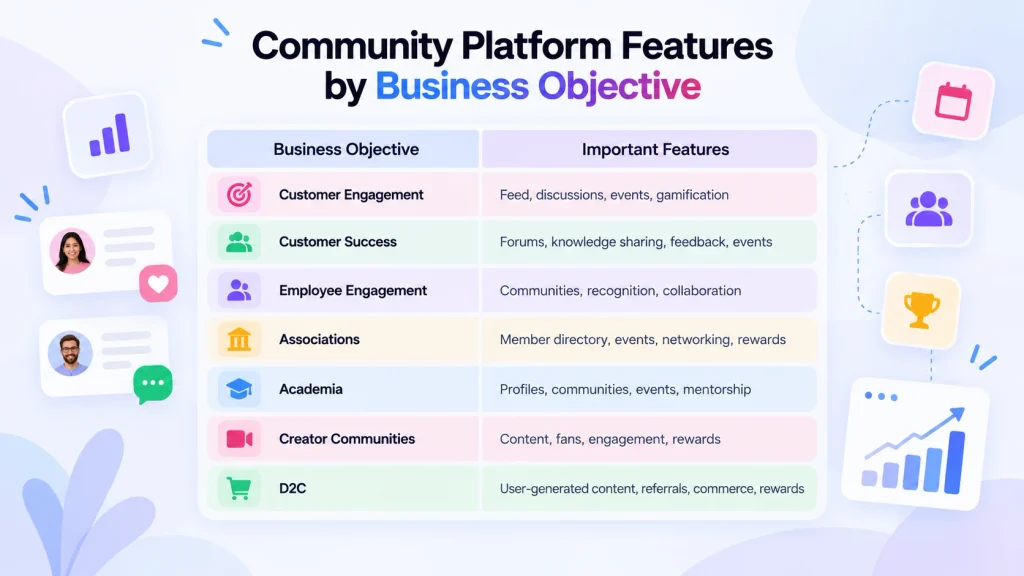
Community Platform Features by Business Objective
Different businesses may prioritise different community platform features.
| Business Objective | Important Features |
|---|---|
| Customer Engagement | Feed, discussions, events, gamification |
| Customer Success | Forums, knowledge sharing, feedback, events |
| Employee Engagement | Communities, recognition, collaboration |
| Associations | Member directory, events, networking, rewards |
| Academia | Profiles, communities, events, mentorship |
| Creator Communities | Content, fans, engagement, rewards |
| D2C | UGC, referrals, commerce, rewards |
For example, an association may prioritise member directories and events, while an employee community may place greater importance on groups, recognition, collaboration, and employee engagement.
This is why businesses should define their community objective before comparing platforms.
How to Evaluate Community Platform Features
A feature checklist is useful, but businesses should also evaluate how each feature works in practice.
Does the Feature Solve a Real Community Problem?
A platform may have dozens of features that your community never uses.
Start by identifying the actual problems you need to solve.
For example:
- Low engagement
- Poor member discovery
- Fragmented communication
- Lack of feedback
- Weak networking
- Limited event participation
- Poor moderation
- Lack of community analytics
Then evaluate features against those problems.
Is It Easy for Members to Use?
Features only create value when members actually use them.
Evaluate:
- Navigation
- Mobile experience
- Onboarding
- Search
- Content discovery
- Posting
- Discussions
- Events
- Notifications
Can Administrators Manage It Easily?
Community managers should not require technical expertise for every routine task.
Look for easy management of:
- Members
- Content
- Groups
- Events
- Moderation
- Roles
- Analytics
- Community settings
Can It Scale With Your Community?
Consider both member growth and operational complexity.
Ask whether the platform can support additional communities, admins, content, activities, and integrations as requirements change.
Does It Integrate With Existing Systems?
Check whether the platform works with the systems your business already depends on.
Can It Be Customized to Your Brand?
If branding is important, evaluate whether you can customise the community’s visual identity, domain, navigation, and member experience.
Can You Measure Its Impact?
A platform should provide enough data to understand whether the community is achieving its objectives.
Must-Have vs Nice-to-Have Community Platform Features
Not every business needs every available feature.
| Must-Have | Nice-to-Have |
|---|---|
| Member management | Advanced matching |
| Profiles | Nearby discovery |
| Communities/groups | Advanced gamification |
| Feed | Custom games |
| Discussions | Advanced rewards |
| Events | Marketplace |
| Moderation | Advanced personalization |
| Analytics | Advanced automation |
| Roles and permissions | Custom integrations |
| Branding | Branded mobile apps |
The exact priority depends on the community’s audience, objectives, size, and business model.
A customer support community may prioritise discussions and knowledge sharing, while an employee community may need stronger collaboration and recognition features.
How Thrico Brings Community Platform Features Together
Thrico approaches community management as a connected platform rather than a collection of isolated features.
Community Engine
Community spaces allow organisations to bring members together around shared interests, experiences, identities, and goals.
Content Engine
Content capabilities support updates, stories, media, resources, and member-generated contributions.
Conversations
Conversation capabilities can support chat, forums, polls, surveys, and other forms of member interaction.
Gamification Engine
Gamification can introduce points, badges, ranks, challenges, rewards, and recognition to encourage meaningful participation.
Insights
Community insights can help teams understand member activity, engagement, participation, content interactions, and growth.
Care Console
The Care Console provides a central environment for areas such as member management, content moderation, dashboards, roles, permissions, and community operations.
The benefit of bringing these areas together is that community teams can manage different parts of the member experience from a connected environment rather than relying entirely on separate systems.
Community Platform Features: Quick Comparison Checklist
Before choosing a platform, check whether it provides:
☐ Member profiles
☐ Member directory
☐ Communities and groups
☐ Feed
☐ Content publishing
☐ Forums
☐ Chat
☐ Events
☐ Networking
☐ Polls
☐ Surveys
☐ Feedback
☐ Gamification
☐ Points and badges
☐ Rewards
☐ Moderation
☐ Analytics
☐ Admin dashboard
☐ Roles and permissions
☐ Branding
☐ Custom domain
☐ Mobile experience
☐ Notifications
☐ Integrations
☐ Privacy controls
☐ Scalability
The checklist should be used alongside the organisation’s specific goals. A platform does not necessarily need every feature listed above if those features do not solve a relevant business or community requirement.
Frequently Asked Questions
Important community platform features can include member profiles, communities, content publishing, discussions, chat, events, networking, moderation, analytics, gamification, rewards, roles, permissions, branding, mobile access, notifications, and integrations. The exact priority depends on the community’s objectives and audience.
A business community platform should generally support member management, profiles, communities or groups, content, discussions, communication, events, networking, moderation, analytics, roles and permissions. Businesses may also need gamification, rewards, branding, mobile apps, integrations, and advanced administrative capabilities.
There is no single feature that is most important for every community. The priority should depend on the community’s objective. For example, a customer support community may prioritise forums and knowledge sharing, while an employee community may prioritise collaboration, groups, recognition, and communication.
Features that can support engagement include discussions, events, polls, networking, member-generated content, recognition, gamification, challenges, rewards, notifications, and personalised experiences. The features should be connected to meaningful member activities rather than used simply to increase activity numbers.
Not every community requires gamification, but it can be useful when the goal is to encourage specific behaviours such as contributing content, answering questions, attending events, completing challenges, providing feedback, or helping other members.
Yes, analytics can help businesses understand whether their community is achieving its objectives. Useful metrics can include active members, engagement, content interactions, participation, member growth, event activity, retention, and contributions.
Moderation tools help businesses maintain community standards as member and content volumes grow. They can support content review, member management, reporting, roles, permissions, guidelines, and handling inappropriate activity.
A branded community platform allows an organisation to create a community experience that reflects its own identity. Depending on the platform, this may include branding, logo, colours, custom domains, navigation, website customization, and branded mobile applications.
Yes, some community platforms provide CRM integrations or other integration capabilities. Businesses should evaluate the specific systems they use and verify whether the community platform supports the required integration, data flow, authentication, and use cases.
Thrico brings community capabilities together across areas such as communities, content, conversations, networking, events, gamification, rewards, member management, moderation, and insights. Its approach is designed to provide organisations with a connected environment for creating, managing, engaging, and growing communities.