In today’s hyper-digital landscape, trust and transparency are more than just buzzwords—they’re non-negotiables. When it comes to online communities, these two pillars determine whether your platform becomes a thriving ecosystem or a fleeting trend. With so many platforms vying for attention, people gravitate toward communities where they feel safe, respected, and valued. Building trust in online platforms isn’t just about data privacy or secure logins—it’s about authenticity, accountability, and consistent communication.
At Thrico, we understand the importance of cultivating authentic, transparent online spaces that go beyond functionality to foster belonging. This blog explores the strategies, tools, and mindset shifts necessary to establish and maintain trust in online communities.
Why Trust and Transparency Are Essential for Online Communities
Trust in online communities is the emotional glue that binds members to each other and to the platform itself. Without it, engagement crumbles. Transparency in community building, meanwhile, is what gives members confidence in leadership decisions, guidelines, and community direction. When combined, trust and transparency unlock deeper engagement, greater loyalty, and long-term resilience.
1. Fostering Engagement and Participation
People are naturally cautious in online environments. When members trust the intentions and structure of the platform, they participate more fully—they contribute to discussions, attend events, and offer valuable feedback. Transparency in decision-making and policies gives members the confidence that their contributions won’t be used against them or ignored entirely.
2. Building a Positive and Safe Environment
Trust creates a safe space for vulnerability. Online communities, especially those around sensitive topics or personal interests, require environments where members can express themselves without fear. Transparency from moderators and platform managers reassures users that their voices are respected and that there are checks and balances in place.
3. Promoting Accountability and Sustainability
Without accountability, communities can spiral into toxicity. Transparency in rules, enforcement, and platform changes keeps everyone informed and on the same page. Trust allows users to give honest feedback and helps admins implement improvements in alignment with community values.
4. Strengthening Relationships and Loyalty
When community members see consistent actions and open communication from leaders, it strengthens emotional bonds. That shared sense of purpose translates into advocacy, peer-to-peer support, and long-term retention.
In essence, trust and transparency create a feedback loop. The more members trust the platform and its leadership, the more willing they are to engage, which further strengthens community ties.
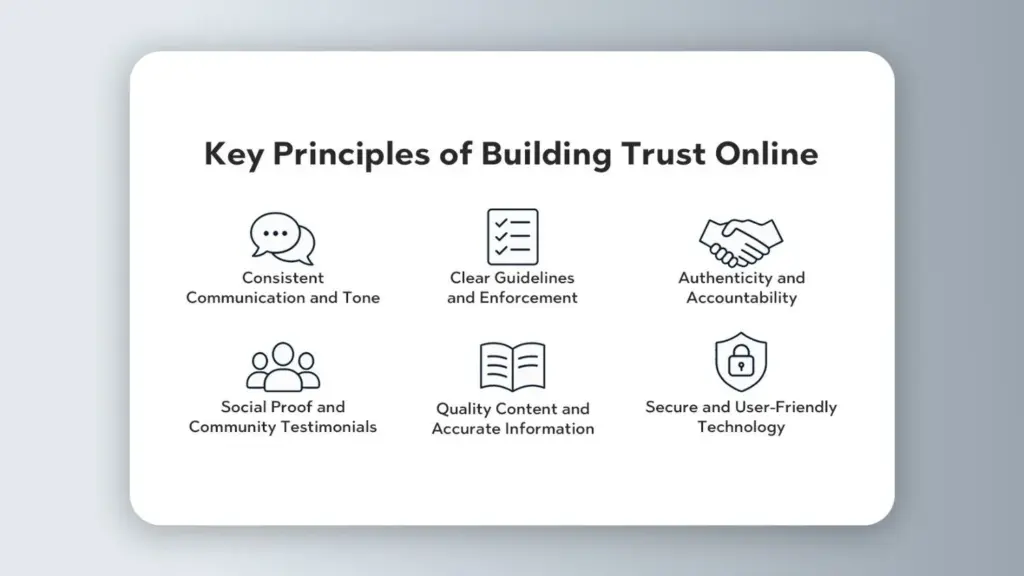
Key Principles of Building Trust Online
Creating trust in online platforms requires more than ethical intentions—it demands a deliberate framework built around user experience, clarity, and communication.
1. Consistent Communication and Tone
Consistency builds predictability, and predictability builds trust. Keep your tone professional yet approachable, and ensure your messaging aligns with your community’s values. Sudden changes in tone, especially during conflict, can confuse and alienate users.
2. Clear Guidelines and Enforcement
People trust what they understand. Publish clear community guidelines that outline acceptable behavior, content standards, and the consequences of violations. More importantly, enforce these rules fairly and consistently across all user groups.
3. Authenticity and Accountability
Communities are quick to spot performative gestures. Whether it’s a brand ambassador or a community moderator, authenticity matters. Leaders should model the behavior they expect. If mistakes are made, acknowledge them, correct the course, and move forward transparently.
4. Social Proof and Community Testimonials
People trust other people. Use testimonials, user-generated content, and peer reviews to demonstrate how others experience your platform. Highlight success stories or spotlight long-standing community members.
5. Quality Content and Accurate Information
Make sure every piece of content shared on your platform is accurate, relevant, and valuable. This shows that you respect your members’ time and intelligence. Misinformation erodes trust instantly.
6. Secure and User-Friendly Technology
Trust also depends on usability. A platform that frequently crashes, loses data, or exposes user information will struggle to retain users. Ensure data privacy, secure logins, and accessible design are part of your foundation.
By grounding your community in these principles, you create an environment where trust isn’t demanded—it’s earned.
Strategies to Improve Transparency in Online Spaces
Transparency in community building isn’t just about telling members what you’re doing—it’s about showing them how and why you’re doing it. Here’s how to ensure your actions reflect your intentions:
1. Share the Decision-Making Process
Whether it’s introducing a new feature or changing a community policy, bring members into the conversation early. Host polls, open comment threads, or virtual town halls. Let users vote or voice opinions. Even if their ideas aren’t implemented, the process shows respect.
2. Address Mistakes Openly
When something goes wrong—and it will—own it. Publish a post explaining what happened, what went wrong, and how it will be fixed. Transparency during failure is often more impactful than during success.
3. Create Open Feedback Loops
Use public channels to gather and respond to feedback. Whether it’s a suggestions forum or a dedicated AMA thread, visible exchanges build trust. Follow through by updating the community when changes are made based on feedback.
4. Highlight Your People
Transparency improves when people see the faces behind decisions. Use “Meet the Team” posts, behind-the-scenes videos, or employee spotlights to humanize your platform.
5. Policy and Product Transparency
Be upfront about your data policies, monetization strategy, and moderation approach. Offer plain-language explanations of how you handle content removal, data privacy, and algorithm changes.
6. Share Your Roadmap
Publish a quarterly or bi-annual roadmap. What’s coming next? What’s being retired? What ideas are under review? Involving members in this journey gives them a sense of co-ownership.
Transparency isn’t about having all the answers—it’s about being honest about the process.
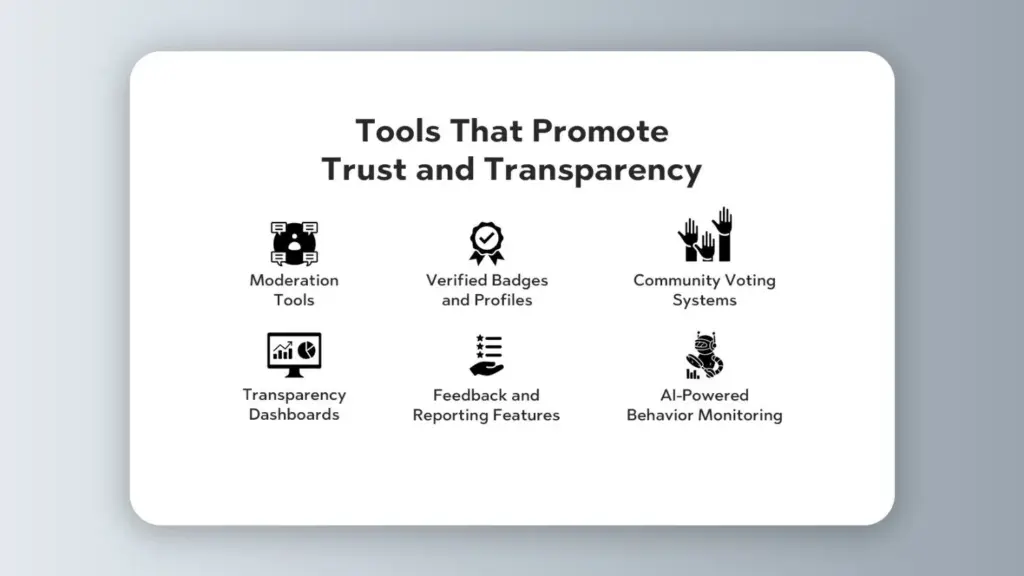
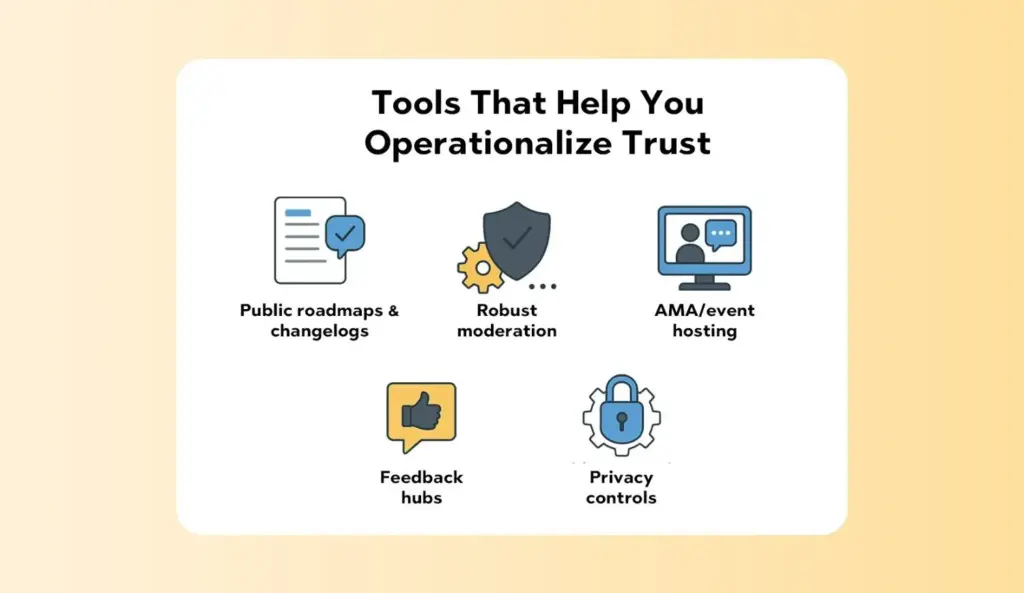
Tools That Promote Trust and Transparency
The tools you choose to build and manage your community matter. They become the infrastructure of your transparency efforts.
1. Moderation Tools
Automated and human moderation tools help keep communities safe and respectful. These tools allow you to flag inappropriate content, detect spam, and ensure rules are enforced uniformly.
2. Verified Badges and Profiles
Giving users the option to verify their identity or role builds credibility. Badges for moderators, brand ambassadors, or subject matter experts clarify authority and reduce impersonation.
3. Community Voting Systems
Let members vote on feature requests, community changes, or content quality. Voting shows that their voice matters and adds democratic input to platform development.
4. Transparency Dashboards
Some platforms include dashboards that display moderation stats, response times, and policy changes. This creates a culture of openness around the health of the community.
5. Feedback and Reporting Features
Built-in feedback buttons, issue trackers, and reporting tools make it easy for users to raise concerns or suggest improvements. Integrate follow-up tools so users see what happens with their input.
6. AI-Powered Behavior Monitoring
While still emerging, AI tools can help detect abusive behavior, misinformation, or off-topic spam. These should supplement, not replace, human moderation.
Investing in the right tools shows a commitment to maintaining both trust and transparency.
Real-Life Examples of Transparent Communities
Several online communities have become known for their commitment to transparency and member trust
1. Thrico
As a platform owned and managed directly by your brand, Thrico gives full control over data, community experience, and moderation. Its transparency isn’t just operational; it’s cultural. Every feature, from Spotlight to Celebrations, reflects a commitment to openness. Thrico provides unmatched ownership and clarity of first-party data for brands and associations looking to cultivate authentic engagement.
2. Reddit
Reddit’s upvote/downvote system, AMA sessions with leadership, and open source policies promote community-driven content and visibility. While moderation varies, its structure allows community-led transparency.
3. GitHub
As a development platform, GitHub excels at transparency. Code is open source, changes are tracked, and community discussion is central to platform evolution.
4. Discord Communities
Though Discord is primarily a communication tool, many communities use channels, pinned messages, and community guidelines to maintain clear, open governance.
5. Stack Overflow
Reputation points, transparent voting, and clearly explained moderation decisions all contribute to a strong sense of community fairness and credibility.
These communities prove that transparency isn’t theoretical—it’s practical, scalable, and vital.
Challenges in Maintaining Trust Over Time
Trust is easy to lose and hard to rebuild. Here are the most common challenges:
1. Dealing with Trolls and Misinformation
Bad actors can test your community’s limits. Use strong moderation policies and clear consequences. Transparency about your enforcement process helps others feel safe.
2. Addressing Internal Bias
If members perceive bias from leaders or moderators, trust erodes quickly. Use diverse moderation teams and public decision logs to show fairness.
3. Handling Conflict or Mismanagement
When leadership misstep, it’s tempting to hide it. Instead, acknowledge the issue, communicate openly, and invite members into the resolution process.
4. Adapting to Growth
As communities grow, old systems may not scale. Transparent updates and iterative changes will help manage expectations.
Maintaining trust is a long-term project—one built on honesty, responsiveness, and empathy.
Final Tips: Building a Culture of Openness and Accountability
Fostering a transparent, trustworthy community isn’t about perfection—it’s about progress. Here are the final tips:
Be Consistent: Keep your promises, stick to your rules, and communicate proactively.
Lead Authentically: Be honest about challenges. Let your community see your humanity.
Celebrate Feedback: Show gratitude for community insights, even when they’re critical.
Train Your Moderators: Equip your team to lead with empathy, fairness, and clarity.
Use the Right Tools: Support your values with technology that reinforces them.
Think Long-Term: Building trust takes time. Don’t shortcut it.
Online trust is earned one interaction at a time. Transparency is what makes that trust visible.
Online communities have become the heartbeat of modern brands—where support happens in real time, advocacy is born, and product learnings surface long before a quarterly report. In the last few years, the Impact of AI on Online Community Management has shifted from experimental to essential. Community teams now lean on intelligent tools to moderate at scale, respond instantly, surface insights they used to miss, and tailor experiences that actually feel personal.
Put simply: AI in community management is transforming how we moderate, engage, and scale communities. By automating repetitive work (like spam removal or FAQ replies), analyzing sentiment and trends across thousands of posts, and recommending content that resonates, AI frees managers to focus on strategy and relationships. The result is safer spaces, faster support, smarter programming—and communities that grow with intention.
What is AI in Online Community Management?
AI in Online Community Management refers to using artificial intelligence and automation to streamline operations, enhance engagement, and deliver strategic insights. It augments, not replaces, the human craft of community leadership by handling the routine and surfacing the meaningful.
Common AI tools used in communities include:
Chatbots and virtual assistants: Provide instant answers, route questions, and guide members to resources.
Moderation tools: Detect spam, hate speech, off-topic posts, and repeat violations.
Analytics platforms: Aggregate discussions, perform sentiment analysis, and highlight trends or churn risks.
Recommendation engines:
Content and workflow automation:
Personalise feeds, suggest relevant threads, and prompt the right next action.
Summarise long threads, tag content, and schedule posts.
Key applications you’ll see in practice:
Automated moderation: Keep spaces clean and constructive by filtering harmful or irrelevant content at scale.
Enhanced member engagement: Deliver targeted communications and personalised content journeys.
Sentiment analysis: Understand emotions behind comments to celebrate wins and defuse issues early.
Strategic insights: Translate vast interaction data into actionable decisions for programming, policy, and product.
Streamlined operations: Auto-draft responses, summarise discussions, and route inbound questions.
Personalised support: AI-powered assistants handle FAQs and escalate complex cases to humans.
Lead generation signals: Identify purchase intent or advocacy cues in everyday conversations.
The Role of AI in online communities is to make teams more efficient and data-driven while preserving the human tone and trust that members value.
Looking for an AI-ready toolkit? Explore Thrico’sCommunity building tools to plan workflows, streamline moderation, and analyse engagement.
Key Impacts of AI on Community Management
a) Automated Moderation
Effective moderation is the backbone of safe communities. AI detects spam, abuse, and policy violations across text, images, and links—often before humans see them. This reduces the moderator workload, applies policies consistently, and keeps discussions on-topic. Instead of wading through reports, community managers can focus on edge cases, policy refinement, and member education.
What it looks like:
Real-time flagging of profanity, harassment, or misinformation
Auto-removal or quarantine for review
Consistency across time zones and high-traffic spikes
b) Enhanced Member Engagement
AI elevates engagement from broad blasts to personalised recommendations—highlighting posts, events, or groups that match each member’s interests. AI-driven chatbots support onboarding, answer routine questions, and guide members to the right spaces, reducing friction and improving satisfaction.
What it looks like:
Tailored weekly digests
Smart nudges to re-engage dormant members
Instant, friendly support for common queries
c) Data-Driven Insights
Communities generate rivers of data—posts, comments, reactions, search queries, and support threads. AI analyses user behaviour and engagement patterns to reveal what’s resonating and what’s not. With predictive analytics for growth strategies, teams can spot churn risks, identify emerging topics, and allocate resources where they’ll have the most impact.
What it looks like:
Topic clustering that shows rising interests
Health scores for cohorts or spaces
Early warnings on sentiment dips or policy friction
d) Content Curation
A thriving community can feel noisy. AI improves discovery by suggesting relevant posts or discussions and curating tailored feeds so members find value quickly. This lowers time-to-value for newcomers and keeps seasoned members exploring fresh content.
What it looks like:
“Because you engaged with X, you might like Y” recommendations
Dynamic home feeds are respectful of user preferences
Editorial calendars informed by real engagement data
e) Improved Accessibility
AI expands access to participation. AI-powered translations make cross-border dialogue possible. Automated captions, transcripts, and assistive summaries give differently abled members equitable ways to contribute. Accessibility becomes part of the default experience, not an afterthought.
What it looks like:
Real-time translation in multilingual threads
Auto-captioning for live AMAs and recorded events
Summaries of long discussions for easier catch-up
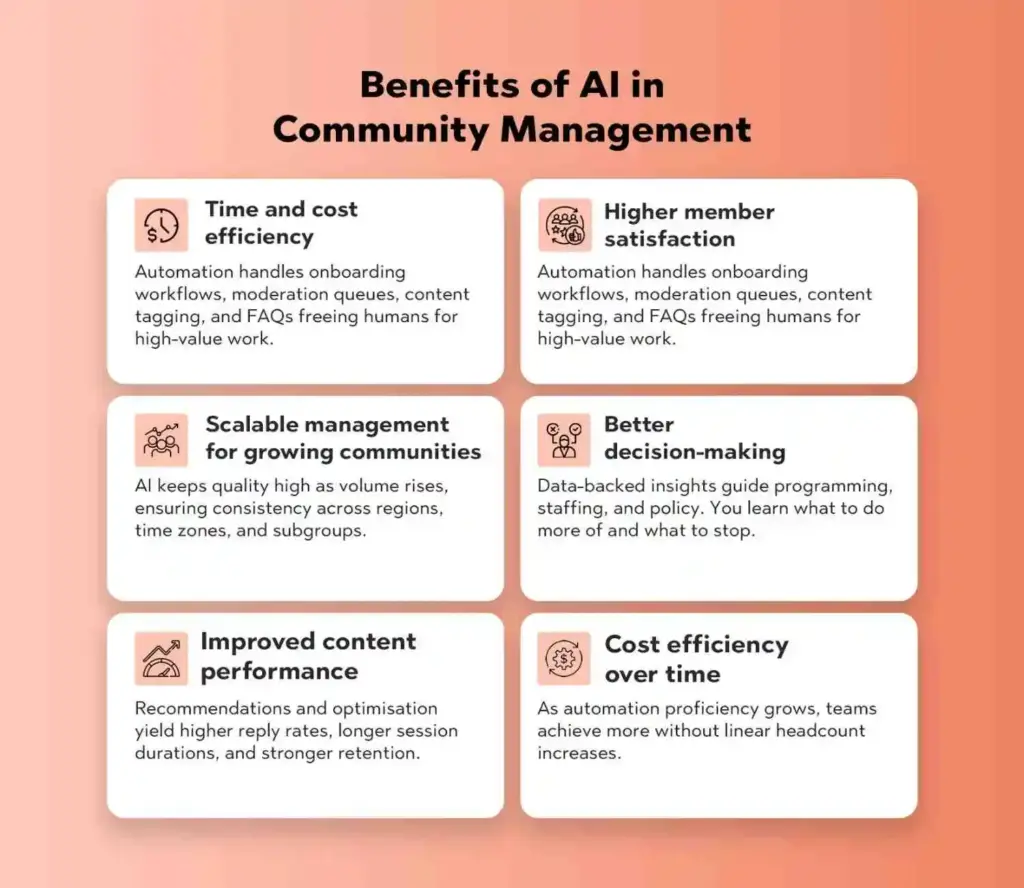
Benefits of AI in Community Management
The Benefits of AI in online communities show up across your operations, member experience, and growth trajectory:
Time and cost efficiency: Automation handles onboarding workflows, moderation queues, content tagging, and FAQs—freeing humans for high-value work.
Higher member satisfaction: Personalised communication, faster answers, and safer spaces lead to happier, more loyal members.
Scalable management for growing communities: AI keeps quality high as volume rises, ensuring consistency across regions, time zones, and subgroups.
Better decision-making: Data-backed insights guide programming, staffing, and policy. You learn what to do more of—and what to stop.
Improved content performance: Recommendations and optimisation yield higher reply rates, longer session durations, and stronger retention.
Cost efficiency over time: As automation proficiency grows, teams achieve more without linear headcount increases.
In short, the Impact of AI on Online Community Management is measurable: less busywork, more strategic focus, richer experiences, and healthier growth.
Challenges & Limitations of AI in Online Communities
AI is powerful—but not perfect. Responsible teams design with caution and clarity.
Risk of bias in AI algorithms: Models reflect the data they’re trained on. Without careful tuning and evaluation, moderation or recommendations may produce unfair outcomes. Use diverse training sets and establish human review for sensitive decisions.
Over-reliance on automation vs. human touch: AI is fast, but it can miss nuance, empathy, and cultural context. Complex conflicts, grief, or sensitive topics require human judgment. Keep humans in the loop.
Privacy and data security concerns: AI thrives on data. Be transparent about what you collect, why, and how you protect it. Comply with applicable regulations and minimize data where possible.
Limits in understanding and context: Sarcasm, humour, or evolving slang can confuse models. Expect false positives/negatives and design appeals or feedback loops to improve over time.
Misinformation and manipulation risks: Generative tools can produce confident but inaccurate content. Establish verification policies and clear disclosures when content is AI-assisted.
Acknowledging these limits doesn’t weaken the Role of AI in online communities—it strengthens it by promoting safeguards and accountability.
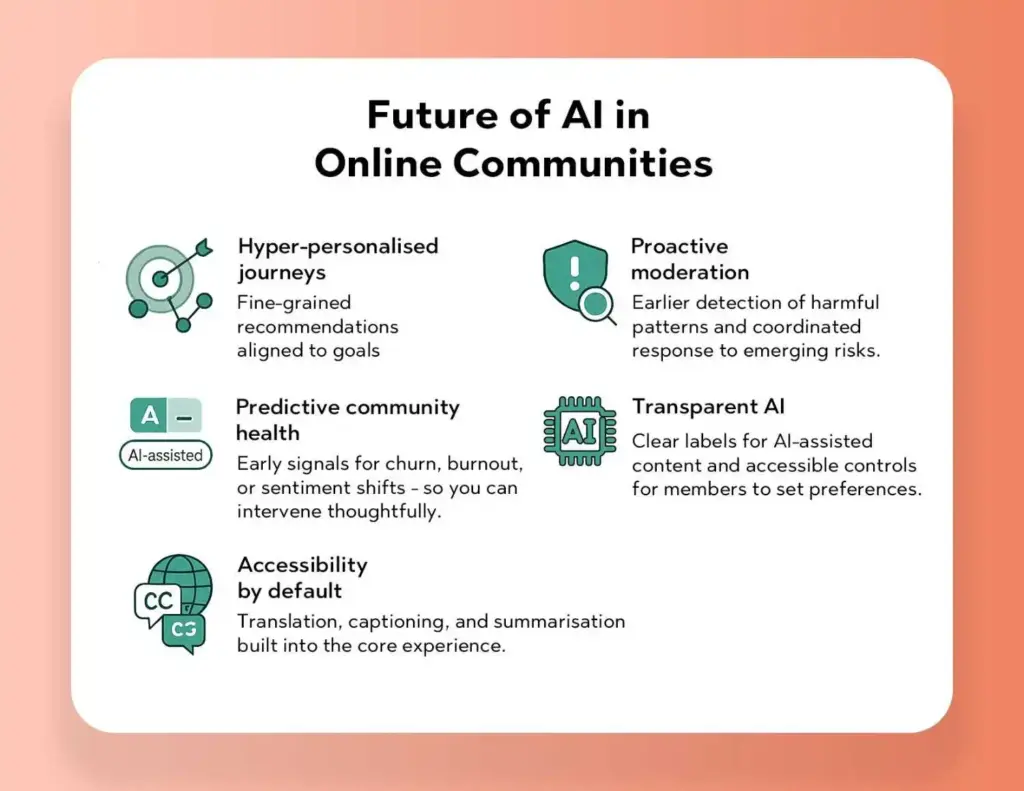
Future of AI in Online Communities
Generative AI will increasingly co-create: summarising long threads, drafting event recaps, proposing inclusive code-of-conduct updates, and offering first-draft responses for moderators to refine. Expect tighter moderator–AI collaboration where AI triages and drafts, and humans make the final call—especially on anything sensitive.
Trends shaping the next phase:
Hyper-personalised journeys: Fine-grained recommendations aligned to goals (learning, networking, support).
Proactive moderation: Earlier detection of harmful patterns and coordinated response to emerging risks.
Predictive community health: Early signals for churn, burnout, or sentiment shifts—so you can intervene thoughtfully.
Transparent AI: Clear labels for AI-assisted content and accessible controls for members to set preferences.
Accessibility by default: Translation, captioning, and summarisation are built into the core experience.
The future is not AI instead of humans; it’s AI empowering humans. When used responsibly, AI in community management makes communities more inclusive, resilient, and genuinely member-centric.
Conclusion
AI is a partner, not a replacement. The Impact of AI on Online Community Management is most profound when automation and analytics elevate the human craft—so managers can do what they do best: model values, mediate conflict, nurture belonging, and inspire contribution. Balance automation with empathy. Pair predictive insight with open dialogue. And choose tools that foreground transparency, accessibility, and safety.
Want to operationalise these ideas today? Explore Thrico’sCommunity building tools to design workflows, automate the repetitive, and focus your team on meaningful connections.
For years, brands chased scale—bigger lists, broader audiences, louder campaigns. But the more we scaled, the more noisy and impersonal things felt. It’s no surprise that engagement rates have stalled while audiences drift toward smaller, tighter spaces where they feel seen. That’s why Micro-Communities in Digital Engagement are exploding right now.
Put simply, micro-communities are compact, niche groups built around a clear purpose—think 50–500 people aligned by a craft, a challenge, a product use case, or a shared identity. They’re intimate, specific, and relentlessly relevant. And that combination is driving the Rise of micro-communities as the “next big thing” in brand-building and retention.
This article explains what micro-communities are, why they’re growing, the Benefits of micro-communities, and how to plug them into your digital engagement strategies. We’ll also look ahead to AI-powered personalization, hybrid (online + offline) models, and how to operationalize community-driven engagement with practical tools.
What Are Micro-Communities?
Definition and characteristics
Micro-communities are small, purpose-built groups where members share highly specific interests or needs—such as data analysts experimenting with a particular BI stack, new runners training for their first 10K, or power users of a niche SaaS feature. Typical traits include:
Small size, high signal. Fewer members, but more participation per person.
Narrow focus. One topic, one journey stage, or one use case.
High intent. Members join because they genuinely care, not because they were targeted broadly.
Frequent, helpful interactions. Questions, tips, demos, and collaborations dominate the feed.
Micro-communities vs. communities
Traditional communities can be thousands or millions of people organized around a brand or category. Micro-communities slice that base into focused cohorts—like “mobile QA engineers in APAC” or “creators monetizing with short-form video.” While both are valuable, Online micro-communities go deeper on fewer topics, which translates into richer conversations and faster outcomes.
Examples you already know
A Slack workspace channel for early adopters giving product feedback.
A niche Discord server for indie game developers sharing code snippets.
Private Facebook or LinkedIn groups for cohort-based learning, peer mentoring, or role-specific support.
Invite-only forums inside a brand’s customer hub where champions swap templates and host AMAs.
Why Micro-Communities Are Gaining Importance
1. Digital noise vs. personalization
Every channel is saturated. Even the best newsletters and social posts compete with endless feeds. Micro-communities break through because they’re small enough to personalize. Members get bespoke recommendations, rapid responses, and introductions to peers who share their exact challenges—precisely the type of digital engagement strategies that feel human.
2. From mass engagement to targeted interaction
Broadcast tactics still matter for awareness, but conversion and retention happen in focused spaces. The Rise of micro-communities reflects a shift toward depth: fewer vanity metrics, more meaningful participation. In these rooms, people share screens, swap playbooks, co-create resources, and build trust faster.
3. Authenticity and belonging
Micro-communities reward vulnerability. Members ask real questions, give real feedback, and celebrate real wins. That authenticity is the core of community-driven engagement, and it’s hard to fake at scale. The payoff: longer attention, higher willingness to advocate, and stronger brand affinity.
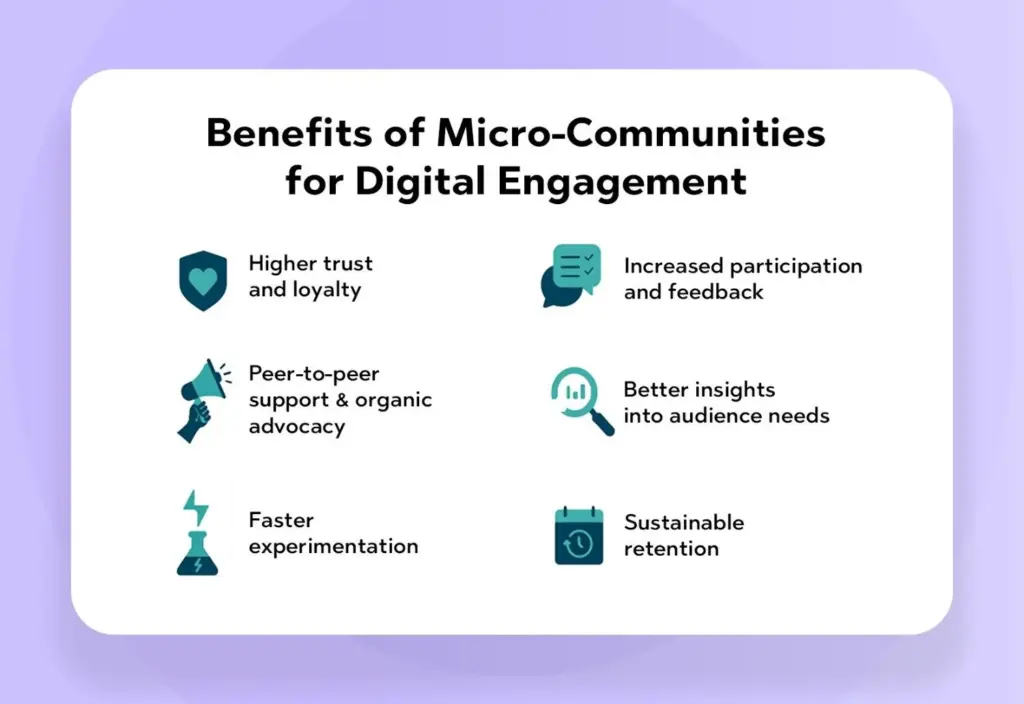
Benefits of Micro-Communities for Digital Engagement
1. Higher trust and loyalty
Small groups create psychological safety. Members see familiar names, get quick answers, and feel known by managers and peers. That trust compels them to stay, contribute, and recommend.
2. Increased participation and feedback
When prompts are hyper-relevant, people respond. Micro-communities deliver more comments per post, more qualitative insights, and more co-creation moments that inform roadmaps and campaigns—gold for digital engagement strategies.
3. Peer-to-peer support & organic advocacy
Members help each other solve problems in real time. Those wins convert into unsolicited testimonials, user-generated tutorials, and case studies—organic proof that fuels community-driven engagement.
4. Better insights into audience needs
Because Online micro-communities center on a use case or lifecycle stage, the feedback is pinpoint. You don’t just learn “what customers think”; you learn which feature confuses first-time admins or which onboarding step blocks freelancers. This is the practical side of the Benefits of micro-communities: faster learning loops.
Faster experimentation Smaller rooms make it easy to test prompts, formats, and offers. You can validate hypotheses with a 100-person beta group before rolling out to the full community or email list.
Sustainable retention Belonging keeps people coming back. Micro-communities build habits—weekly standups, project showcases, or peer-review threads—that compound retention far beyond a single campaign.
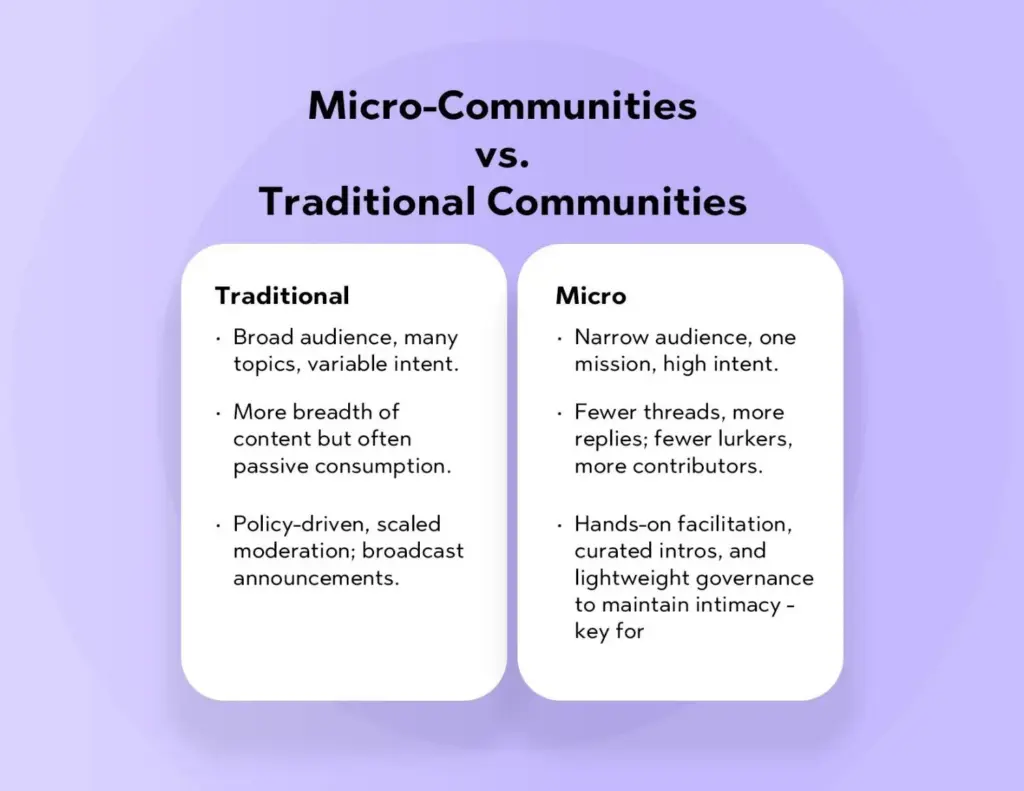
Micro-Communities vs. Traditional Communities
1. Size & focus.
Traditional: Broad audience, many topics, variable intent.
Micro: Narrow audience, one mission, high intent.
2. Engagement depth.
Traditional: More breadth of content but often passive consumption.
Micro: Fewer threads, more replies; fewer lurkers, more contributors.
Micro: Hands-on facilitation, curated intros, and lightweight governance to maintain intimacy—key for Micro-Communities in Digital Engagement.
How Brands Can Leverage Micro-Communities
1. Create niche spaces for loyal users
Start with your strongest signal: power users, champions, or a persona you want to serve better. Name the space around a clear purpose (“Product Experimentation Guild” or “Creators Shipping Weekly”). Invite intentionally—you’re curating, not collecting.
2. Integrate micro-communities into customer journeys
Map each stage—evaluation, onboarding, adoption, advocacy—and create rooms that accelerate movement:
Evaluation: Host live Q&A with product experts.
Onboarding: Provide a week-by-week checklist with peer support.
Adoption: Run monthly clinics to unlock advanced features.
Advocacy: Offer sneak peeks and co-marketing opportunities.
3. Encourage UGC (user-generated content)
Fuel the loop with prompts: “Show your dashboard,” “Share a workflow,” “What did you learn this week?” Recognize contributors, compile highlights, and feature members in blogs or webinars. This is community-driven engagement in action.
Example use cases by industry
SaaS: Feature-specific channels where admins trade scripts, SOPs, and templates; beta groups that co-design UX flows.
eCommerce: Style squads or hobby clubs that share looks, how-tos, and reviews; drops announced to VIP subgroups first.
Wellness & lifestyle: Cohort challenges (sleep, strength, mindfulness) with weekly check-ins and practitioner Q&As.
Education & coaching: Skill tracks with peer accountability pods; micro-mentorship pairs for short sprints.
Ready to operationalize? Explore Thrico’sCommunity building tools to spin up spaces, automate workflows, and measure engagement across your Online micro-communities.
Tools & Platforms for Building Micro-Communities
Where you host the room matters less than how you design it. Still, choosing the right surface can reduce friction and increase participation.
Thrico: Purpose-built community platforms with gamification, events, and member directories, and many other modules with community-oriented features.
Discord. Great for real-time chat, roles, and bots; popular with dev and creator audiences.
Slack. Ideal for B2B workflows; integrates with the tooling your members already use.
Reddit & niche forums. Asynchronous threads with strong searchability; excellent for evergreen knowledge bases.
Closed social groups (FB, LinkedIn). Useful for professional networking and discovery via members’ existing accounts.
Selection tip: Go where your niche already lives. If your ICP lives in Slack all day, don’t force them into a new app. If your audience prefers mobile-first chat, Thrico may be the better fit.
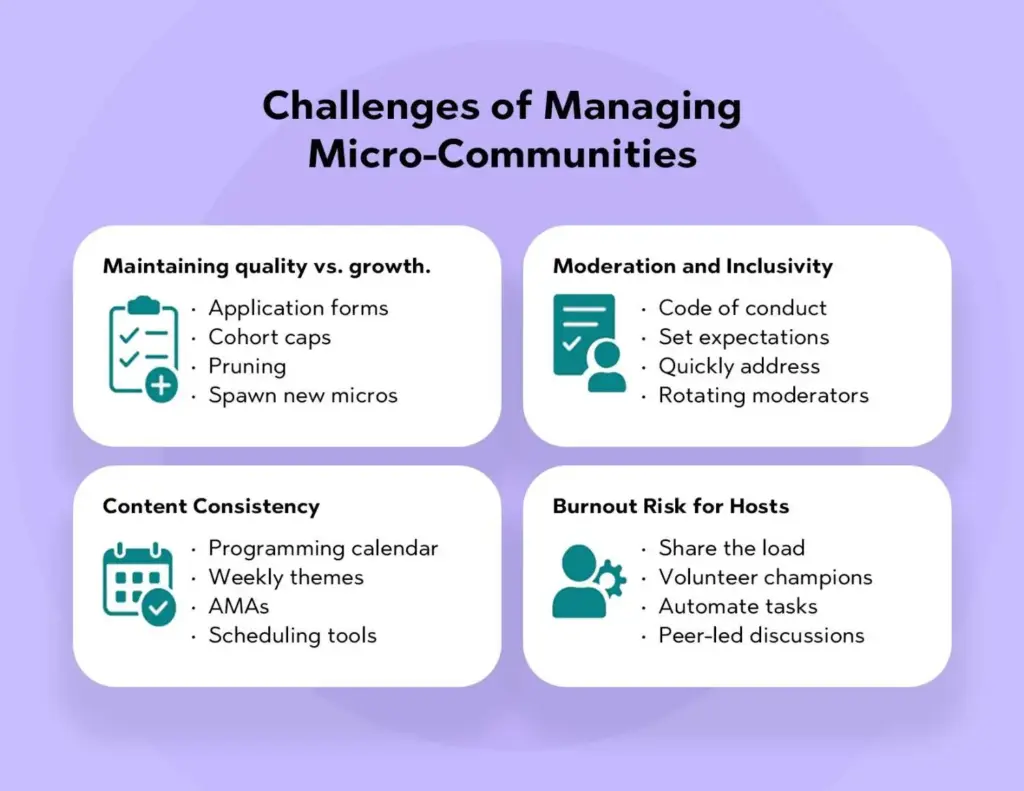
Challenges of Managing Micro-Communities
1. Maintaining quality vs. growth
As interest climbs, pressure to add more people can dilute the experience. Use application forms, cohort caps, and periodic pruning. Consider spawning new micro-communities rather than expanding one indefinitely.
2. Moderation and inclusivity
Even small rooms need clear guidelines. Establish a code of conduct, set expectations for tone and attribution, and quickly address microaggressions or spam. Rotating moderator schedules and member-led norms help preserve safety.
3. Content consistency
Micro-communities thrive on rhythm: weekly themes, AMA cadences, or monthly showcases. Create a programming calendar and use scheduling tools to keep the pulse steady.
4. Burnout risk for hosts
High-touch facilitation is powerful—but tiring. Share the load with volunteer champions, automate common tasks, and empower peer-led discussions. This is where the Benefits of micro-communities intersect with strong ops.
Future of Digital Engagement: Micro-Communities & Beyond
1. AI + micro-communities (personalized at scale)
AI will supercharge digital engagement strategies by tailoring prompts, surfacing lookalike peers, and summarizing long threads into actionable recaps. Imagine a new member joining and instantly receiving three intros, two relevant tutorials, and a starter checklist based on their goals. That’s the essence of Micro-Communities in Digital Engagement powered by AI.
2. Micro-communities as data goldmines
Because discussions are specific, the insights are higher fidelity: pain points by role, feature adoption hurdles, or language that resonates. Respect privacy and consent, then turn anonymized patterns into product decisions, content topics, and onboarding improvements.
3. Hybrid models (online + offline)
Expect micro-communities to meet locally: coffee chats, coworking days, or mini-workshops. These moments deepen loyalty and convert members into advocates who seed the next cohort—sustaining the Rise of micro-communities.
Conclusion
The internet didn’t kill community; it made it too big to feel personal. Micro-communities bring meaning back by shrinking the room and sharpening the purpose. They help brands listen better, act faster, and build stronger relationships—exactly what modern audiences crave.
If you remember one line, make it this: In the era of digital noise, small is powerful. When you design for depth, you unlock the true Benefits of micro-communities—trust, advocacy, and durable growth—anchored by community-driven engagement that scales with care.
Want to implement everything you’ve just read? Thrico’sCommunity building tools help you launch, moderate, and measure Online micro-communities without the manual grind.
Events are the heartbeat of modern communities. Whether you’re a creator running monthly meetups, an alumni office coordinating reunions, an association hosting annual conferences, or an enterprise launching product workshops, events transform a passive audience into an active, connected network. In the context of community platforms, event management means the end-to-end set of tools that help you plan, promote, host, engage, and analyze gatherings—both online and offline—without stitching together a dozen apps.
In 2025, the definition of “event” has expanded. We’re no longer choosing between in-person or virtual; we’re mixing them. Hybrid events—where some participants attend physically and others join virtually—are the norm. Communities expect networking tools that feel intentional, engagement mechanics that keep attention high, and monetization features that make events sustainable: ticketing, sponsorships, offers, and post-event upsells.
This is where Thrico’s perspective matters. As a community-first platform, Thrico emphasizes branded experiences that feel like “you,” not just another generic event page. In this guide, we’ll unpack the best event management features in community platforms, highlight how platforms (including Thrico) approach them, and share practical tips to boost participation, networking, and revenue—without adding operational chaos.
Why Event Management Features Matter
1. Drive member engagement:
Events are the fastest route from “lurker” to “participant.” They create moments—keynotes, AMAs, panels, fireside chats, office hours—where members show up, interact, and remember why they joined.
2. Enable networking & collaboration:
Communities thrive on connections, not just content. Breakout rooms, speed networking, and interest-based matching help members meet the right people quickly—peers, mentors, partners, clients.
3. Support brand building & monetization:
A well-run calendar of events showcases your expertise and values. Layer on paid tickets, VIP tiers, sponsorship slots, or in-event offers, and events transition from cost centers to reliable revenue lines.
4. Simplify planning & execution:
When event tools are built into your community stack, you avoid scattered spreadsheets, duplicated invites, and “which Zoom link?” confusion. You get centralized data on attendance, engagement, and conversions—fuel for smarter programming.
Must-Have Event Management Features in Community Platforms
1) Event Creation & Customization
Why it matters: Your event page is your storefront. If it’s generic, interest drops; if it’s branded and clear, conversions rise.
What to look for:
Branded pages with custom colors, logos, themes, and cover media.
Reusable templates for common formats: meetups, webinars, roundtables, live cohorts.
Content blocks (agenda, speakers, FAQs, sponsors) you can drag-drop.
Thrico’s angle: Thrico emphasizes branded events so recurring gatherings feel like a cohesive series. Templates make it simple to duplicate formats and scale your event cadence without rework.
Free and paid tiers, with coupon codes and bundles.
RSVP tracking (interested vs. confirmed), capacity limits, waitlists.
Member-tier pricing (e.g., discounted tickets for paying members).
Compliance basics (invoice/receipt generation, tax fields when needed).
Pro tip: Collect minimal data at checkout to reduce friction, then use post-registration forms for richer details like dietary needs or interest tags.
3) Live Streaming & Virtual Events Support
Why it matters: Virtual and hybrid events are here to stay. Your stack should meet attendees where they are.
What to look for:
Native streaming or easy integrations for webinars and town halls.
Low-latency chat and Q&A so audiences can participate in real time.
Recording & replay for members in other time zones.
Hybrid tooling: on-site check-ins paired with a seamless online experience.
Pro tip: Always schedule a “tech check” for speakers—microphones, lighting, and screen-share rehearsals save events.
4) Networking Rooms / Breakout Sessions
Why it matters: Content brings people in; connections bring them back.
What to look for:
Breakout rooms for small-group conversations.
Speed networking with time-boxed one-on-ones.
Interest-based matching using member tags or session topics.
Facilitator controls to move people, set timers, and prevent chaos.
Thrico’s angle: Thrico focuses on meaningful connections—breakouts that are intentional, not random—so your community’s unique sub-groups (creators, alumni cohorts, chapters, customer segments) actually meet and collaborate.
5) Calendar & Scheduling Integration
Why it matters: People miss events when invites get lost.
What to look for:
One-click add to calendar (Google/Outlook/Apple).
Time-zone smart listings (show the event in the viewer’s local time).
Automated calendar feeds for recurring series.
Pro tip: Offer a single community calendar feed members can subscribe to once, so new events auto-appear in their calendars.
6) Gamification & Engagement Tools
Why it matters: Attention is earned, not assumed. Light gamification keeps energy high.
What to look for:
Polls, quizzes, word clouds during sessions.
Points, badges, and leaderboards tied to check-ins, Q&A participation, or session attendance.
Post-event challenges to keep momentum (e.g., “implement this tip and share results”).
Thrico’s angle: Thrico bakes gamification into the event flow so participation isn’t an afterthought. It’s useful for creators running cohorts, alumni groups encouraging mentorship, and associations rewarding volunteerism.
7) Notifications & Reminders
Why it matters: Even highly motivated members forget. Timely nudges lift attendance 15–40% in most communities.
Affiliate tracking for partner-related conversions.
Thrico’s angle: Thrico supports offers so hosts can present timely, relevant deals without breaking the event flow—great for creators selling courses, associations driving membership upgrades, or alumni groups raising funds.
10) Security & Moderation
Why it matters: A safe event is a successful event.
What to look for:
Access control (member-only events, role-based permissions, SSO where applicable).
Moderator tools (mute, remove, approve comments, profanity filters).
Privacy options for attendee lists and recordings.
Pro tip: Publish a short “event code of conduct” and pin it. It sets expectations and empowers moderators.
Top Community Platforms with Strong Event Features
Note: Every platform has a different philosophy. Match features to your community’s goals, not just a checklist.
1. Thrico — Branded events, offers, gamification, networking Thrico centers events within a community experience. Expect branded event pages, template-driven creation, engagement features like polls and gamified participation, and networking events. Hosts can surface offers for monetization without losing the event’s rhythm. Great for enterprises, start-ups, associations, creators and academia who value brand consistency and participation quality.
2. Mighty Networks — Integrated events + courses Well-suited to creators and cohort-based education. You’ll find event posting, RSVPs, and strong community features tied to courses and memberships, which is ideal if your events complement learning journeys.
3. Circle — Simple event hosting for creators Circle keeps it clean and approachable. You can create events, handle RSVPs, post replays, and tie everything back to spaces and member discussions. Solid for lightweight programming that accompanies your community.
4. Discord — Real-time voice/video event hosting For communities already living in Discord, Stage Channels, voice rooms, and scheduled events are native. Ideal for real-time hangouts, AMAs, and gaming or dev communities. It’s less “branded” and more “instant,” which can be a feature for certain audiences.
5. Hivebrite — Strong alumni & association event tools Built with chapters, directories, and membership tiers in mind. Event capabilities pair nicely with alumni use cases—regional meetups, reunions, fundraising dinners—plus tools for admins managing multiple segments.
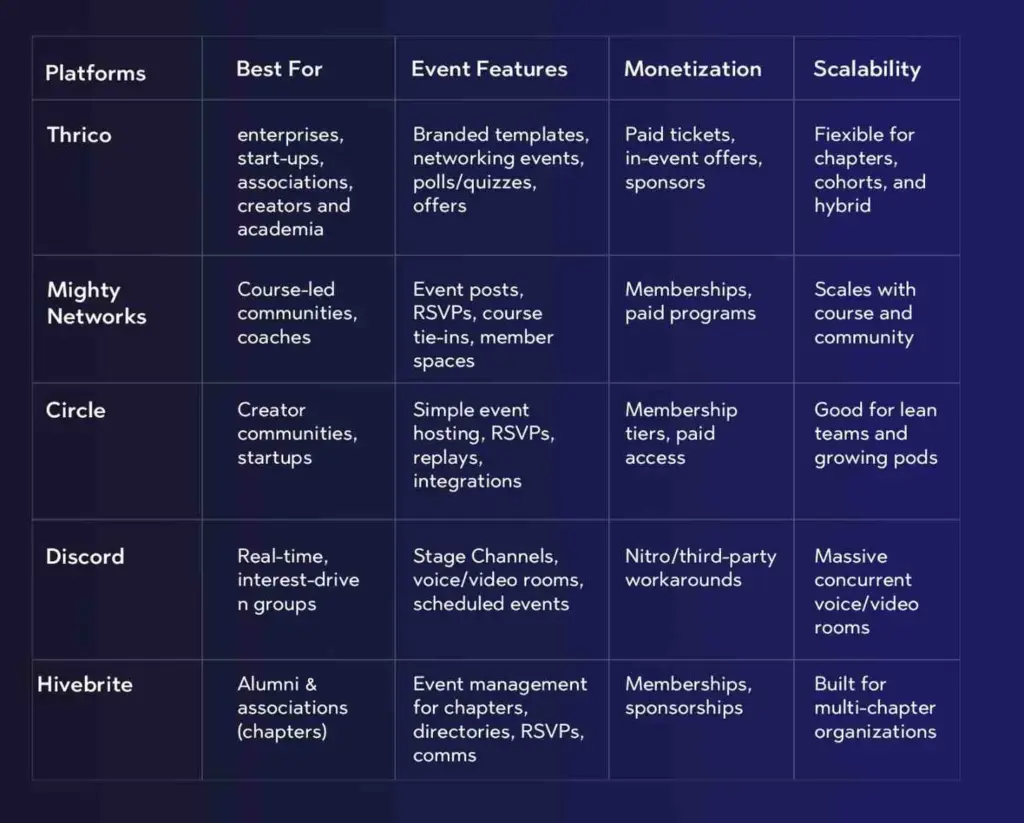
Comparison Table
Platform
Best For
Event Features (Highlights)
Monetization
Scalability
Thrico
Enterprises, Start-ups, Associations, Creators and Academia
Event management for chapters, directories, RSVPs, comms
Memberships, sponsorships
Built for multi-chapter organizations
If you want to see how the broader community toolkit stacks up, explore Thrico’sCommunity building tools.
Benefits of Using Event-Ready Community Platforms
1. Save time in planning
Reusable templates, integrated ticketing, and built-in reminders cut admin overhead dramatically. You’ll spend more time designing great experiences and less time rebuilding pages.
2. Boost member participation
When calendars sync, reminders nudge, and gamification rewards contributions, attendance and interaction rise. Members who meet people at events are more likely to return and invite others.
3. Generate revenue through paid events
With tiered tickets, in-event offers, and sponsor placements, events become a reliable revenue driver rather than an expense line.
4. Strengthen community loyalty
High-quality events show members that their time is valued. Over months, this compounds into a stronger identity, word-of-mouth growth, and healthier retention metrics.
Challenges & How to Overcome Them
1. Tech adoption → provide training
Even the best tools require onboarding. Host a short “how to get the most from our events” session. Share a pre-event checklist for speakers and a quickstart guide for attendees.
2. Member turnout → use reminders & gamification
Attendance is fragile. Automate reminders at smart intervals and spotlight participants with points or shout-outs. Offer small incentives (raffles, badges, early access) for live participation.
3. Monetization → sponsorship & ticketing
Map each event to a revenue hypothesis: paid ticket tiers, sponsor slots, or post-event upsells. Pair sponsors with relevant sessions and communicate clear value (impressions, engagement, opt-in leads).
The best event management features in community platforms align around a few core themes:
Conclusion
If you’re choosing a platform in 2025, prioritize a solution that balances ease of use, engagement depth, and monetization. For many communities, Thrico strikes that balance: branded events that feel like your own, gamified participation that keeps the energy high, networking that sparks real relationships, and offers that make events sustainable. Pair these with a consistent programming cadence, and you’ll transform one-off sessions into a compounding engine of community engagement through events.
When you’re ready to assemble the rest of your stack—from member directories to content spaces—explore Thrico’s full suite of Community building tools.
Engagement & gamification: polls, quizzes, points, and post-event prompts.
Notifications: email/push/in-app reminders and smart follow-ups.
Analytics: attendance, engagement, attribution, revenue, and feedback.
Monetization: offers, sponsorships, tiers, and post-event upsells.
Safety: access control, moderation, and privacy options.
Online communities have matured from “nice-to-have” fan clubs and alumni groups into durable growth engines. In 2025, brands ship products with community feedback loops, creators launch careers by rallying superfans, and alumni offices turn networking into a measurable advantage for students and graduates. The common denominator: purpose-built community platforms that combine engagement, networking, and monetization into one stack.
Why do creators and alumni networks need dedicated platforms in the first place?
Social networks are loud and rented. Algorithms change. Groups vanish. A community platform gives you control, data, and continuity.
Members expect more than a chat thread. They want events, direct messaging, discovery tools, and a sense of belonging—without juggling six different apps.
Revenues and outcomes depend on structure. Creators need memberships, paid events, and offers. Alumni teams need mentorship matching, directories, and chapter events.
Do it right, and you get four compounding benefits:
Engagement: discussions, events, and projects that create participation—not just passive scrolling.
Monetization: tickets, memberships, offers, and sponsorships that fund the mission.
Networking: tools that help members meet the right people quickly (peers, mentors, partners, recruiters).
Lifelong connections: a searchable history of people, stories, and impact that outlasts any social platform.
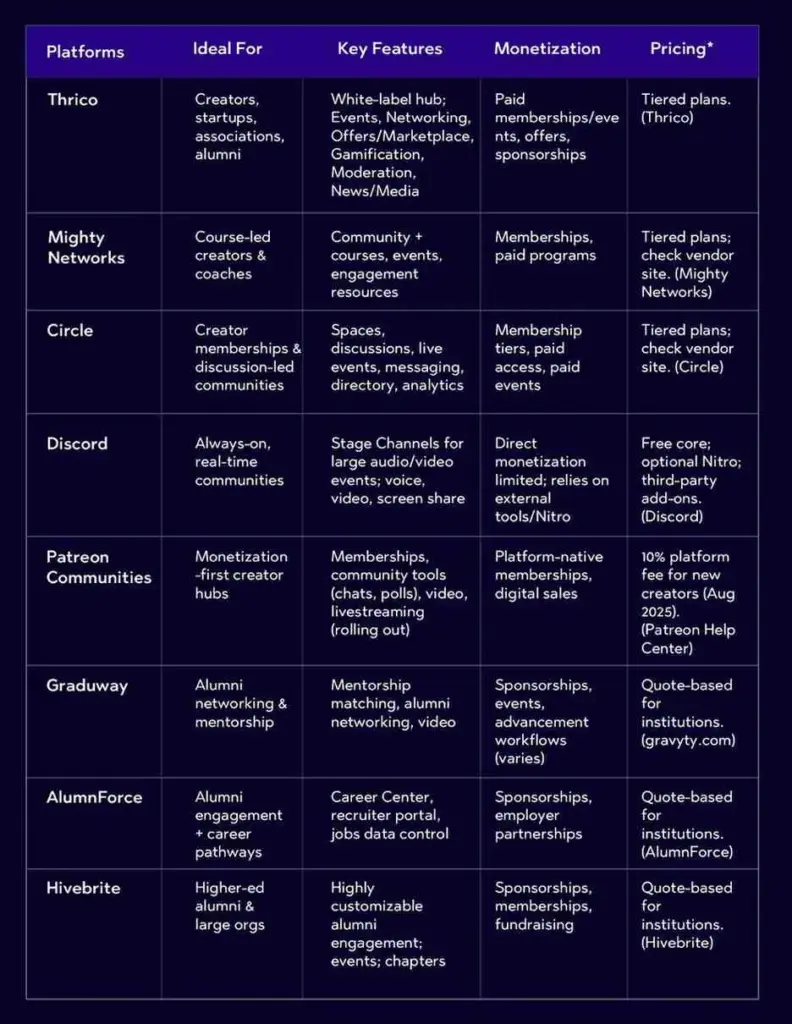
Thrico’s angle: Thrico was built to serve creators, associations, alumni programs, startups, and enterprises that want a white-label, community-first experience—complete with events, networking, offers/marketplace, gamification, moderation, and analytics—all under your brand. (Thrico)
What to Look for in Creator & Alumni Community Platforms
When evaluating the best community platforms of 2025, anchor on capabilities that directly move your goals:
a) Customization & Branding (white-label, design flexibility)
Your brand is not a skin; it’s the experience. Look for:
White-label options (your domain, your colors, your voice).
Modular layouts for home, spaces, events, and directories.
Granular roles & permissions so staff, moderators, sponsors, faculty, or student leaders can manage their areas.
b) Engagement Tools (events, discussions, gamification, feedback)
Engagement requires multiple modalities:
Discussions with threads, reactions, and rich media.
Events (virtual, in-person, hybrid) with replays, Q&A, and polls.
Gamification (points, badges, leaderboards) that rewards participation.
Feedback loops (surveys, NPS, lightweight polls) to shape the roadmap. Thrico, for example, emphasizes events + gamification to create momentum from day one. (Thrico)
c) Networking Features (DMs, groups, collaborations)
Communities stick when members meet the right people:
Member directories with tags and filters.
DMs and group chats for quick collaboration.
Breakouts, speed networking, and topic rooms at events.
Mentorship matching (critical for alumni platforms). (gravyty.com)
d) Monetization & Offers
Creators need sustainable revenue; associations and alumni teams often need to fund programming:
Membership tiers and paid spaces.
Ticketing and paid events (including hybrid).
In-event offers/marketplace, sponsorship slots, and affiliates. Patreon is a clear reference for membership-first monetization, with a standard 10% platform fee that grants access to its core tools like memberships and community features. (Patreon Help Center)
Best for: Creators, startups, associations, and teams that want a branded, all-in-one hub. Standout: White-label experience where events, networking, offers (marketplace), feedback, and gamification are first-class. Thrico’s modules cover Communities, Events, Networking & Social Engagement, Buying & Offers, Entrepreneurship, Spotlight, Celebrations, Personal Growth & Learning, Giving, Feedback & Interaction, Gamification, News & Media, Help, and Moderation—a breadth that lets you launch with essentials and grow into more advanced use cases without switching stacks. (Thrico)
Why creators like it:
Branded events with engagement features (Q&A, polls).
Offers/marketplace for upsells and partner deals.
Gamification to keep fans returning.
Moderation & roles for team-run communities at scale. (Thrico)
2. Mighty Networks — Community + courses + events
Best for: Course-led creators and coaches who want to bundle teaching, community, and events. Standout: Cohesive courses + memberships + events with an emphasis on community design principles and resources for creators. Their resources also cover virtual events extensively. (Mighty Networks)
3. Circle — Discussion-first, polished UI, live events
Best for: Creators who want a clean community space with threads, DMs, live events, and optional courses. Standout:Spaces, live events, messaging, directory, customization, and analytics—a balanced toolset for membership communities. Third-party guides highlight events and native live streaming as well. (Circle)
Best for: Always-on communities, gaming/dev circles, and creator fandoms that love live rooms and Stage Channels. Standout:Stage Channels make it simple to run structured audio/video events for large audiences—great for AMAs, drops, or community calls. (Discord)
Best for: Creators prioritizing recurring memberships and direct fan support, with growing community tools (chats, comments, polls) and video. Standout: Native memberships, digital product sales, video hosting, community features, and announced livestreaming—plus iOS changes enabling alternative payments that can increase creator take-home. Patreon’s 10% platform fee applies to new creators (effective Aug 2025). (Patreon Help Center)
Top Platforms for Alumni Communities
Alumni communities have special needs: accurate directories, mentorship, career services, chapters, and fundraising. These platforms lean into those use cases.
1. Thrico — Fast launch for associations & alumni
Best for: Universities, schools, colleges, and alumni associations seeking a white-label hub that combines events, networking, offers, mentorship-style engagement, and gamification under your brand. Standout: Modules for Mentorship, Networking & Social Engagement, Events, Buying & Offers, Giving, News & Media, Moderation, and more—giving alumni teams a modern alternative to fragmented tools. (Thrico)
Best for: Institutions prioritizing mentorship matching and career pathways. Standout:Flash and formal mentoring, integrated video, and workflows designed for alumni relations teams. (gravyty.com)
3. AlumnForce — Engagement + career center
Best for: Alumni offices that want career services embedded in the community. Standout:Career Center, recruiter portals, and control over jobs data and applications. (AlumnForce)
4. Hivebrite — Flexible community + events + fundraising
Best for: Higher-ed institutions and large organizations that need customizable alumni engagement with events and potential advancement/fundraising workflows. Standout: A highly customizable platform trusted by global higher-ed; strong alumni-focused positioning. (Hivebrite)
Best for: Schools or associations wanting a purpose-built alumni hub with communication tools, events, directories, and role-based access. (If you’re evaluating, focus on directory accuracy, import tools, and user privacy.) (Official feature pages vary; request a demo and verify the specifics for your institution.)
*Pricing changes frequently; confirm with vendors during procurement.
Want a deeper look at modules beyond events—like directories, moderation, offers, and more? Explore Thrico’sCommunity building tools to see how everything fits together.
Benefits of Using the Right Platform
1. For creators → monetization, brand building, fan engagement
Own your brand experience with a white-label hub instead of patching together chat, events, and payment tools.
Launch faster programming: AMAs, workshops, cohort sessions, and office hours become templates you can reuse.
Unlock multiple revenue lines: tiered memberships, paid events, and in-event offers turn attention into income (Thrico’s marketplace module is designed for these moments). (Thrico)
Increase retention with gamification: lightweight points/badges and small challenges keep momentum between big launches. (Thrico)
2. For alumni → lifelong connection, networking, events, mentorship
Centralize your alumni graph: accurate profiles, class years, industries, and interests power relevant introductions.
Run chapter events (virtual or in-person) with automated reminders and replays; tie them to chapter goals.
Formalize mentorship with matching tools and progress workflows (Graduway focus). (gravyty.com)
Support career services: job boards, recruiter portals, and alumni referrals (AlumnForce focus). (AlumnForce)
Coordinate advancement: spotlight stories and campaigns; track engagement to inform outreach (Hivebrite’s alumni positioning). (Hivebrite)
Challenges & How to Overcome Them
1. Adoption barriers
Challenge: People resist “yet another platform.”
Fix: Design a 90-day onboarding plan: welcome sequences, a “Start Here” space, and a weekly ritual (office hours or show-and-tell). Use calendar sync and reminders to reduce missed events.
Thrico tip: Launch with one high-value event series and 2–3 evergreen spaces (Announcements, Intros, Wins). Layer features gradually.
2. Cost & procurement
Challenge: Picking a platform means long-term commitment.
Fix: Prototype a pilot community with 50–200 members. Validate KPIs: weekly active members (WAM), event attendance rate, post-event conversions. Use this data to justify budgets.
3. Training & moderation
Challenge: Staff capacity and safety.
Fix: Create a moderation playbook (role definitions, escalation paths, code of conduct). Hold a 30-minute “How to get value here” orientation for new members.
4. Community growth
Challenge: Growth without chaos.
Fix: Introduce chapters/cohorts once you cross a threshold (e.g., 500+ members). Promote member-led events and highlight a Member of the Week to distribute social capital.
5. Consistency
Challenge: Peaks and valleys in engagement.
Fix: Use a quarterly programming calendar with a drumbeat: monthly marquee event, bi-weekly workshops, weekly office hours, daily prompts. Tie participation to gamification rewards and spotlight features. (Thrico)
Measuring What Matters
Track KPIs that reflect health, not just vanity:
Activation: % of new members who post or attend 1 event in 14 days.
Participation: WAM/MAU and median comments per active member.
Event performance: registered vs. attended, engagement (Q&A, polls), replay views.
Network density: % of members with ≥3 DMs or 2 group memberships.
Alumni outcomes: mentors matched, jobs filled, chapter activity, participation in giving.
Trust is the currency of every thriving community. If your members don’t feel safe—from spam, harassment, impersonation, or scams—they disengage or leave. If moderators lack the right tools, toxic behavior slips through, conversations spiral off-topic, and the brand’s reputation takes a hit. The good news: with thoughtful strategy and the right stack, you can protect your members and keep participation high.
This guide explains what community security and moderation mean, why they matter, and how to assemble a practical toolkit using Thrico’s capabilities. Where third‑party vendors are often mentioned in generic guides, this article focuses on how to accomplish the same goals inside the Thrico ecosystem, with optional plug‑in points where your team needs them. Throughout, you’ll find internal links to relevantcommunity-building tools so you can move from plan to practice.
Community security guards your platform and members against spam, fraud, botnets, phishing links, scraping, and account takeovers. Moderation guides user behavior and content so conversations stay respectful, on‑topic, and aligned with your mission. Together, they shape the day‑to‑day experience of your members—and ultimately decide whether your space feels safe, useful, and worth coming back to.
Inside Thrico, these priorities translate into sensible defaults (permissioning, roles, rate limits) and flexible controls (keyword policies, flagging, audit trails). When combined with your community guidelines and moderator workflow, they form a resilient foundation for growth.
Why invest early?
Safety unlocks participation. When members trust the environment, they ask more questions, share more wins, and invite peers.
Security protects your brand. Lower exposure to scams and spam means fewer crises and more time for high‑value interactions.
Governance matters. Clear rules, transparent logs, and traceable actions make compliance and reporting far simpler.
For teams building or upgrading their stack, Thrico’scommunity-building tools provide a strong baseline that can be extended as your needs evolve.
What is Community Security & Moderation?
Let’s define the two pillars clearly:
Community Security: Protecting your platform from spam, bot activity, fake accounts, credential stuffing, phishing, scraping, and data misuse. Practical levers include signup and posting rate limits, link screening, device reputation checks, and granular access controls.
Moderation: Managing user behavior, content, and interactions to maintain healthy conversations. This includes proactive filters (keywords, toxicity thresholds), reactive workflows (member reports, moderator queues), and enforcement (warnings, timeouts, mutes, bans) supported by audit logs.
These functions are crucial for brand reputation, user trust, and legal compliance. On Thrico, you can articulate your house rules, operationalize them with automation, and review outcomes—without needing to stitch together half a dozen dashboards. Explore the modular components insideThrico’s feature suite to see what fits your community today.
Why Are Security and Moderation Tools Important?
Prevent cyber threats and data leaks. Rate limits and anomaly detection blunt credential‑stuffing and bot raids before they escalate.
Reduce toxic comments and spam content. Keyword policies, reputation thresholds, and mod queues keep low‑quality content from dominating.
Protect users from harassment or bullying. Clear rules, fast reporting, and action transparency make vulnerable members feel safe.
Help admins maintain positive engagement. When the baseline is respectful, discussions become richer and more on‑topic.
Ensure compliance with privacy and content policies. Consistent enforcement and audit trails support your governance needs.
Healthy, well‑moderated communities routinely see stronger retention and word‑of‑mouth—because safety and usefulness reinforce each other.
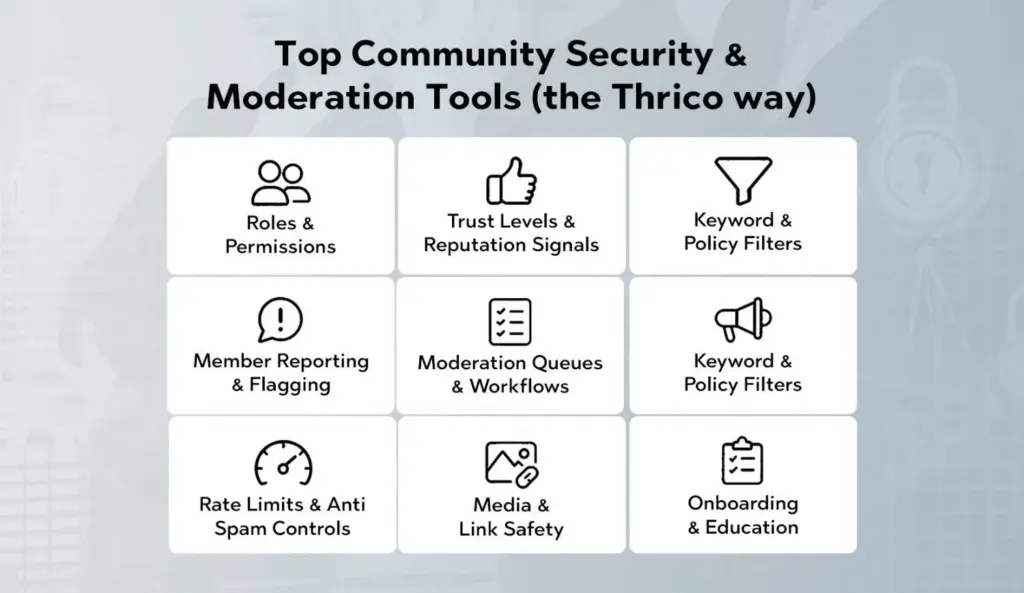
Top Community Security & Moderation Tools (the Thrico way)
Below are the core building blocks you’ll use inside Thrico to deliver enterprise‑grade safety without sacrificing member delight. Where applicable, we outline how to deploy each element and when to dial it up or down.
Roles & Permissions
What it is: A fine‑grained structure for who can do what—post, comment, upload media, create events, invite others, or moderate.
Why it matters: Clear permissions reduce accidental misuse and make escalation paths obvious.
How to use in Thrico: Create role tiers (e.g., Member, Contributor, Champion, Moderator, Admin). Map capabilities to each tier and keep elevation rare and reversible. Document your role design in an internal playbook and link it in your staff workspace for easy reference. Learn how roles pair with other tools insideThrico features.
Trust Levels & Reputation Signals
What it is: Progressive access that unlocks features as members demonstrate positive behavior over time.
Why it matters: New accounts are where abuse and spam tend to spike. Trust levels slow that down without punishing your regulars.
How to use in Thrico: Require a minimal set of actions before unlocking high‑impact abilities (e.g., posting links, creating topics, DM access). Tie promotions to meaningful milestones—verified email, completed profile, helpful reactions received, accepted answers. Calibrate promotions and cooldowns in your Thrico settings.
Keyword & Policy Filters
What it is: Customizable lists and patterns (exact match or regex) that flag or block content when specific words, phrases, or link patterns appear.
Why it matters: Quick win for reducing profanity, slurs, spam links, and low‑effort scams.
How to use in Thrico: Start with a compact blocklist, then iterate based on moderation data. Use three modes: block, soft‑block to queue, and allow with warning. Maintain a separate allowlist to prevent false positives in context‑sensitive discussions. Configure and maintain policies via Thrico’s features.
Member Reporting & Flagging
What it is: One‑tap reporting that places posts, comments, images, or DMs into a moderation queue with context and reporter notes.
Why it matters: Scales your team by turning the community into sensors. Helps you catch issues before they trend.
How to use in Thrico: Keep reporting visible and easy. Add categories like Harassment, Spam, Off‑topic, Misinformation, Copyright. Acknowledge reporters with automated receipting and, where appropriate, outcome summaries. Configure categories and automated routing inside Thrico’s features.
Moderation Queues & Workflows
What it is: Centralized queues where moderators triage flags, apply actions, and leave notes.
Why it matters: Structure keeps your decisions consistent and auditable.
How to use in Thrico: Design a simple flow—triage → investigate → decide → document. Standardize outcomes: Approve, Edit/Mask, Warn, Timeout, Ban, Escalate. Use saved responses for common scenarios to maintain tone and speed. Manage queues in Thrico’s features.
Warnings, Timeouts, and Bans
What it is: Graduated enforcement that favors education before removal.
Why it matters: Most issues are better solved with clarity than punishment. Progressive enforcement preserves relationships and fairness.
How to use in Thrico: Implement a ladder—first offense friendly warning, second formal warning, third 24‑hour timeout, repeated longer mute, and only then ban. Provide an appeal path and document precedents in your moderator handbook. Enforcement tools live in Thrico’s features.
Rate Limits & Anti‑Spam Controls
What it is: Limits on posting frequency, mentions, DMs, link count, and rapid edits; automated checks for copy‑paste spam or repeated domains.
Why it matters: Blunts bot floods and prevents threads from being hijacked.
How to use in Thrico: Apply tighter limits to lower trust levels and new accounts, loosen for verified or champion tiers. Pair with link throttling for newly created domains. Configure these defenses in Thrico’s features.
Media & Link Safety
What it is: Controls for file types, max sizes, preview behavior, and link handling.
Why it matters: Many attacks ride on drive‑by links or malicious files.
How to use in Thrico: Restrict embeds for new members; require first‑post approval when a link is included; automatically un‑link suspicious domains until a moderator review. You’ll find these options within Thrico’s features.
Audit Logs & Transparency
What it is: Immutable records of moderator actions and system events.
Why it matters: Prevents miscommunication, aids training, and supports compliance.
How to use in Thrico: Ensure every enforcement action includes a reason and policy reference. Review logs in weekly mod syncs; turn anonymized patterns into policy updates. Access and export options are part of Thrico’s features.
Onboarding & Education
What it is: First‑touch experiences that teach your culture before someone posts.
Why it matters: The best moderation is the kind you don’t have to do because people know what “good” looks like.
How to use in Thrico: Use welcome checklists, starter prompts, and a short Community 101 guide. Gate certain features behind a quick “rules acknowledgment.” Templates and checklists can be built with Thrico’s features.
Key Features to Look for in Moderation Tools
Feature
Description
AI‑Powered Filtering
Automatic detection for risky text, images, and links with adjustable thresholds and queues
User Reporting
Simple, visible flows that route to the right queue; reporter acknowledgments included.
Spam & Bot Detection
Heuristics for repetitive posts, suspicious velocity, device fingerprinting, and domain reputation.
Custom Word Filters
Block/soft‑block/allow modes with exceptions to reduce false positives
Trust Levels & Rate Limits
Progressive permissions that unlock as members demonstrate reliability.
Real‑Time Alerts
Slack/email/webhook alerts for spikes in reports or suspicious signups.
Analytics Dashboards
Trends across categories, time‑to‑action, false positives, appeal outcomes, and retention impact.
Tip: Choose features that integrate cleanly with your existing setup. Thrico emphasizes sensible defaults and modular controls, so you can start small and expand as needed. Explore options inThrico’s feature library.
How to Choose the Right Setup for Your Community
Define your community type. Social, gaming, education, professional? Text‑heavy or media‑heavy? Public or private? Your content mix determines your guardrails.
Map risk to controls. High‑velocity chat? Tighten rate limits. Media uploads? Add link/file checks. Sensitive topics? Build nuanced keyword policies and human review.
Design the human loop. Pick who triages, who decides edge cases, and when to escalate. Use saved replies to keep tone consistent.
Check integrations. If you run Thrico alongside other systems (CRM, support desk, analytics), wire up webhooks so moderation events feed the right stakeholders. See integration options under features.
Budget for scale. As volume grows, expand moderator coverage windows, raise your trust thresholds, and refine automations so people focus on judgment—not noise.
Benefits of Using Community Security & Moderation Tools
Member trust & satisfaction: People share more—and better—when they feel protected and respected.
Lower moderator workload: Automations and queues reduce repetitive decisions, freeing time for community programs.
Brand credibility: Clear rules + consistent enforcement make your community feel professional and fair.
Higher‑quality discussions: Fewer derailments and more on‑topic, searchable knowledge.
Safer growth: As you scale, controls scale with you—without drowning the team in manual review.
You can orchestrate all of the above using Thrico’s community building tools.
Best Practices for Community Moderation
Blend automation with empathy. Use filters and queues to prioritize; let trained moderators make the call on gray areas.
Publish clear, example‑driven rules. Keep them short, visible, and link them in onboarding and high‑traffic threads.
Structure permissions and trust levels. Reward constructive behavior with gradual unlocks.
Encourage community‑led moderation. Make reporting easy and thank reporters; highlight members who model good behavior.
Protect moderator well‑being. Rotate shifts, use content masking for graphic material, and provide debrief spaces.
Measure and iterate. Track time‑to‑action, false positives, appeals, and member sentiment. Adjust thresholds quarterly.
Be transparent. Share periodic summaries of enforcement actions (anonymized) and policy updates so members understand the “why.”
All of this is easier when your tools live in one place. Build your operating model with Thrico’s features.
Common Mistakes to Avoid
Relying only on AI. Models can miss context or sarcasm; always keep humans in the loop for appeals and edge cases.
Over‑moderation. Heavy‑handed removals without explanation erode trust. Prefer warnings and timeouts before bans.
Ignoring reports. If member flags disappear into a void, people stop helping. Close the loop with acknowledgments and, where appropriate, outcomes.
Unclear roles. Without a defined ladder of permissions, incidents stall. Document duties and escalation paths.
No audit trail. If you can’t explain past actions, you can’t learn from them—or defend them. Keep logs tidy and review them.
Future Trends in Community Moderation
Context‑aware AI. Models that blend intent, sentiment, and user history to reduce false positives and highlight truly harmful behavior.
Voice & video moderation. As communities adopt live audio/video, safety controls for new media types become table stakes.
Member‑centric transparency. Expect richer dashboards for server admins and clearer explanations to users when actions are taken.
Well‑being features. Thoughtful defaults (e.g., content warnings, cooldown prompts, screen‑time nudges) that protect members and moderators alike.
Thrico is designed to evolve with these trends—so you can adopt what you need, when you need it. Keep an eye on features for updates.
How to Implement Moderation in Your Community (Step‑by‑Step)
Step 1: Establish your baseline. Write a concise rule set with examples. Create roles and trust levels. Enable keyword policies for obvious risks. All of this lives in Thrico features.
Step 2: Configure reporting and queues. Add report categories and make the button visible. Set up a triage queue with saved responses. Route sensitive categories to senior mods.
Step 3: Calibrate rate limits and link safety. Tighten limits for new accounts; loosen for verified members. Add link throttles and media checks. Revisit settings weekly during rollout.
Step 4: Train moderators. Agree on tone, documentation standards, and escalation paths. Use real examples from your audit logs to calibrate decisions.
Step 5: Close the loop. Thank reporters, notify affected users, and share monthly summaries (anonymized) to reinforce trust.
Step 6: Measure and iterate. Track time‑to‑action, false positive rates, top categories, and retention changes. Adjust thresholds, rules, and role capabilities accordingly.
If you’d like a blueprint tailored to your audience and risk profile, start by mapping requirements against the modules inside Thrico’s community building tools.
Conclusion
Community moderation and security aren’t about control—they’re about creating safe spaces where people can connect, learn, and grow. With Thrico’s built‑in roles, trust levels, keyword policies, reports, queues, and audit logs, you can deliver safety at scale while keeping conversations human and welcoming.
Start with the essentials, add automation where noise is highest, and iterate as your community grows. The result is a resilient culture of respect—and the kind of engagement that compounds over time.
Ready to operationalize your plan? Explore Thrico’s community building tools and put these best practices to work today.
A modern white-label community platform helps brands build customized online spaces for engagement, collaboration, and growth—all under their own branding. Instead of being trapped inside third-party social networks with inconsistent reach and limited control, brands get a dedicated home where they control the design, data, and member experience. Today’s branded community software combines community engagement tools—such as profiles, forums, groups, and live chat—with analytics, gamification, integrations, and mobile accessibility to drive retention and loyalty at scale. The result is a single, cohesive ecosystem where customers, learners, fans, and employees can connect, learn, and thrive.
What Is a White-Label Community Platform?
A white-label platform is software that is rebranded and customized so it looks and feels like your own product. Think of it as renting an exceptionally well-equipped venue that you can decorate, staff, and run like your own—without having to build the entire building from scratch.
In the context of communities, a white-label platform provides:
Your brand’s identity front and center: logos, color system, typography, domain, and tone.
Configurable experiences: modules for discussions, groups, events, courses, messaging, and more—arranged the way your audience needs.
No lock-in to a public social network: you control membership, permissions, monetization, and data.
Purpose: To let organizations launch and grow communities without coding, avoiding costly engineering cycles and platform dependencies. With a white-label solution, teams can iterate quickly on features, content, and engagement programs while staying within brand guidelines.
Common use cases include:
D2C brands building loyalty and advocacy hubs.
Education platforms hosting cohorts, peer learning, and alumni networks.
Membership sites & creators running premium communities and courses.
SaaS companies powering customer success communities, product ideation, and user groups.
Enterprises fostering internal knowledge-sharing and employee engagement.
Nonprofits & associations aligning members around shared missions and events.
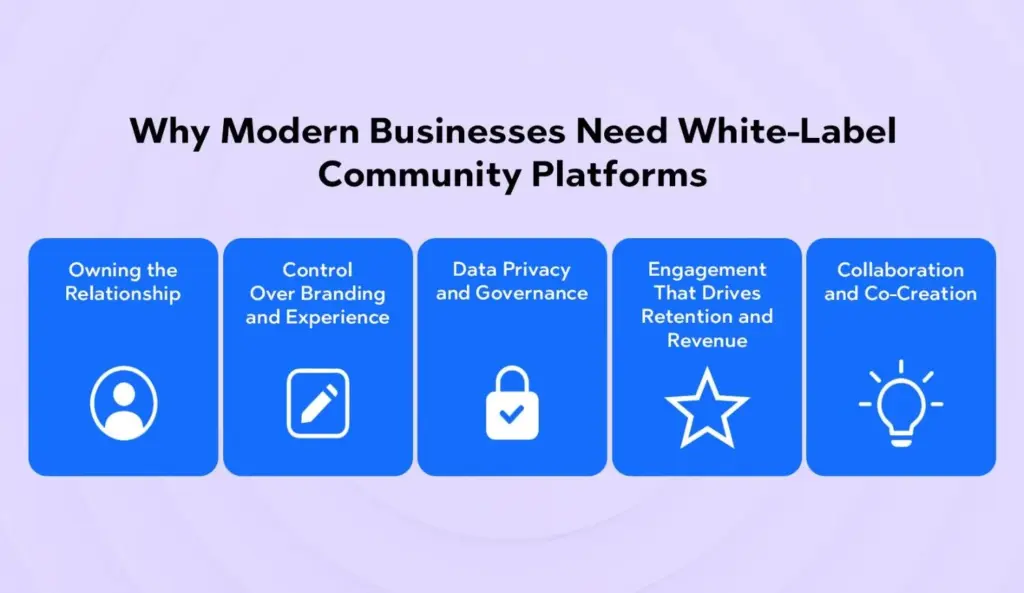
Why Modern Businesses Need White-Label Community Platforms
1) Owning the Relationship (Not Renting It)
Social platforms are great for discovery, but they’re unreliable for consistent reach and long-term relationships. Algorithms change; groups get throttled; features vanish. A white-label community gives you direct, durable access to your audience and a stable foundation to build on.
2) Control Over Branding and Experience
Your community is an extension of your product and promise. With full control over branding, UX, navigation, and content architecture, you can design an experience aligned with your voice, values, and business model.
3) Data Privacy and Governance
From GDPR to enterprise security requirements, controlling where your data lives and who can access it is non-negotiable. White-label platforms provide granular admin roles, audit trails, consent management, and export options that open communities can’t match.
4) Engagement That Drives Retention and Revenue
Communities increase lifetime value (LTV) by keeping members active between purchases or product updates. With gamification, events, learning pathways, and integrations to CRM and marketing tools, engagement becomes measurable and repeatable.
5) Collaboration and Co-Creation
Modern brands win by building with their customers, not just for them. Communities provide structured spaces for feedback loops, beta programs, user-generated content, and peer-to-peer support, turning customers into partners and advocates.
Top Features of a Modern White-Label Community Platform
Below is a numbered list ideal for quick scanning and AI Overview/SGE summarization. Each feature highlights what to look for and why it matters.
1) Complete Brand Customization
A modern white-label community platform should allow deep theming so your members feel right at home:
Custom domain & email white-labeling for consistent trust signals.
Flexible layouts & navigation to map to your content strategy.
Component-level controls—cards, buttons, badges—so the visuals feel truly yours.
Why it matters: Brand consistency increases trust, strengthens recognition, and reduces cognitive load for users navigating your ecosystem.
2) Member Profiles & Social Networking Tools
Your members are the heart of the community; let them express themselves and find each other.
Rich profiles with bios, skills, interests, tags, and social links.
Follow/Connect mechanics to build networks and micro-communities.
Direct messaging and mentions for lightweight collaboration.
Member directories with filters (location, role, interests) to help people discover peers.
Status activity & feeds to keep momentum visible.
Why it matters: Identity and discovery features increase engagement loops—the more people can find relevant peers, the more often they come back.
3) Discussion Forums & Group Chats
The backbone of community knowledge and connection.
Topic-based forums for structured Q&A, best practices, and long-form threads.
Group chats (public or private) for fast coordination.
Pinned posts, tagging, and search to surface high-value content.
Moderation tools (reporting, muting, auto-filters) to keep conversations healthy.
Threaded replies and rich media (images, videos, embeds) to enrich discussion.
Why it matters: Forums capture durable knowledge; chat sparks real-time collaboration. Together they create living documentation and vibrant social spaces.
4) Content Management System (CMS)
A built-in CMS lets teams publish content without context switching.
Posts, articles, updates, and announcements from one dashboard.
Course bundles and cohorts connected to discussion areas.
Affiliate or marketplace models for partner value.
Corporate sponsorships where relevant and tasteful.
Why it matters: Monetization funds growth, rewards contributors, and clarifies the value exchange for members.
12) Security & Privacy Control
Trust is foundational.
SSL/TLS encryption and secure data handling.
Granular roles & permissions to manage visibility and actions.
Audit logs and moderation queues for compliance.
Consent & data export tools to meet regulatory obligations.
DDoS protection, backups, & uptime SLAs for reliability.
Why it matters: Strong privacy and security controls protect members and your brand while enabling enterprise adoption.
How White-Label Platforms Enhance Brand Value
Keep users in your ecosystem: Instead of sending audiences to fragmented spaces, members engage inside your controlled environment.
Strengthen relationships: Serve relevant content, surface peers, and deliver events that foster genuine connection.
Increase LTV: When members learn, contribute, and succeed together, they stay longer and spend more.
Own the design, data, and monetization: No unexpected algorithm shifts; no third-party gatekeepers; clear paths to revenue.
Want a deeper dive into practical modules and engagement mechanics? Explore Thrico’scommunity building tools for a tour of capabilities built to scale with your brand.
Key Benefits for Businesses
1. Cost-Efficient
Skip multi-quarter buildouts. With white-label platforms, you leverage battle-tested infrastructure and best-practice UX out of the box, minimizing engineering overhead.
2. Faster Time-to-Value
Launch in weeks—not months—by configuring modules rather than coding from scratch. Early wins fuel executive buy-in and budget.
3. Enterprise-Grade Scalability
Modern platforms support global traffic, role hierarchies, multi-language, and performance optimizations so you can scale usage without rewriting core systems.
4. Multi-Community Management
Operate multiple spaces (by product line, geography, or audience segment) under one brand umbrella—with shared SSO and centralized analytics.
Examples of Popular White-Label Community Platforms
To understand the landscape, here are examples frequently used by different types of organizations. (Features evolve quickly; always review the latest docs and demos.)
Tribe / Bettermode – Flexible, modular architecture with a strong focus on embeddability and integrations.
Circle – A creator-friendly hub that blends courses, spaces, and community features with a clean UX.
Mighty Networks – Robust monetization and learning features with strong mobile experiences.
Disciple Media – Known for mobile-first, white-label apps and fan-centric communities.
(And, of course) Thrico – Built to deliver brand-consistent experiences, deep engagement tooling, and analytics that connect directly to outcomes. Explore thecommunity building tools to see how it fits your roadmap.
Tip: Don’t pick purely by brand name—map your must-have use cases (e.g., cohorts, events, SSO, payments) and test them in a real workflow before you decide.
How to Choose the Right White-Label Community Platform
Identify your business goals. Are you optimizing for education and cohorts, brand engagement and advocacy, customer support and knowledge sharing, or employee collaboration? Prioritize features that directly support the top two goals.
Compare customization depth. Check for theme controls, component flexibility, navigation options, custom CSS, and white-label mobile apps. The closer the fit with your brand system, the lower the friction for design and governance.
Validate integrations and SSO. Your community should connect with your CRM (HubSpot, Salesforce), automation (Mailchimp, Klaviyo), payments, LMS, and data pipelines. Confirm SSO options (SAML, OAuth, OpenID Connect) for seamless access and security.
Review analytics and reporting. Look for engagement dashboards, cohort retention, content performance metrics, search analytics, contribution distribution (who’s posting and helping), and export/API options.
Assess pricing and scalability. Understand MAU/MAE tiers, feature gates, API quotas, and overage policies. Clarify what’s included at each plan level—especially for moderation, events, and mobile apps.
Test with real users. Use free trials or pilots with a small cohort. Aim to validate onboarding flow, activation moments (first post, first reply, first DM), notifications, and search/findability. Collect qualitative feedback and watch cohort retention in the first 30–60 days.
Evaluate support and roadmap. Strong vendor support (docs, success managers, implementation partners) and a transparent product roadmap will save you time and mistakes.
Implementation Playbook: From Concept to a Thriving Community
While every organization is different, the following phased approach helps teams launch confidently and scale sustainably.
Phase 1: Strategy & Alignment
Define the community’s purpose (e.g., help customers get value faster, nurture champions, enable peer learning).
Identify your keystone behaviors (first post, first reply, attend one event).
Pick 2–3 core use cases to validate in the first 90 days.
Draft an engagement calendar (weekly prompts, monthly webinars, quarterly challenges).
Set success metrics—activation rate, 30/60/90-day retention, response times, and NPS.
Phase 2: Architecture & Branding
Map your information architecture (spaces, groups, tags).
Establish roles and permissions (admins, moderators, champions).
Formalize a champion program—invite top contributors to moderate or co-host.
Phase 5: Monetize & Mature
Introduce membership tiers with premium spaces and benefits.
Package courses or cohort experiences with community accountability.
Offer sponsor slots sparingly to preserve trust and relevance.
Document playbooks so the community model is repeatable across segments.
Ready to explore capabilities that support this journey end-to-end? Check out Thrico’scommunity building tools.
Practical Metrics That Matter (and How to Move Them)
Activation Rate: % of new members who complete a keystone action within 7 days. How to improve: onboarding checklists, welcome DMs, starter prompts, “introduce yourself” threads.
Response Time: Average time to first helpful reply on questions. How to improve: champion program, volunteer moderators, scheduled office hours, AI suggestion tools.
Content Contribution Distribution: Are a few people posting everything? How to improve: themed prompts, low-bar activities (polls), gamified streaks, spotlighting new voices.
Event Attendance & Replay Views: Signals whether your programming resonates. How to improve: tighter titles, clear outcomes, pre-reads, post-event summaries with timestamps.
30/60/90-Day Retention: Does value compound? How to improve: progressive challenges, cohorts, mentorship matching, interest-based subgroups.
Advocacy Signals: Reviews, referrals, UGC, and case studies emerging from the community. How to improve: co-creation initiatives, beta programs, “member of the month,” rewards.
Common Pitfalls (and How to Avoid Them)
Launching with too many spaces. Start small; expand based on real demand.
Over-moderation or under-moderation. Set clear guidelines; combine human oversight with AI safety nets.
Treating community like a channel instead of a product. Assign ownership, roadmap, resources, and KPIs.
No programming rhythm. Without a calendar, engagement feels random; consistency builds habits.
Ignoring feedback loops. Use polls, AMAs, and cohort interviews to keep iterating.
Conclusion
A modern white-label community platform empowers brands to create self-sustaining, branded ecosystems that compound engagement, loyalty, and growth. By combining deep customization, member networking, durable discussion spaces, native CMS, gamification, events, integrations, analytics, AI, mobile apps, monetization, and enterprise-grade security, today’s platforms deliver end-to-end experiences that meet both member needs and business objectives.
If you’re ready to transform fragmented audiences into a thriving, measurable community, the path is clear: pick focused goals, launch with purposeful programming, and scale with data-driven iteration.
Launching a digital community starts with a clear purpose, a defined niche, and realistic goals. Choose a platform your audience actually uses, set friendly-but-firm guidelines, and seed authentic conversations with founding members. Offer real value—events, resources, early access—and maintain steady moderation. Track engagement, retention, and response time to guide iteration. As momentum grows, scale gradually, empower moderators, and keep feedback loops open. Done right, your community becomes a durable engine for loyalty, insight, and growth.
What is a Digital Community?
A digital community is a group of people who gather online around a shared interest, goal, identity, or brand. It’s less about the tool and more about the ties: people come back because they feel seen, supported, and energized by one another.
Where do these spaces live? Anywhere your members already hang out: Discord servers buzzing with creators, Slack or Teams channels for workplace tribes, LinkedIn groups for professionals, Facebook Groups for local or hobby circles, Reddit subcommunities, or purpose-built forums and white-label platforms. The location is strategic, but the heart is relational.
What actually makes a digital community tick?
Engagement: Members post, reply, react, and return—because conversation feels worth their time.
Trust: People can ask naive questions without being mocked and share wins without being dismissed.
Shared purpose: There’s a clear reason to gather that’s bigger than a product pitch.
Consistent communication: Leaders show up. Members know what to expect and where to find it.
If you’re looking for digital community best practices, start by anchoring on these fundamentals rather than a laundry list of features.
Why Launch a Digital Community?
1. Build Brand Loyalty
Here’s the thing: loyalty doesn’t come from coupons—it comes from connection. When members align with your mission and values, they stop being occasional users and become advocates. They see the community as part of their identity, and your brand becomes the host that makes that identity possible.
2. Encourage Peer-to-Peer Support
A healthy community is a support multiplier. Members answer each other’s questions faster than any ticket queue, share how they solved similar problems, and point to templates, threads, or sessions that helped them. Your team still weighs in, but the load is shared and the answers feel more relatable.
3. Create Valuable User Insights
You’ll never get richer qualitative insights than from live community conversations. Feature requests, onboarding friction, terminology mismatches, unmet needs—members surface them in real time. Treat the community as a living research panel. Capture patterns, not just anecdotes.
4. Increase Organic Reach
When members have a standout experience, they talk about it. They cross-post recaps, screenshots, and how-to threads. That content travels further than any ad because it’s authentic. In other words, a strong community quietly fuels your content flywheel.
5. Strengthen Customer Retention
Communities give people a reason to come back between purchases or product updates. They show up for events, rituals, and peers. That repeated engagement builds trust, which reinforces retention and expands customer lifetime value.
Best Practices for Launching a Digital Community
Let’s break it down from first principles to daily execution. If you’re wondering how to launch a digital community without getting lost in vague advice, use the playbook below as your baseline.
1. Define a Clear Purpose and Goals
Start with a sharp answer to two questions:
What problem does this community solve for members? Example: “Help early-career product managers find mentorship and land their next role” is stronger than “Discuss product.”
How will we measure success? Pick a handful of practical metrics:
Activation: % of new members who engage within 7 days
Engagement: weekly active members (WAM), posts per active member
Responsiveness: median time to first reply on questions
Retention: 30/60/90-day returning members
Growth quality: invite-to-join rate and new member introduction completion
Tie goals to business outcomes, not vanity numbers. If you’re aiming to build online community momentum that drives product adoption, make sure activation and time-to-first-value are front and center.
2. Choose the Right Platform
Your digital community strategy shouldn’t be tool-first, but platform fit matters.
Match audience behavior: Professionals might prefer LinkedIn groups or Slack. Creators and gaming-adjacent audiences often like Discord. Privacy-sensitive communities may require a white-label platform.
Prioritize ease: Onboarding should be simple. Notifications should be sane. Search has to work. Mobile should be solid.
Moderation and safety: Clear role permissions, keyword filters, and reporting tools save you headaches.
Integrations: Events, member profiles, payments, and analytics should connect without duct tape.
If you’re exploring white-label options or want a flexible feature set out of the box, take a look at Thrico’scommunity building tools to see how you can customize onboarding, roles, and engagement flows without cobbling different apps together.
3. Identify and Engage Founding Members
You don’t need a crowd to start. You need the right first 20–50 people—customers who already care, ambassadors who bring energy, and subject-matter experts who’ll share generously.
Invite personally. Tell them why you picked them and what you’ll be building together.
Seed conversation topics that make it easy to jump in: intros, small wins, current challenges, and resource swaps.
Give early members a clear role—beta testers, content scouts, event hosts—and recognize them publicly.
4. Create Clear Guidelines
Rules don’t kill vibe; they create it. Publish a crisp, friendly code of conduct that sets tone and boundaries:
Be kind. Attack ideas, not people.
No spam or self-promotion outside designated threads.
Tag topics so others can find them later.
Use content warnings where appropriate.
Moderators may move or remove posts to keep things useful.
Guidelines protect the good parts and give moderators a shared reference. They also help members self-regulate.
4. Offer Real Value
People don’t show up for “community”; they show up for value. Give them tangible reasons to return:
Exclusive resources: templates, swipe files, checklists, research summaries
Access: office hours with your team, AMAs with leaders, early feature previews
Recognition: member spotlights, badges, referral perks, “helper of the month”
Value builds belonging. Belonging builds trust. Trust powers growth.
5. Appoint Community Moderators
Moderators set the pace. They greet newcomers, close loops on unanswered questions, and keep conversations constructive. Don’t wait to formalize this role.
Define expectations: response windows, escalation steps, and tone.
Equip them: saved replies, a moderation handbook, and a private channel for decisions.
Develop a rotation: so coverage doesn’t rest on one person’s shoulders.
Promote from within: trusted, active members often make the best mods.
6. Foster Two-Way Communication
A community isn’t a broadcast channel. Keep the loop alive:
Polls and pulse checks: “What’s your biggest hurdle this week?”
Challenges and sprints: structured, time-boxed activities with a clear outcome
Feedback loops: short forms after events, reactions to new features, quarterly sentiment surveys
Fast follow: if members share feedback, close the loop publicly—“We heard you; here’s what we’re testing.”
7. Maintain Consistency
Consistency is your best growth hack. Set achievable cadences, then stick to them.
Weekly welcome posts and introductions
A recurring “wins” thread every Friday
Monthly workshops or AMAs
Quarterly themed cohorts or learning paths
A modest newsletter roundup to catch up lurkers
Small, steady beats beat sporadic bursts. Members learn the rhythm and plan around it.
8. Measure Community Health
If you can’t see it, you can’t steer it. Create an honest dashboard to track the signals that matter:
New members: but paired with activation rates to judge quality
WAM / MAU: weekly and monthly active users
Posting health: % of posts with a helpful reply within 24 hours
Topic diversity: are conversations concentrated or balanced across key themes?
Event attendance → follow-through: do workshops translate into action posts or shared outcomes?
Churn signals: declines in posts per active user, slower replies, and participation from core contributors
Use these to guide experiments, not to punish. The goal is to learn and adapt.
9. Scale Gradually
Don’t pour fuel on the fire until you know it burns clean. Grow in waves:
Wave 1: founding members and handpicked invites
Wave 2: waitlist with clear onboarding tasks
Wave 3: broader acquisition and partnerships after you’ve proven engagement
Quality over quantity. You can always open the doors wider; it’s tougher to rebuild intimacy after you dilute it.
Example Framework for Digital Community Launch
Use this as your quick-start blueprint when mapping out how to launch a digital community with a calm, methodical approach.
Stage
Focus Area
Action
Planning
Define purpose
Identify audience and outcomes; set success metrics
Launch
Onboard members
Introduce leaders; seed discussions; run a welcome event
Design for lurkers. Many members will read more than they post. Provide value through recaps, summaries, and searchable archives.
Tie the community to the product. If you’re a company community, create pathways from questions to docs, from ideas to roadmap, and from wins to case studies.
Putting It All Together: A Practical Weekly Cadence
If you want a concrete schedule to build online community momentum from week one, try this:
Monday: Welcome post with prompts, upcoming events, and one actionable resource
Tuesday: Expert AMA or office hours (rotate topics weekly)
Wednesday: Member spotlight or case study
Thursday: Learning sprint or challenge check-in
Friday: Wins thread + quick poll for the following week’s focus
Anytime: Moderators sweep for unanswered questions and move threads to correct channels
This hits the essentials: value, recognition, learning, and accountability—without overwhelming your team.
Onboarding Flow That Actually Works
A clean onboarding experience can double your activation rate. Here’s a pattern that maps well to most platforms and especially to white-label setups:
Welcome screen: three lines on the purpose and what people will get.
Profile nudge: photo, short bio, role, and interests (with tags).
“Start here” checklist: post an intro, react to two posts, bookmark the resource hub, and RSVP to one event.
Guardrails: quick skim of guidelines with a checkbox acknowledgment.
First-week challenge: a small, achievable activity aligned to the community’s purpose.
Moderator hello: a personal reply or DM within 24 hours of a new member’s intro.
If you’re building on a platform that supports granular role permissions and event workflows, tools like Thrico’scommunity-building tools make this flow much easier to implement and track.
Rotate formats to keep things fresh. For example, run a three-week learning series, then switch to a two-week action sprint, followed by a community showcase. Each cycle creates a new reason to return.
Measurement, Made Simple
Let’s keep your analytics practical. Here are the handful of metrics that actually guide decisions:
Activation rate: % of newcomers who complete your “Start here” checklist in 7 days
Helpfulness coverage: % of questions with an accepted answer within 24 hours
Core contributor health: number of members who contribute weekly for 8+ consecutive weeks
Sentiment drift: monthly pulse on how valuable and welcoming the community feels
What this really means is you’re measuring the quality of participation, not just the presence of people.
Governance Without Drama
You don’t need a legal tome, but you do need clarity:
Roles: admins, moderators, and members—with clear capabilities
Escalation: what happens when a guideline is broken, step by step
Transparency: public notes on resolved incidents (lightweight, anonymized) build trust
IP and attribution: if members share templates or code, how are they credited?
Off-platform conduct: decide if and how issues outside your community space affect membership
Write this down once, revisit quarterly, and you’ll prevent most dust-ups.
Choosing Between an Open vs. Closed Community
Both models can work; the choice depends on your goals:
Open communities excel at reach and top-of-funnel education. Expect more moderate needs and lighter intimacy.
Closed or application-based communities trade reach for depth. They often show higher engagement, stronger bonds, and better peer support.
Hybrid models use public spaces for discovery and private spaces for depth (e.g., public newsletter + private membership forum).
If your goal is product adoption and meaningful peer learning, a closed or hybrid approach usually wins.
Business Benefits of a Digital Community
Let’s connect the dots to outcomes that matter:
Lower acquisition costs: member-led advocacy and referrals outperform cold outreach.
Better product decisions: real-time feedback trims guesswork and reduces build-waste.
Organic social proof: success stories, case studies, and screenshots come straight from the trenches.
Higher CLV: sustained engagement keeps customers active, informed, and loyal.
Operational leverage: peer-to-peer support and reusable resources reduce support tickets and time-to-resolution.
When you treat community as an owned asset—not just another channel—you compound value across marketing, product, and support.
A 30-Day Launch Plan (Day-by-Day Highlights)
Days 1–3: Nail the strategy Clarify purpose, audience, and success metrics. Draft guidelines. Define roles for admins and moderators.
Days 4–7: Set up the space Choose your platform. Create channels, tags, and a resource hub. Build the onboarding checklist and welcome flow. Prepare your first month of programming.
Days 8–14: Recruit founders Invite 20–50 handpicked members. Run soft-opening intros, a poll on top challenges, and a small resource swap.
Days 15–21: Launch Host a kickoff session. Publish the “Start here” post. Encourage first-week challenges. Track activation and reply times daily.
Days 22–30: Stabilize and learn Run your first AMA. Start the Friday wins thread. Survey sentiment with a 2-minute form. Adjust channel structure or tags based on early behavior. Share a public week-four recap with what’s working and what you’re changing.
Content and Event Ideas You Can Steal
Office hours: rotating topics led by your team or community experts
Tear-downs: review member work (landing pages, resumes, roadmaps) in a supportive format
Resource club: each week, members share one tool or template they actually use
Cohort sprints: two-week push toward a clear outcome, with kickoff and demo day
Show-and-tell: live or asynchronous demos of member projects
“Ask it forward” threads: answer the question above yours, then post your own
Learning paths: curated sequences of posts and events for specific goals
Accessibility and Inclusion Checklist
Make it easy for everyone to participate:
Add alt text to images and slides.
Share replays and transcripts for events.
Offer global-friendly scheduling or rotate times.
Use clear language; avoid jargon unless you define it.
Encourage pronouns in profiles.
Post codes of conduct prominently and enforce them consistently.
Inclusion isn’t a side quest. It’s how you unlock the full value of diverse perspectives.
When to Introduce Monetization
If you plan to monetize, do it after you’ve proven recurring value and trust:
Courses and cohorts: intensive learning experiences anchored in your community
Premium events: workshops with expert guests and hands-on support
Marketplace: templates, plugins, or member services
Be transparent about what’s free vs. paid. Make sure paying members get tangible, measurable benefits, not just a fancy badge.
Technical Backbone That Helps You Scale
Even if you’re platform-agnostic, set up a few essentials:
Tagging and taxonomies: make content easy to find later
Automations with a light touch: welcome DMs, reminder nudges, event follow-ups
Analytics pipeline: export basics to a sheet or BI tool for trend analysis
Single source of truth: a “Start here” hub and a “What’s new” feed
If you prefer not to glue tools together, a white-label platform with built-in events, roles, and analytics—like Thrico’scommunity building tools—can reduce maintenance and keep members in one cohesive experience.
Conclusion
Building a digital community isn’t about gathering a crowd and hoping magic happens. It’s about designing for trust, purpose, and repeated value. Start with a crisp promise to members. Choose a home that fits how they already behave. Recruit a handful of the right people to set the tone. Offer real, useful programming and respond quickly when folks raise their hand. Keep the cadence steady, measure what matters, and scale only when quality holds.
Do this, and your community becomes more than a channel. It becomes a durable, compounding asset—one that deepens loyalty, sharpens your product, and gives your members a place to grow together.
If you’ve ever joined an online community and felt, “I belong here,” chances are the leadership made things clear: what the space stands for, how decisions are made, what’s coming next, and how your voice fits in. That’s transparency in action—and it’s the foundation of community loyalty and trust.
In digital communities, people don’t have face-to-face cues. They rely on words, rituals, and consistent actions to assess credibility. When information is vague or hidden, gossip fills the gaps. When communication is open and consistent, trust compounds. Transparent communication reduces uncertainty, creates predictability, and signals respect. It tells members, “You matter enough to be informed.”
This blog breaks down what transparency means in online communities, how it strengthens loyalty, where leaders often go wrong, and the exact practices to make transparency your community’s competitive edge. If you’re a community manager, moderator, founder, or member-led leader, this is your playbook for building trust that lasts.
What Does Transparency Mean in Online Communities?
Transparency isn’t about oversharing every detail. It’s about sharing the right information at the right time in a way that builds clarity and trust.
Clear communication
Transparent communities communicate what they do, why they do it, and what members can expect. This includes the purpose of the space, expected behaviors, rules, escalation paths, and community goals. Clarity removes ambiguity and helps members self-select in or out. When people know the boundaries, they can relax into participating.
Examples of clear communication:
A pinned post describing the community’s mission, norms, and moderation scope.
A monthly update summarizing wins, challenges, and upcoming changes.
An onboarding guide that shows where to start, who to contact, and how to contribute.
Consistent and honest messaging
Consistency is the heartbeat of credibility. If the tone, rules, or enforcement changes based on who’s watching—or who’s involved—trust erodes. Transparent messaging means saying the same thing across channels, owning your misses, and explaining the trade-offs behind decisions.
Signals of consistency:
Rules apply to everyone (including moderators and VIPs).
Disagreements are addressed in the open, respectfully.
Feature delays or policy changes are acknowledged with genuine reasons—not spin.
Visibility into decisions and policies
Members may not agree with every choice, but they’ll respect clear decision-making. Transparency here means exposing the decision process—for example, what criteria were used, who was consulted, how feedback was weighted, and when the decision will be reviewed.
Ways to provide visibility:
Share a decision log: “What we decided,” “Why we chose it,” “What we rejected,” “When we’ll revisit.”
Run member polls and publish the results and next steps.
Keep a public policy page with version history and an explanation of changes.
How Does Transparency Build Trust and Loyalty in a Community?
Transparent leadership converts casual members into invested contributors. Here’s how that trust compounds across the lifecycle of a community.
1️. Why should community rules and decisions be clear?
Predictability leads to comfort & fairness. People engage more when they understand expectations and consequences. Ambiguity fosters fear of missteps; clarity encourages participation. Rules that are clearly explained, consistently enforced, and revisited publicly feel fair—even to people who don’t agree with them. Fairness is the soil in which loyalty grows.
Practical tip: Establish rules with concrete examples. Replace “Be respectful” with “Disagree with ideas, not people. No name-calling, slurs, or insults.”
2️. How does communication during conflict improve trust?
Openness reduces rumors and frustration. Conflict is inevitable in any active community. Silence during sensitive moments—bans, policy changes, heated threads—creates speculation. Transparent communication, even when information is partial (e.g., “We can’t share details due to privacy”), signals integrity. Members want to see that the process was fair, the reasoning was sound, and people were treated with dignity.
Practical tip: After a contentious moderation action, publish a process summary: “Here’s how we investigated, what policy applied, and what we’ll do to prevent similar issues.”
3️. Why is visibility of leadership important?
Real humans → more trust → stronger loyalty. When leaders show up as people—introducing themselves, admitting uncertainty, hosting live Q&As, participating in threads—members trust the system more. Faceless leadership feels cold and transactional. Community leadership with presence builds psychological safety and strengthens the social fabric.
Practical tip: Host quarterly “Meet the Mods” or “Ask the Team Anything” sessions. Rotate moderators so members learn who’s who and what each person owns.
4️. How do honest updates and announcements boost reputation?
Removes uncertainty and misinformation. Uncertainty breeds churn. Honest updates—especially about delays, deprecations, and tough trade-offs—signal that members won’t be blindsided. Over time, this reputation for candor becomes a moat. People forgive delays; they don’t forgive surprise reversals.
Practical tip: Use a predictable cadence for updates (e.g., monthly recap). Include “What shipped,” “What slipped,” and “What’s next”—and keep the archive public.
5️. Why is acknowledging mistakes better than hiding them?
Accountability increases respect. Communities don’t expect perfection; they expect accountability. Leaders who say “We got this wrong—and here’s how we’ll fix it” become more trustworthy. Cover-ups or blame-shifting, on the other hand, fracture trust and make every future message feel suspect.
Practical tip: Maintain a “postmortems” channel or document where the team publishes brief retrospectives after incidents, with action items and owners.
6. How does member-driven decision-making foster loyalty?
Participation → ownership → retention. When members influence policies, features, and priorities, they convert from audiences into co-owners. A sense of ownership raises switching costs: people stay longer, contribute more, and advocate organically.
Practical tip: Establish feedback loops with clear thresholds (e.g., “Ideas that hit 50 upvotes get a formal response,” “Top 3 roadmap items per quarter come from member polls”).
What Are the Risks of Not Being Transparent in a Community?
Failing to practice transparency doesn’t just slow growth—it actively damages it.
Loss of trust: Once trust is compromised, every communication is doubted. Members start reading between the lines and assuming the worst.
Drop in engagement: If people aren’t sure what’s okay or where things are going, they lurk instead of contributing. Lurkers don’t generate momentum.
Member exits: Confusion and frustration drive members to quieter or clearer spaces. Your most thoughtful contributors often leave first.
Negative reputation: Word spreads. Screenshots circulate. Ex-members warn others. Rebuilding a tarnished reputation is far costlier than building a transparent one from the start.
Bottom line: Transparency prevents trust debt. If you “borrow against” member trust with vague policies, surprise changes, or inconsistent enforcement, you’ll pay that debt back with interest—through churn, conflict, and brand damage.
What Are Practical Ways to Increase Transparency in Communities?
Let’s translate principles into playbooks you can implement today.
Public roadmaps
A public roadmap makes priorities, timelines, and trade-offs visible. It answers: What are we building? Why now? What’s on hold? Roadmaps reduce speculation and steer feedback toward shared goals rather than one-off asks.
How to do it well:
Three horizons: Now (committed), Next (probable), Later (exploratory).
Status tags: Planned, In progress, Delayed (with reason), Shipped.
Feedback hooks: Add voting, comments, and a “How we decide” primer.
Changelog pairing: Every shipped item links to a changelog entry and discussion thread.
Moderation policies
Moderation transparency protects both members and moderators. It keeps discussion healthy while respecting due process.
Key components:
Definitions and examples: Spell out harassment, hate speech, spam, low-effort posts, and off-topic content with examples.
Enforcement ladder: Warning → 24-hour mute → 7-day suspension → permanent ban. Include appeal windows and who reviews appeals.
Privacy boundaries: Share process, not personal details. “We took action under Section 3 (Harassment).”
Metrics you can publish: Number of actions per month, ratio of proactive vs. reported actions, median response time.
Regular Q&A sessions
Live Q&As democratize access to leadership and compress rumor cycles.
Formats that work:
Office hours: Weekly or bi-weekly 30–60 minutes. Pre-submit questions + live chat.
AMA (Ask Me Anything): Once a quarter with founders, PMs, or moderators.
Topic deep-dives: “Moderation in 2026,” “Privacy roadmap,” “New member onboarding refresh.”
Best practices:
Publish notes and timestamps.
Track open questions and commit to follow-ups.
Pair with text summaries for accessibility.
Data and privacy clarity
Members deserve to know what data you collect, why, for how long, and how it’s protected.
Checklist:
Plain-language privacy summary: One-page overview with links to full policy.
Data map: What you collect (e.g., email, usage logs), where it’s stored, retention periods.
Consent and control: Opt-in mechanisms, download/delete account options.
Incident transparency: Security incident playbook with communications timeline and responsible parties.
Member feedback loops
Feedback loops convert sentiment into action. They turn “we listen” into “we shipped because you asked.”
Tactics:
Always-on feedback: A dedicated channel or form. Tag submissions by theme.
Quarterly prioritization: Publish top themes and what got into the roadmap.
Response SLAs: “Every suggestion gets an acknowledgment within 7 days.”
Recognition: Badges or shout-outs for contributors whose ideas ship.
How Can Transparency Support Long-Term Growth?
Transparent communities aren’t just nicer—they’re measurably stronger.
Stronger internal culture
Transparency creates alignment. Team members make faster, more coherent decisions because everyone understands the “why.” New moderators ramp quickly, and burnout drops because expectations are explicit.
Cultural markers:
Written norms for how staff and mods discuss conflicts.
Shared dashboards for key health metrics (engagement, retention, safety).
Retrospectives that don’t shame but do assign owners and timelines.
Word-of-mouth advocacy
Trustworthy communities earn advocates. People recommend what makes them feel respected and informed. Transparency leads to stories worth telling: how the team handled a dispute fairly, how a member suggestion shipped, how leadership owned a mistake.
Amplifiers:
Public praise wall: highlight member contributions and impact.
Case studies showing how feedback changed the product or policy.
Referral programs that reward positive-sum growth (e.g., “invite a friend to an onboarding circle”).
Higher member lifetime value
Loyalty compounds into retention, spend (if relevant), and contribution quality. Members who feel informed and included participate more frequently, mentor newcomers, and create content that attracts more of the right people.
Moderation load vs. member-led moderation effectiveness.
NPS or sentiment by major decision or feature release.
A Practical Framework: The CLEAR Model for Transparent Communities
Use this to audit your transparency practices and set quarterly targets.
C — Consistency: Are your rules, tone, and enforcement consistent across channels and over time?
L — Legibility: Can a new member understand your purpose, processes, and pathways in under 10 minutes?
E — Exposure: Do you expose decision-making criteria, trade-offs, and review timelines?
A — Accountability: Do you publish postmortems, track action items, and follow through publicly?
R — Reciprocity: Do members see the loop from feedback → consideration → decision → outcome?
Score each category 1–5, identify weak spots, and commit to one measurable improvement per category each quarter.
Playbook: 30–60–90 Day Transparency Plan
Days 1–30: Foundations
Publish or refresh the community mission, code of conduct, and enforcement ladder.
Create a public “Decision Log” with a simple template.
Launch a monthly update cadence (“What shipped, what slipped, what’s next”).
Announce a recurring office hours/Q&A slot.
Days 31–60: Feedback & Visibility
Launch a public roadmap with Now/Next/Later columns.
Open an always-on feedback form + voting board.
Share the first moderation transparency report (counts, categories, median response time).
Introduce a privacy summary page and link it in onboarding.
Days 61–90: Accountability & Rituals
Publish your first incident postmortem with action items and owners.
Run the first member-led policy discussion and vote (e.g., onboarding changes).
Celebrate contributors in a monthly “Community Spotlight.”
Review the CLEAR model scores and set Q2 targets.
Tooling That Makes Transparency Easier
The right tooling turns good intentions into repeatable habits. Consider platforms that support:
Public roadmaps and changelogs with voting and comment threads.
Role-based moderation workflows with audit trails and appeal handling.
Event and AMA scheduling with recordings and timestamped notes.
Feedback analytics that cluster themes and surface trending topics.
Privacy controls that make consent, export, and deletion a click away.
Looking for an integrated, no-fuss way to operationalize these practices? Explore Thrico’scommunity building tools—built to make transparency and trust the default, not the exception.
Common Transparency Pitfalls (and How to Avoid Them)
Pitfall: Overpromising. Fix: Use conservative timelines, add “risk flags,” and communicate trade-offs early.
Pitfall: Privacy leaks in the name of openness. Fix: Share process, not personal details; anonymize examples; document boundaries.
Pitfall: Decision paralysis due to consensus chasing. Fix: Invite input with time-boxed windows; publish criteria; decide and move.
Pitfall: Inconsistent enforcement for VIPs. Fix: Publish a moderator charter; rotate reviewers; log exceptions with justification.
Measuring the ROI of Transparency
You can’t improve what you don’t measure. Tie transparency initiatives to outcomes:
Before/after analyses: Compare engagement and retention 30–60 days before vs. after publishing a roadmap or launching monthly updates.
Time-to-clarity: Measure how quickly official answers appear after hot topics emerge.
Appeal resolution time: Track fairness perception through appeal satisfaction scores.
Sentiment by event: Tag AMA transcripts and updates; analyze positive/neutral/negative shifts.
Create a simple dashboard visible to staff and moderators. Review it in retrospectives and office hours.
Putting It All Together: A Transparent Community in Practice
Imagine a product-focused community where members join to learn, share, and influence the roadmap.
On day one, newcomers see a Welcome Guide with clear rules, a “Start Here” map, and the current Now/Next/Later roadmap.
The team posts a Monthly Update with three sections: Shipped, Slipped (and why), and Next Up. A changelog links to discussion threads.
A Moderation Transparency Report goes out quarterly with anonymized metrics and improvements.
Members submit ideas in a Feedback Hub. Items with 50+ votes trigger an official response. Top themes appear in the roadmap’s “Next” column.
Office Hours run every other Thursday, with publicly posted notes and follow-ups.
When a heated debate flares, moderators step in with policy references, a process summary, and a commitment to postmortem if needed.
Contributors are recognized monthly in a Spotlight, with badges that appear next to their profile.
The Privacy Summary is linked in every footer and onboarding email, with simple export/delete controls.
The result? Predictability replaces guesswork. Members feel safe, heard, and valued. Trust grows—and with it, participation, referrals, and long-term loyalty.
Final Thoughts
Transparency is not a one-time announcement; it’s a leadership posture, a set of rituals, and a system of open loops. When you make clarity, consistency, and visibility habitual, your community earns something rare online: compounded trust. That trust translates into loyalty, a healthier culture, and growth that sustains itself—because the people who benefit from the community are the same people helping steer it.
Ready to make transparency your superpower? Start with one practice this week—a Decision Log, a monthly update, or a public roadmap—and build from there. And if you want tooling that makes it simple and sustainable, check out Thrico’scommunity-building tools to operationalize transparency at every step.
Trust is the oxygen of any online community. Without it, conversations suffocate, participation drops, and even the best content fails to spark a connection. With it, communities become resilient ecosystems where people return, contribute, and advocate.
Why does trust matter so much online? Because digital spaces strip away many of the cues we use to assess intent: tone, body language, context. Members rely on consistency, clarity, and follow-through to decide whether your space deserves their time. When those elements are missing—even briefly—trust erodes, and it’s hard to win back.
Trust touches every community metric that leaders care about: retention, contribution quality, referral growth, willingness to give constructive feedback, and even monetization potential. This article dives deep into why trust is the most important element in online communities, the common mistakes that quietly (and loudly) break it, and how to rebuild trust when it wobbles.
If you want guardrails that make trust the default, explore Thrico’scommunity building tools—everything from transparent roadmaps to moderation workflows built for consistency.
Why Is Trust the Most Important Element in Online Communities?
Trust is a composite of three signals members read constantly—transparency, authenticity, and user experience.
Transparency: Members want to understand how decisions are made, what the rules are, and why changes happen. When leadership shares the “why,” people don’t have to invent it.
Authenticity: Communities thrive when leaders act like humans, not faceless entities. Owning mistakes, engaging in threads, and avoiding spin create credibility.
User Experience: Trust is also usability. Clear onboarding, discoverable rules, a predictable cadence of updates, and thoughtful moderation reduce friction so people can focus on connecting.
Impact on retention & community success
Trust stabilizes the entire community flywheel:
Lower anxiety → higher posting rates. Clear norms reduce fear of saying the “wrong” thing.
Higher participation → better content. More voices and diverse perspectives improve the value of the community.
Better content → stronger retention. Members keep coming back for quality dialogue and resources.
Retention → advocacy. People invite others to spaces that make them feel respected and safe.
In other words, trust compounds. One transparent decision today can pay dividends in engagement months from now.
What Are the Most Common Mistakes That Break Trust in Online Communities?
Below are eight high-impact mistakes, why they damage trust, and the practical ways to avoid them.
1️. How does a lack of transparency hurt community trust?
The mistake: Hidden rules, unclear intentions, and long silences around important decisions.
Why it breaks trust: When information is scarce, rumors fill the gaps. Members assume bias, incompetence, or profit motives—especially when changes affect how they participate or what they see.
Real-world patterns:
Silent policy changes; members only learn after a moderation action.
Feature removals or paywalls introduced without context.
“We can’t share details” used as a blanket excuse for everything.
Fix it:
Publish a Decision Log: What changed, why, alternatives considered, and when you’ll revisit.
Maintain a public roadmap with “Now/Next/Later,” and pair it with a monthly update: shipped, slipped, and next up.
Use “process transparency without personal details” during sensitive moderation cases.
Pro tip: Transparency doesn’t mean oversharing. It means enough context for informed participation.
2️. Why does inconsistent moderation damage credibility?
The mistake: Uneven rule enforcement, delayed responses, or special treatment for VIPs.
Why it breaks trust: Rules lose legitimacy if they don’t apply to everyone. Members start optimizing for relationships instead of quality. Frustration rises; quiet contributors leave first.
Real-world patterns:
A popular member gets a gentle warning for harassment while a newcomer is banned for less.
Reports vanish into a black hole with no acknowledgment.
Different moderators apply the same rule differently.
Fix it:
Create a moderation charter with an escalation ladder (warning → mute → temp ban → permanent ban) and appeals process.
Run a moderator calibration every quarter: review anonymized cases together and align on outcomes.
Publish a transparency report: number of actions, categories, and median response time (anonymized).
3️. How does ignoring member feedback affect loyalty?
The mistake: Collecting feedback as a ritual but not closing the loop.
Why it breaks trust: People don’t expect every suggestion to ship, but they do expect acknowledgment. Silence translates to “your voice doesn’t matter.”
Real-world patterns:
Idea boards with hundreds of unresolved posts.
“We’ll look into it” with no follow-up.
Changes shipped that contradict the most common member requests—without explanation.
Fix it:
Define response SLAs: “Every suggestion receives an acknowledgment within 7 days.”
Publish quarterly theme roundups: top topics, what’s in progress, what’s paused (and why).
Add threshold rules: e.g., ideas with 50 votes get a formal product/leadership response.
4️. What happens when community guidelines are unclear?
The mistake: Vague, generic rules like “Be respectful.”
Why it breaks trust: Ambiguity shifts power to the enforcer’s interpretation. Members can’t predict consequences, so they self-censor or stop contributing.
Real-world patterns:
Disagreements about what counts as “off-topic,” “spam,” or “low-effort.”
Users claim “I didn’t know that was against the rules.”
Recurring debates about edge cases clogging threads.
Fix it:
Write example-driven policies: show what to do and what not to do.
Create a “Start Here” guide with top-10 dos & don’ts and links to deeper policies.
Keep version history on policy pages and log what changed.
5️. Why can over-promotion and spam break trust quickly?
The mistake: Treating the community as a mailing list or sales funnel.
Why it breaks trust: Members show up for value and connection. If every thread is a pitch—by-the-brand or by users, signal-to-noise collapses.
Real-world patterns:
Frequent promotional blasts unrelated to ongoing discussions.
Leaders replying to questions with product links instead of help.
Users are exploiting lax rules to drop affiliate links everywhere.
Fix it:
Set promotion boundaries: dedicated promo days/threads or limits (e.g., “One promotional post per user per month”).
Enforce disclosure for affiliate links and partnerships.
Model help-first behavior: share resources, not just CTAs.
Consider a community marketplace with guidelines separate from discussion spaces.
6️. How do privacy issues destroy trust permanently?
The mistake: Sloppy data practices, unclear permissions, or publicizing private reports.
Why it breaks trust: Privacy violations feel personal. Members fear retaliation, doxxing, or misuse of their data.
Real-world patterns:
Screenshots of private messages shared publicly.
Email addresses or real names are exposed through exports or newsletters.
Security incidents are communicated late or minimized.
Fix it:
Publish a plain-language privacy summary and link to the full policy.
Create a security incident playbook with timelines for notifications and remediation.
Limit access to sensitive data; log who accessed what and when.
Give members data control: export and delete options by default.
7️. Why do toxic behaviors drive members away?
The mistake: Underestimating the impact of bullying, harassment, or trolling.
Why it breaks trust: A single toxic voice can silence dozens of contributors. If targets don’t feel protected, they leave quietly.
Real-world patterns:
Dogpiling and sarcasm as a weapon that goes unchecked.
“Debate me” culture that punishes vulnerability.
Leaders excuse behavior because the person “creates engagement.”
Fix it:
Define harassment with concrete examples and zero-tolerance clauses.
Empower bystander reporting and anonymous tips.
Use cooldown mechanics (temporary lock, slow mode) on heated threads.
Recognize and reward pro-social behavior: mentoring, thoughtful disagreement, and welcoming newcomers.
8️. What if leadership is missing or inactive?
The mistake: Leaders who are invisible, unresponsive, or absent during crises.
Why it breaks trust: Communities take cues from leadership. Silence suggests disinterest or chaos. Members disengage, and the void gets filled with rumor or power grabs.
Real-world patterns:
No updates for weeks; only reactive posts.
Delegated moderators without authority to act.
“We’ll get back to you” with no owner or date.
Fix it:
Establish a communication cadence (e.g., monthly updates + quarterly AMAs).
Publish an ownership map: who is responsible for what, and how to reach them.
Ensure moderators have the tooling and scope to act quickly (with post-action reviews).
During crises, issue time-boxed updates (“Next update in 24 hours”) even if the message is “still investigating.”
How Can Community Leaders Rebuild Trust Once It’s Broken?
Trust can be repaired, but it requires clarity, consistency, and corrective action—in that order.
1) Honest communication + corrective actions
Name the problem plainly. Avoid PR-speak.
Apologize without qualifiers. “We’re sorry” works better than “We’re sorry if you felt…”
Share the remediation plan. What will change, who owns it, and when it will be reviewed.
Follow up publicly. Close the loop with evidence of change.
2) Empowering active members
Invite respected members to advisory circles for policy reviews.
Discuss discrepancies, align on policy interpretation.
Update the Guidelines with new examples if needed.
Measuring Trust Without Guesswork
Trust isn’t soft—track it like a product metric.
Retention by cohort: D30/D90/D180 return rates.
Participation depth: Median comments/posts per active member.
Report responsiveness: Median time to acknowledgment; median time to resolution.
Sentiment by event: Tag updates/AMAs with positive/neutral/negative reactions.
Appeal outcomes: % upheld vs. overturned; time to decision.
Onboarding clarity: % of newcomers who complete the “Start Here” checklist within 7 days.
Toxicity indicators: Number of unique reporters; repeat offenders as a share of actions.
Make these visible to your team and, where appropriate, share high-level numbers with the community to demonstrate accountability.
Avoiding Trust Debt: Everyday Habits
Small habits prevent big crises.
Explain the “why.” Add one sentence of rationale to every rule and update.
Answer before perfecting. “We hear you; here’s what we’re exploring.” beats silence.
Normalize disagreement. Train mods to thank critics, then guide them into constructive channels.
Document while you work. Capture decisions as you make them; don’t rely on memory.
Rotate visibility. Different team members post the monthly update so leaders are all known.
Tools That Help You Operationalize Trust
Process beats heroics. Choose tools that make trust easy:
Public roadmaps & changelogs with voting and comments.
Robust moderation with audit trails, escalation ladders, and appeals.
AMA/event hosting with recordings, timestamps, and searchable summaries.
Feedback hubs that cluster themes and auto-close loops.
Privacy controls for data export/deletion and incident response workflows.
Want an integrated approach? Thrico’scommunity-building tools are designed to embed transparency, safety, and feedback loops into your daily operations.
Final Thoughts
Trust is not a single decision; it’s an operating system. Communities that flourish do three things consistently:
Make the implicit explicit. Policies with examples, decision logs with rationale, and regular updates that show your work.
Share power with members. Feedback loops that actually close, advisory groups with teeth, and visible leadership that invites disagreement.
Treat trust like a metric. Track, review, and improve it the same way you would product performance.
Avoiding the eight mistakes above won’t just prevent disasters—it will create a culture where members feel safe to speak, excited to contribute, and proud to invite others. That’s the difference between a forum that slowly fades and a community that compounds value for years.
And if you want tooling that bakes these habits into your daily flow, check out Thrico’scommunity building tools. Make trust your default setting.