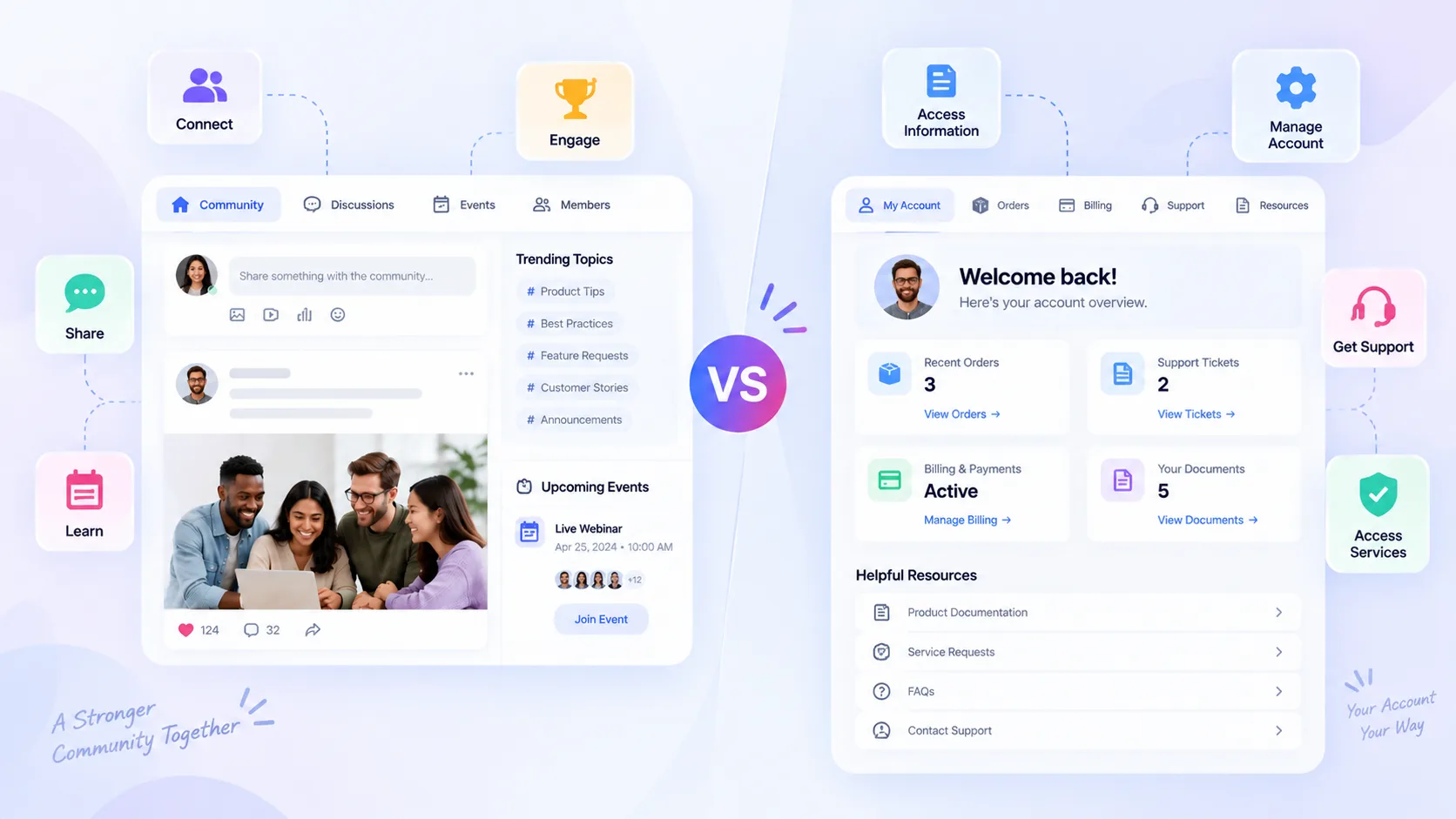
A community platform is designed to help customers or members connect with each other, interact with a brand, participate in discussions, share knowledge, attend events and engage with a broader community. A customer portal is generally designed around individual customer access to account-specific information, services, support, transactions or resources.
The simplest distinction is:
Community Platform = Connection + Participation + Engagement
Customer Portal = Account Access + Services + Support
Although both platforms can overlap in some areas, their primary purposes are different. A community platform focuses on creating an environment where customers or members can interact, participate and build relationships. A customer portal generally focuses on helping an individual customer complete account-related tasks or access private information.
For businesses, understanding this difference is important when deciding whether they need a customer community, a self-service portal, or a combination of both.
What Is a Community Platform?
A community platform is a digital environment where customers, members, employees, partners, fans or other groups can interact, communicate, share content, participate in activities and build relationships.
Unlike a basic website or information portal, a community platform is designed around ongoing participation.
Community Platform Definition
A community platform provides a dedicated digital environment where users can:
- Interact with each other
- Communicate with a brand or organization
- Participate in discussions
- Share knowledge and experiences
- Attend events and activities
- Create and consume content
- Build professional or customer relationships
- Provide feedback
- Participate in gamification
- Earn recognition and rewards
- Engage with other members
Modern community platforms can combine content, conversations, communities, events, connections, gamification and analytics in one environment.
Thrico positions its platform around community management and engagement, with capabilities covering communities, content, conversations, events, connections, gamification and other participation-focused functionality.
What Can a Community Platform Include?
Depending on the platform, a community experience can include:
- Member profiles
- Member directories
- Feed
- Communities and groups
- Discussion forums
- Chat
- Events
- Polls
- Surveys
- Connections
- Referrals
- Gamification
- Rewards
- User-generated content
- Analytics
- Moderation
- Roles and permissions
These features allow the community to become more than a support destination.
For example, a customer can join a discussion, ask another customer a question, attend an event, share a product experience, earn recognition for contributing and connect with other users.
Thrico’s community experience includes features designed around connections, communities, events, profiles, referrals and ongoing member participation.
What Is a Customer Portal?
A customer portal is a secure digital interface that allows an individual customer to access information, services or functionality associated with their account.
The primary focus is generally self-service and account management rather than member-to-member interaction.
Customer Portal Definition
A customer portal may provide access to:
- Account information
- Orders
- Billing
- Support tickets
- Documents
- Service requests
- Product information
- Private resources
- Account settings
- Subscription information
- Transaction history
The exact functionality depends on the organization and industry.
For example, a software company may use a customer portal to let customers view subscriptions, manage account information, access invoices and submit support requests.
An insurance company may use a portal for policies, claims and documents.
An e-commerce business may use a portal for orders, returns and account information.
What Is the Main Purpose of a Customer Portal?
The main purpose of a customer portal is generally:
Self-Service + Account Management + Customer Support
Customers usually enter the portal because they need to complete a specific task or access specific information.
Typical Customer Portal Experience
A typical customer portal journey may look like:
Login → View Account → Check Information → Submit Request → Access Documents → Contact Support
This is different from a community journey, where the user may enter without having one specific account-related task.
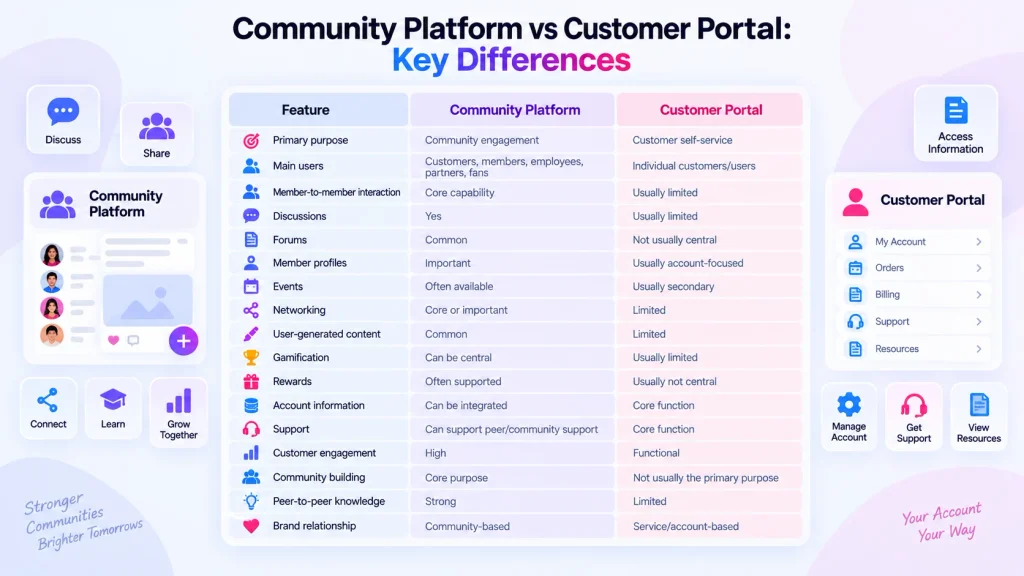
Community Platform vs Customer Portal: Key Differences
The core difference between a community platform and customer portal is the type of experience each system is designed to provide.
| Feature | Community Platform | Customer Portal |
|---|---|---|
| Primary purpose | Community engagement | Customer self-service |
| Main users | Customers, members, employees, partners, fans | Individual customers/users |
| Member-to-member interaction | Core capability | Usually limited |
| Discussions | Common | Usually limited |
| Forums | Common | Not usually central |
| Member profiles | Important | Usually account-focused |
| Events | Often available | Usually secondary |
| Networking | Core or important | Limited |
| User-generated content | Common | Limited |
| Gamification | Can be central | Usually limited |
| Rewards | Often supported | Usually not central |
| Account information | Can be integrated | Core function |
| Support | Can support peer/community support | Core function |
| Customer engagement | Participation-focused | Functional/self-service |
| Community building | Core purpose | Not usually the primary purpose |
| Peer-to-peer knowledge | Strong | Limited |
| Brand relationship | Community-based | Service/account-based |
These are general distinctions rather than absolute rules. Some modern platforms can combine community functionality with account-specific experiences, while some customer portals can include limited discussion, knowledge or engagement features.
Community Platform vs Customer Portal: Purpose
Understanding the primary purpose makes the difference easier to identify.
Community Platform
The goal of a community platform is to build relationships and participation.
The relationship can be represented as:
Brand ↔ Customer ↔ Customer
A customer is not simply receiving information from the business. They can also interact with other customers, contribute knowledge, participate in discussions and become part of the wider community.
This can be useful when peer interaction, networking, knowledge sharing or advocacy is important.
Customer Portal
The goal of a customer portal is to give customers access to services and account information.
The typical relationship is:
Business → Customer
The customer uses the portal to perform an action or retrieve information.
For example:
Login → View Invoice → Download Document → Submit Support Request
The customer portal is therefore generally task-oriented, while a community platform is generally participation-oriented.
Community Platform vs Customer Portal: User Interaction
Community Platform Interaction
Customers can potentially:
- Ask questions
- Answer other customers
- Share experiences
- Post content
- Comment
- Join groups
- Attend events
- Connect with peers
- Participate in activities
- Give feedback
- Earn recognition
- Share knowledge
Discussion forums, chat, polls and surveys can support different forms of community interaction.
Customer Portal Interaction
Customers generally use a portal to:
- Check account details
- Access documents
- Manage services
- Submit support requests
- Check transactions
- Update information
- Review orders
- Manage subscriptions
- Access private resources
The interaction is usually between the customer and the organization’s system.
Key Difference in User Interaction
A customer portal primarily helps a customer do something for their account.
A community platform helps customers interact, participate and build relationships.
Community Platform vs Customer Portal: Customer Engagement
The difference becomes especially important when evaluating a customer engagement platform.
Engagement in a Community Platform
Community engagement can include:
- Discussions
- Events
- Content
- Networking
- Polls
- Recognition
- Gamification
- Rewards
- Member contributions
- Peer-to-peer support
The customer can move from being a passive consumer to an active participant.
For example:
Customer → Asks Question → Receives Peer Answer → Shares Experience → Helps Another Customer
This creates an ongoing cycle of participation.
Engagement in a Customer Portal
Engagement in a customer portal is usually focused on:
- Service access
- Support
- Account actions
- Information retrieval
- Transactions
- Document access
The customer may visit the portal when they have a specific need.
Which Model Creates More Community Interaction?
Community platforms are specifically designed around ongoing interaction and participation, while customer portals are generally designed around efficient customer self-service.
This does not mean a customer portal cannot contain engagement features. The key difference is the primary purpose of the experience.
Community Platform vs Customer Portal: Features Comparison
A detailed feature comparison can help businesses understand where each model fits.
| Capability | Community Platform | Customer Portal |
|---|---|---|
| Member directory | ✓ | Sometimes |
| Member profiles | ✓ | Account profile |
| Discussion forum | ✓ | Sometimes |
| Chat | ✓ | Sometimes |
| Feed | ✓ | Rare |
| Events | ✓ | Limited |
| Polls | ✓ | Limited |
| Networking | ✓ | Rare |
| User-generated content | ✓ | Limited |
| Gamification | ✓ | Usually limited |
| Rewards | ✓ | Usually limited |
| Support tickets | Possible | ✓ |
| Billing | Possible/integrated | ✓ |
| Account management | Possible | ✓ |
| Customer-specific data | Possible | ✓ |
| Peer-to-peer interaction | ✓ | Usually limited |
| Community analytics | ✓ | Usually product/account analytics |
| Moderation | ✓ | Usually not a central function |
The appropriate combination depends on what customers need to accomplish and how the organization wants customers to interact.
When Should a Business Use a Community Platform?
A community platform can be relevant when customer-to-customer interaction is an important part of the overall customer experience.
When Customer-to-Customer Interaction Matters
Examples include:
- SaaS customers
- Professional communities
- Product communities
- Customer success communities
- Member organizations
- Educational communities
- Creator communities
Customers can benefit from hearing how other users solve problems, use products or achieve specific outcomes.
When Peer-to-Peer Support Is Valuable
A community can allow experienced customers to help newer customers.
For example:
Question → Peer Experience → Answer → Shared Knowledge
This can turn individual customer questions into reusable community knowledge.
Thrico’s customer-success community content also focuses on discussions, shared tactics, resources, feedback and peer interaction as part of a customer community experience.
When You Want Long-Term Customer Engagement
A community can support a broader customer journey:
Purchase → Onboarding → Learning → Discussion → Advocacy → Retention
The relationship can continue after the original purchase.
When You Want Customer Advocacy
Community participation can support:
- Customer stories
- Referrals
- Recognition
- User-generated content
- Advocacy programs
- Expert/member programs
Active members can contribute knowledge, participate in events and recommend products or services to other users.
When Should a Business Use a Customer Portal?
A customer portal can be appropriate when the main requirement is secure access to individual customer information and services.
When Account-Specific Information Is the Priority
A portal can be useful when customers need access to information associated specifically with their accounts.
Examples include:
- Account information
- Orders
- Policies
- Subscriptions
- Invoices
- Documents
When Customers Need Self-Service
A portal can allow customers to complete tasks without contacting a support representative for every request.
When Customers Need Secure Access
A customer portal can provide controlled access to private account information and resources.
When Support Requests Are the Main Interaction
Businesses can use portals to allow customers to:
- Submit support requests
- Track requests
- Access help resources
- Communicate with support
- Review previous interactions
When Billing or Transactions Are Central
Customer portals are also commonly used when customers need access to:
- Billing
- Payments
- Orders
- Invoices
- Subscription management
- Transaction information
Industries where portal experiences can be relevant include banking, insurance, SaaS account management, subscription services and B2B service providers.
Can a Community Platform Replace a Customer Portal?
A community platform does not automatically replace a customer portal because the two systems are designed around different primary purposes.
A community platform focuses on engagement and interaction, while a customer portal focuses on account-specific access and self-service.
However, depending on the platform’s capabilities and integrations, a community experience can incorporate some customer-service or account-related functionality.
When They Can Work Together
A combined experience can look like:
Login → Account Information → Community → Discussions → Events → Support → Advocacy
This allows customers to access private information while also participating in a broader community.
For example, a SaaS company could provide account management through a portal while using the community for product discussions, educational events, peer support and customer advocacy.
When a Community Platform May Be Enough
A community-oriented experience may be sufficient when the primary objectives are:
- Engagement
- Peer interaction
- Knowledge sharing
- Networking
- Customer success
- Advocacy
- Events
- Member participation
The decision should be based on customer requirements rather than assuming one system must replace the other.
Community Platform vs Customer Portal for Customer Success
The distinction becomes particularly useful when designing a customer success journey.
Customer Onboarding
Community
A community can support onboarding through:
- Tutorials
- Discussions
- Events
- Peer support
- Educational content
- Q&A
Portal
A portal can support:
- Account setup
- Documents
- Service access
- Configuration
- Private resources
Product Adoption
Community
Customers can discover:
- Use cases
- Best practices
- Peer discussions
- Expert sessions
- Product tips
Portal
The portal primarily provides:
- Product/account access
- Account-specific resources
- Service management
Customer Retention
Community
Retention can be supported through:
- Relationships
- Recognition
- Engagement
- Events
- Peer interaction
- Advocacy
Portal
A portal can support:
- Service continuity
- Support
- Account management
- Billing
- Renewals
Customer Advocacy
A community can facilitate:
- Reviews
- Referrals
- Customer stories
- Recognition
- Expert programs
- User-generated content
This makes the community a potential part of the post-purchase customer journey rather than only a support destination.
What Features Should You Look for in a Customer Community Platform?
Businesses evaluating a customer community platform should look beyond basic discussion functionality.
Member Profiles and Directory
Profiles allow members to introduce themselves, display relevant information and discover other people in the community.
A directory can make networking easier.
Communities and Groups
Different groups can organize conversations around:
- Products
- Locations
- Interests
- Customer segments
- Professional roles
- Programs
Discussion Forums
Forums create structured spaces for questions, answers, knowledge sharing and longer-form discussions.
Feed and Content
A feed can bring together posts, updates, conversations, events and other community activity.
Thrico’s content capabilities are designed to support content sharing and discovery across the community.
Events
Events can support:
- Webinars
- Workshops
- Meetups
- Product sessions
- Community activities
- Networking
Polls and Surveys
Polls and surveys help organizations gather community feedback and understand member opinions.
Networking
Connections, profiles and discovery features can help members find relevant people and build relationships.
Gamification
Gamification can use:
- Points
- Badges
- Coins
- Leaderboards
- Rewards
- Recognition
The objective is to encourage meaningful participation rather than simply adding game mechanics.
Rewards
Rewards can recognize contributions, referrals, participation and other desired behaviors.
Moderation
Community moderation is important for maintaining a safe, relevant and useful environment.
Analytics
Analytics can help teams understand:
- Active members
- Engagement
- Content interactions
- Participation
- Growth
- Retention
- Community behavior
Integrations
A community platform may need to connect with existing systems such as:
- CRM
- E-commerce
- HR systems
- Marketing tools
- Analytics platforms
Thrico’s current platform information includes integrations with business systems such as Salesforce CRM, Zoho CRM, Shopify, WooCommerce, Workday and SAP SuccessFactors.
Roles and Permissions
Different users may need different access levels.
Roles and permissions can help organizations control:
- Content
- Community spaces
- Member data
- Administrative functions
- Private areas
How Thrico Fits Into the Customer Community Experience
Thrico positions itself as a unified community management platform designed to help organizations create, engage, manage and grow communities.
Its current platform experience brings together community, content, conversations, gamification, insights and administration.
Unified Community Experience
Thrico brings multiple community capabilities together, including:
- Community
- Content
- Conversations
- Connections
- Events
- Gamification
- Rewards
- Insights
- Administration
This allows organizations to build a community experience around multiple types of interaction.
Customer Discussions and Conversations
A customer community can include:
- Forums
- Chat
- Polls
- Surveys
- Feedback
- Community spaces
Thrico’s Conversations functionality supports different forms of community communication, including chat, forums, polls and surveys.
Events and Experiences
Events can create recurring opportunities for customers and members to interact.
Thrico’s community experience includes events alongside connections, communities, profiles, Spotlight and referrals.
This can support an experience such as:
Community → Event → Interaction → Discussion → Follow-up
Customer Engagement Through Gamification
Gamification can encourage participation through:
- Points
- Badges
- Coins
- Rewards
- Leaderboards
- Recognition
Thrico’s platform includes gamification-oriented capabilities designed to support participation and recognition.
For businesses interested specifically in customer success communities, the customer community platform approach can connect discussions, resources, events, peer support, personalization and analytics across the customer journey.
Community Platform vs Customer Portal: Which One Does Your Business Need?
Instead of asking which model is universally better, start with the primary customer requirement.
| Your Primary Goal | More Relevant Model |
|---|---|
| Customer self-service | Customer Portal |
| Account management | Customer Portal |
| Support requests | Customer Portal |
| Peer-to-peer interaction | Community Platform |
| Customer networking | Community Platform |
| Customer discussions | Community Platform |
| Events and activities | Community Platform |
| Customer advocacy | Community Platform |
| Knowledge sharing | Community Platform |
| Account + community experience | Combination |
Choose Based on Your Customer Journey
Ask these questions:
- Do customers need account-specific information?
- Do customers need to interact with one another?
- Is peer-to-peer support valuable?
- Are events important?
- Do you need customer advocacy?
- Do you want ongoing engagement beyond support?
- Do you need gamification?
- Do you need community analytics?
- Does the experience need CRM or e-commerce integration?
- Do different customer groups need different permissions?
If the primary need is account access and self-service, a customer portal may address that requirement.
If the primary need is participation, connection and ongoing engagement, a community platform may be more relevant.
If the business needs both, the two experiences can be designed to work together.
Benefits of Combining a Customer Portal With a Community Experience
For some organizations, combining account functionality with community participation can create a broader customer journey.
One Customer Journey
Customers can access private account information and then move into community spaces without having to use completely separate experiences.
Better Self-Service
Customers can access account resources while also finding community-generated knowledge.
Peer-to-Peer Support
Customers can ask questions and learn from other users.
Stronger Engagement
Community features can encourage customers to return even when they do not have an immediate account-related task.
More Customer Feedback
Discussions, polls and surveys can provide additional channels for gathering feedback.
Better Customer Insights
Community activity can provide information about:
- Popular topics
- Member behavior
- Product questions
- Engagement patterns
- Customer interests
Stronger Advocacy
Active members can participate in:
- Referrals
- Reviews
- Events
- Customer stories
- User-generated content
- Recognition programs
The combination can therefore connect service functionality with relationship building.
How to Choose Between a Community Platform and Customer Portal
A practical evaluation can start with seven steps.
1. Define the Primary Objective
Ask what the organization wants customers to accomplish.
Is the objective:
- Self-service?
- Support?
- Account management?
- Networking?
- Knowledge sharing?
- Customer success?
- Advocacy?
2. Understand Customer Behavior
Identify what customers currently do after purchase.
Do they:
- Ask peers questions?
- Contact support frequently?
- Need account information?
- Attend events?
- Share experiences?
- Need educational resources?
3. Identify Required Interactions
Determine whether customer-to-customer interaction is important.
If customers benefit from conversations and peer knowledge, community functionality becomes more relevant.
4. Map Account-Specific Requirements
List information that must remain private and associated with individual accounts.
Examples include:
- Billing
- Orders
- Documents
- Subscriptions
- Service requests
5. Identify Engagement Requirements
Consider whether the business needs:
- Events
- Discussions
- Polls
- Groups
- Networking
- Gamification
- Rewards
- User-generated content
6. Evaluate Integrations
Check whether the platform needs to connect with existing CRM, commerce, analytics or business systems.
7. Consider Future Scalability
The platform should support the organization’s expected community size, content volume, member roles, moderation requirements and engagement model.
Conclusion
Community platforms and customer portals solve related but different problems.
A customer portal primarily helps customers access account-specific information, services, support and self-service functionality.
A community platform focuses on connection, participation, conversations, knowledge sharing, networking and ongoing engagement.
The difference can be summarized as:
Community Platform → Connection + Participation + Engagement
Customer Portal → Account Access + Services + Support
For some businesses, the right approach may be to connect both experiences so customers can move from account management to community participation, support, learning and advocacy.
The decision should ultimately be based on the customer journey, required interactions, account-specific functionality, engagement goals, integrations and long-term business requirements.
For organizations looking to build a dedicated community experience around customers, members, employees, creators or other audiences, Thrico provides a platform focused on community, content, conversations, gamification, events and insights.
Frequently Asked Questions
A community platform focuses on interaction, participation, networking, content and relationships between customers or members. A customer portal focuses on account-specific information, self-service, support, transactions and private resources.
No. They can overlap, but their primary purposes are different. A community platform is generally participation-oriented, while a customer portal is generally task and account-oriented.
Not automatically. A community platform may provide some account or support functionality, but a customer portal is specifically designed around secure account access and self-service. Some businesses may use both systems together.
A customer community platform is a digital environment where customers can interact with one another and the brand, share knowledge, participate in discussions and events, access resources and engage in ongoing activities.
A customer portal is commonly used for account management, document access, billing, orders, support requests, service information, subscriptions and other customer-specific activities.
Businesses can use community platforms to support customer engagement, peer-to-peer knowledge sharing, customer success, networking, advocacy, feedback, events and long-term relationships.
Yes. Some customer portals can include discussion, knowledge or engagement features. However, the depth of community functionality varies between platforms.
The answer depends on what “engagement” means for the business. If engagement means participation, discussions, networking and peer interaction, community functionality is relevant. If engagement primarily means account activity, support and self-service, portal functionality may be more appropriate.
Yes. A business can use a customer portal for account-specific tasks and a community platform for discussions, events, peer support, knowledge sharing and advocacy.
Important capabilities can include member profiles, communities, forums, feed, chat, events, polls, surveys, networking, user-generated content, gamification, rewards, moderation, analytics, roles and integrations.
Thrico provides community capabilities across conversations, content, communities, connections, events, gamification, rewards, insights and administration. Its customer-success community approach can also support peer interaction, knowledge sharing, events and ongoing customer engagement.